
Lincoln Aviator 2020-2026 Service Manual / Electrical / Electronic Feature Group / Collision Warning and Collision Avoidance System / Description and Operation - Collision Warning and Collision Avoidance System - Component Location
Lincoln Aviator: Collision Warning and Collision Avoidance System / Description and Operation - Collision Warning and Collision Avoidance System - Component Location
.jpg)
| Item | Description |
|---|---|
| 1 | HUD module |

 Description and Operation - Collision Warning and Collision Avoidance System - Overview
Overview
The forward collision warning system works in conjunction with the ACC
system. The forward collision warning system provides two major alerts
for the driver in the event of a collision...
Other information:
Lincoln Aviator 2020-2026 Service Manual: Diagnosis and Testing - Preliminary Inspection
Overview The preliminary inspection is part of Automatic Transmission Diagnosis. The preliminary inspection is used to find obvious causes of transmission concerns. To correctly diagnose a concern, first understand the customer concern or condition...
Lincoln Aviator 2020-2026 Service Manual: Removal and Installation - Front Seat Cushion Extension Adjuster
Removal NOTE: Removal steps in this procedure may contain installation details. NOTE: Driver seat with power head restraint shown, other seats similar. Remove the front seat. Refer to: Front Seat (501-10A Front Seats, Removal and Installation)...
Categories
- Manuals Home
- Lincoln Aviator Owners Manual
- Lincoln Aviator Service Manual
- Body and Paint
- Disabling Auto-Start-Stop
- Fuel Quality
- New on site
- Most important about car
Fastening the Seatbelts
The front outboard and rear safety restraints in the vehicle are combination lap and shoulder belts.
Insert the belt tongue into the proper buckle (the buckle closest to the direction the tongue is coming from) until you hear a snap and feel it latch. Make sure that you securely fasten the tongue in the buckle.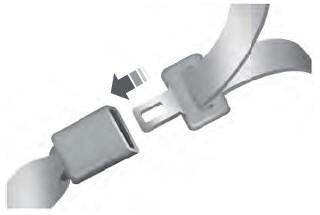

Copyright © 2026 www.liaviator2.com