
Lincoln Aviator: Capacities and Specifications - Excluding: Plug-In Hybrid Electric Vehicle (PHEV) / Grease

Materials
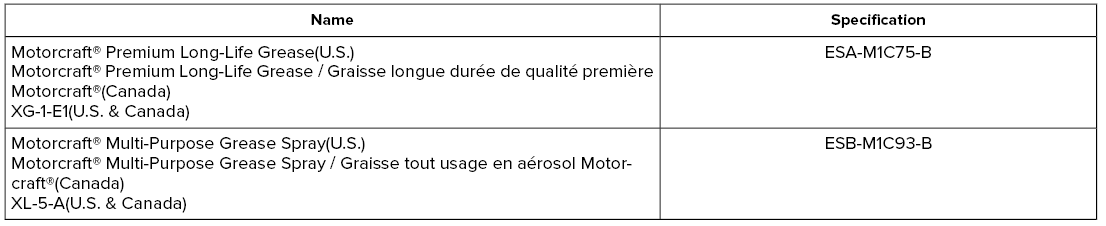
Lincoln Aviator. Grease

    Fuel Tank

    C..

    Hydraulic Brake System

    Materials Note: We recommend using DOT 4 Low Viscosity (LV) High Performance Brake Fluid or equivalent meeting WSS-M6C65-A2. Use of any fluid other than the recommended fluid could cause reduced brake performance and not meet our performance standards...

    Other information:

    Lincoln Aviator 2020-2026 Service Manual: Diagnosis and Testing - External Controls


    Diagnostic Trouble Code (DTC) Chart Diagnostics in this manual assume a certain skill level and knowledge of Ford-specific diagnostic practices. REFER to: Diagnostic Methods (100-00 General Information, Description and Operation).   Diagnostic Trouble Code Chart Module   DTC Description Action   GSM P0562:00 System Voltage Low: No Sub Type Information   GO to Pinpoint Test B   GSM P0563:00 System Voltage High: No Sub Type Information   GO to Pinpoint Test C   GSM P0605:00 Internal Control Module Read Only Memory (ROM) Error: No Sub Type Information   GO to Pinpoint Test L   GSM P0606:00 Control Module Processor: No Sub Type Information   GO to Pinpoint Test L   GSM P0607:00 Control Module Performance: No Sub Type Information   GO to Pinpoint Test L   GSM P06B8:00 Internal Control Module Non-Volatile Random Access Memory (NVRAM) Error: No Sub Type Information   GO to Pinpoint Test L   GSM P07EC:00 Transmission Range Multi-Function Select Circuit: No Sub Type Information   GO to Pinpoint Test J   GSM P07ED:00 Transmission Range Multi-Function Select Circuit Stuck: No Sub Type Information   GO to Pinpoint Test J   GSM P0814:00 Transmission Range Display Circuit: No Sub Type Information   GO to Pinpoint Test I   GSM P164E:00 Internal Control Module Transmission Range Select Performance: No Sub Type Information   GO to Pinpoint Test L   GSM P166B:00 Drivers Door Status Correlation: No Sub Type Information   GO to Pinpoint Test H   GSM U0100:00 Lost Communication With ECM/PCM "A": No Sub Type Information   GO to Pinpoint Test G   GSM U0100:87 Lost Communication With ECM/PCM "A": Missing Message   GO to Pinpoint Test G   GSM U0121:00 Lost Communication With Anti-Lock Brake System (ABS) Control Module "A": No Sub Type Information   GO to Pinpoint Test F   GSM U0140:00 Lost Communication With Body Control Module: No Sub Type Information   GO to Pinpoint Test E   GSM U0155:00 Lost Communication With Instrument Panel Cluster (IPC) Control Module: No Sub Type Information   GO to Pinpoint Test D   GSM U0203:00 Lost Communication With Door Control Module "E": No Sub Type Information   GO to Pinpoint Test H   GSM U0301:00 Software Incompatibility with ECM/PCM: No Sub Type Available   GO to Pinpoint Test M   GSM U0401:00 Invalid Data Received from ECM/PCM A: No Sub Type Information   GO to Pinpoint Test N   GSM U0422:00 Invalid Data Received From Body Control Module: No Sub Type Information   GO to Pinpoint Test N   GSM U0504:00 Invalid Data Received From Door Control Module "E": No Sub Type Information   GO to Pinpoint Test H   GSM U1011:00 Invalid Internal Control Module Monitoring Data Received from ECM/PCM: No Sub Type Information   GO to Pinpoint Test O   GSM U101F:00 Invalid Internal Control Module Monitoring Data Received from ECM/PCM: No Sub Type Information   GO to Pinpoint Test O Global Customer Symptom Code (GCSC) Chart   Global Customer Symptom Code Chart Customer Symptom Action Start/Run/Move > Moving > Paddle Shift > Inoperative   GO to Pinpoint Test K Start/Run/Move > Moving > Gear Selector > Return to Park   GO to Pinpoint Test Q Start/Run/Move > Moving > Gear Selector > Return to Park   GO to Pinpoint Test R Start/Run/Move > Moving > Engagement Quality > Park   GO to Pinpoint Test P Start/Run/Move > Moving > Engagement Quality > Park   GO to Pinpoint Test S Start/Run/Move > Moving > Gear Selector > Progressive Range Selection   GO to Pinpoint Test A Pinpoint Tests PINPOINT TEST A : PROGRESSIVE RANGE SELECTION DOES NOT OPERATE CORRECTLY Refer to Wiring Diagrams Cell 30 for schematic and connector information...

    Lincoln Aviator 2020-2026 Service Manual: Description and Operation - Perimeter Anti-Theft Alarm - System Operation and Component Description


    System Operation System Diagram Item Description 1 BCM 2 Turn Signals 3 Hood Ajar Switch 4 Liftgate Ajar Switch 5 IPC 6 Courtesy Lamps 7 Passive Key 8 RTM 9 RGTM 10 GWM 11 GWM 12 Intrusion Sensor 13 Horn 14 DLC 15 DCME (Left Front Door) 16 Door Ajar Switch 17 Power Liftgate 18 Manual Liftgate 19 DCMF (Right Front Door) 20 Door Ajar Switch 21 DCMG (Left Rear Door) 22 Door Ajar Switch 23 DCMH (Right Rear Door) 24 Door Ajar Switch 25 DDM 26 PDM Network Message Chart   BCM Network Input Messages Broadcast Message Originating Module Message Purpose RKE data   RTM Used by the BCM to arm/disarm the perimeter alarm or to activate/deactivate the panic alarm...

    Categories

    Fastening the Seatbelts

    The front outboard and rear safety restraints in the vehicle are combination lap and shoulder belts.

    Insert the belt tongue into the proper buckle (the buckle closest to the direction the tongue is coming from) until you hear a snap and feel it latch. Make sure that you securely fasten the tongue in the buckle.
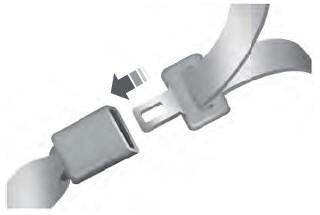
    Lincoln Aviator. Fastening the Seatbelts

    To unfasten, press the release button and remove the tongue from the buckle.

    read more

     
    Copyright © 2026 www.liaviator2.com