
Lincoln Aviator: Entertainment / HD Radio™ Information (If Available)
To activate HD radio, please see the Radio Settings in the Settings Chapter.
Note: HD Radio broadcasts are not available in all markets.
HD Radio technology is the digital evolution of analog AM/FM radio. Your system has a special receiver that allows it to receive digital broadcasts (where available) in addition to the analog broadcasts, it already receives. Digital broadcasts provide a better sound quality than analog broadcasts with free, crystal-clear audio and no static or distortion. For more information, and a guide to available stations and programming, please visit:
Website
When HD Radio is on and you tune to a station broadcasting HD Radio technology, you may notice the following indicators on your screen:

The HD logo is grey when acquiring a digital station, and then changes to orange when digital audio is playing. When this logo is available, you may also see Title and Artist fields on-screen.
The multicast indicator appears in FM mode (only) if the current station is broadcasting multiple digital broadcasts. The highlighted numbers signify available digital channels where new or different content is available. HD1 signifies the main programming status and is available in analog and digital broadcasts. Other multicast stations (HD2 through HD7) are only available digitally.
Note: There is also an additional feature for stations that have more than 1 HD multicast (For example, HD1 or HD2). The HD logo and Radio text appears as a button. Pressing this button allows you to cycle through all of the HD stations on that specific frequency. For example, if you are on 101.1 and it has HD1, HD2, HD3, pressing the button repeatedly causes the radio to cycle through the HD stations in a cyclic increasing order.
When HD Radio broadcasts are active, you can access the following functions:

Note: As with any station you save, you cannot access the saved station if your vehicle is outside the station’s reception area.
HD Radio Reception and Station Troubleshooting
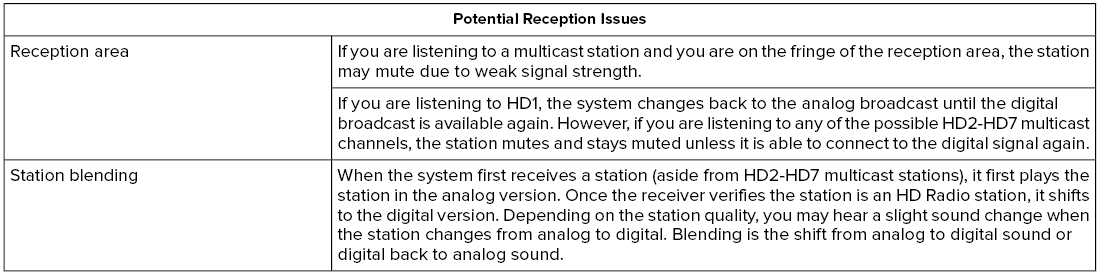
In order to provide the best possible experience, use the contact form to report any station issues found while listening to a station broadcasting with HD Radio technology. Independent entities own and operate each station. These stations are responsible for ensuring all audio streams and data fields are accurate.
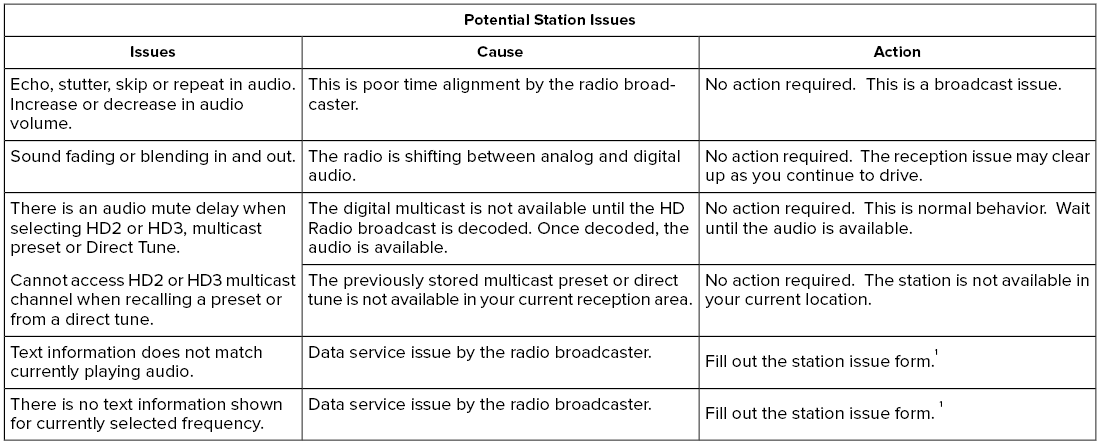
1 You can find the form here:
Website
http://hdradio.com/stations/feedback
HD Radio Technology manufactured under license from iBiquity Digital Corporation and foreign patents. HD Radio and the HD and HD Radio logos are proprietary trademarks of DTS. The vehicle manufacturer and DTS are not responsible for the content sent using HD Radio technology. Content may be changed, added or deleted at any time at the station owner's discretion.
 SiriusXM® Satellite Radio (If Activated)
Note: This feature may not be available in
all markets and requires an active
subscription.
SiriusXM satellite radio is a
subscription-based satellite radio service that
broadcasts a variety of music, sports, news,
weather, traffic and entertainment
programming...
 CD (If Equipped)
Once you select this option, the system
returns you to the main audio screen.
The current audio information appears on
the screen.
The following buttons are also available:
You can use the forward, reverse, pause or
play buttons to control the audio playback...
Other information:
Lincoln Aviator 2020-2026 Service Manual: Removal and Installation - A-Pillar Trim Panel
Special Tool(s) / General Equipment Interior Trim Remover Removal NOTE: LH (left hand) shown, RH (right hand) similar. Release the clips and remove the instrument panel side trim panel. Use the General Equipment: Interior Trim Remover Remove the cowl side trim panel...
Lincoln Aviator 2020-2026 Owners Manual: Luggage Covers (If Equipped)
WARNING: Make sure that the posts are properly latched in mounting features. The cover may cause injury in a sudden stop or accident if it is not securely installed. WARNING: Do not place any objects on the cargo area shade. They may obstruct your vision or strike occupants of your vehicle in a sudden stop or crash...
Categories
- Manuals Home
- Lincoln Aviator Owners Manual
- Lincoln Aviator Service Manual
- Child Safety Locks
- Resetting the System
- Locking and Unlocking
- New on site
- Most important about car
Child Seats
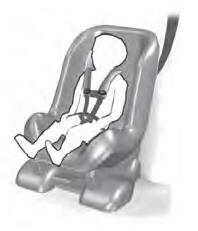
Use a child restraint (sometimes called an infant carrier, convertible seat, or toddler seat) for infants, toddlers and children weighing 40 lb (18 kg) or less (generally four-years-old or younger).
Using Lap and Shoulder Belts
WARNING: Do not place a rearward facing child restraint in front of an active airbag. Failure to follow this instruction could result in personal injury or death.
