
Lincoln Aviator 2020-2026 Owners Manual / At a Glance
Lincoln Aviator: At a Glance
INSTRUMENT PANEL
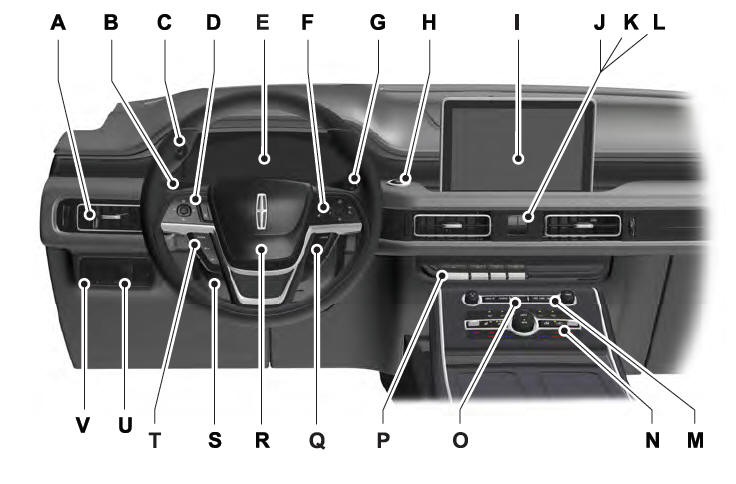
- Air vents.
- Direction indicator.
- Voice control.
- Audio control.
- Information display.
- Information display control.
- Wiper lever.
- Ignition switch.
- Information and Entertainment display.
- Camera button.
- Park aid button.
- Driver assistance button.
- Audio unit.
- Climate control.
- Hazard flasher switch.
- Transmission selector.
- Cruise control.
- Horn.
- Steering wheel adjustment.
- Cruise control.
- Lighting control.
- Power liftgate. Fuel door release (Hybrid only).
 Environment
You should play your part in protecting the
environment. Correct vehicle usage and the
authorized disposal of waste, cleaning and
lubrication materials are significant steps
toward this aim...
 Child Safety
..
Other information:
Lincoln Aviator 2020-2026 Service Manual: Removal and Installation - Cabin Heater Coolant Pump - 3.0L EcoBoost
Special Tool(s) / General Equipment Hose Clamp(s) Hose Clamp Remover/Installer Removal NOTE: Removal steps in this procedure may contain installation details. WARNING: Always allow the engine to cool before opening the cooling system...
Lincoln Aviator 2020-2026 Service Manual: Removal and Installation - Cylinder Head to Coolant Outlet Connector Hose Assembly
Special Tool(s) / General Equipment Hose Clamp Remover/Installer Removal NOTE: Removal steps in this procedure may contain installation details. Drain the cooling system. Refer to: Engine Cooling System Draining, Vacuum Filling and Bleeding (303-03A Engine Cooling - 3...
Categories
- Manuals Home
- Lincoln Aviator Owners Manual
- Lincoln Aviator Service Manual
- Child Safety Locks
- USB Port and Power Point Locations
- Configuring The Head Up Display
- New on site
- Most important about car
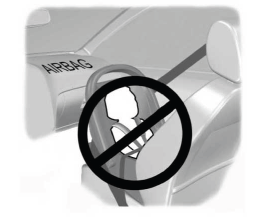
Children and Airbags
WARNING: Airbags can kill or injure a child in a child restraint. Never place a rear-facing child restraint in front of an active airbag. If you must use a forward-facing child restraint in the front seat, move the seat upon which the child restraint is installed all the way back.

Copyright © 2026 www.liaviator2.com