
Lincoln Aviator 2020-2026 Owners Manual / Auxiliary Power Points / USB Port and Power Point Locations
Lincoln Aviator: Auxiliary Power Points / USB Port and Power Point Locations
USB Ports and Power Points may be in the following locations:
- On the lower instrument panel.
- Inside the first row center console.
- Inside the second row center console.
- On the front of the center console.
- On the rear of the center console.
- In the cargo area.
- On the passenger side floor panel.
- 3rd row on the quarter trim panels.
Note: Some of the USB ports may not have data transfer capabilities.
Note: Incorrect use of the USB ports can cause damage not covered by the vehicle warranty.
 12 Volt DC Power Point
WARNING: Do not plug optional
electrical accessories into the cigar lighter
socket. Incorrect use of the cigar lighter
can cause damage not covered by the
vehicle warranty, and can result in fire or
serious injury...
 110 Volt AC Power Point
WARNING: Do not keep electrical
devices plugged in the power point
whenever the device is not in use. Do not
use any extension cord with the 110 volt
AC power point, since it will defeat the
safety protection design...
Other information:
Lincoln Aviator 2020-2026 Service Manual: Removal and Installation - Passenger Side Temperature Door Actuator
Removal Fully lower the glove compartment. Disconnect the check strap. Push the stop tabs inward. Remove the scres and the passenger side tempreature door actuator. Disconnect the electrical connector...
Lincoln Aviator 2020-2026 Owners Manual: Phone as a Key Backup Starting Passcode
Note: In order to use the Backup Start Passcode feature, Phone as a Key must be active and enabled on at least one phone. If you are unable to start your vehicle, do the following: Fully depress the brake pedal. SYNC displays the Backup Starting Passcode entry screen...
Categories
- Manuals Home
- Lincoln Aviator Owners Manual
- Lincoln Aviator Service Manual
- Body and Paint
- Locking and Unlocking
- General Procedures - Transmission Fluid Drain and Refill
- New on site
- Most important about car
Fastening the Seatbelts
The front outboard and rear safety restraints in the vehicle are combination lap and shoulder belts.
Insert the belt tongue into the proper buckle (the buckle closest to the direction the tongue is coming from) until you hear a snap and feel it latch. Make sure that you securely fasten the tongue in the buckle.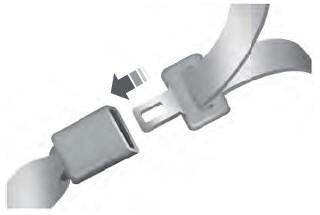

Copyright © 2026 www.liaviator2.com