
Lincoln Aviator: Vehicle Care / Cleaning the Wheels
- Regularly clean them with a wheel cleaner. We recommend that you use Ford approved wheel cleaner if available.
- Remove dirt and brake dust with a sponge.
- Remove tar and grease with a bug and tar remover. We recommend that you use Ford approved bug and tar remover if available.
- Thoroughly rinse the wheels with water after cleaning.
If you intend on parking your vehicle for an extended period after cleaning the wheels with a wheel cleaner, drive your vehicle for a few minutes before doing so. This reduces the risk of corrosion of the brake discs, brake pads and linings.
Do not clean the wheels when they are hot.
Note: Some car washes could damage wheel rims and covers.
Note: Using non-recommended cleaners, harsh cleaning products, chrome wheel cleaners or abrasive materials could damage wheel rims and covers.
 Repairing Minor Paint Damage
Authorized dealers have touch-up paint to
match your vehicle’s color. Your vehicle
color code is printed on a sticker on the front,
left-hand side door jamb...
 Vehicle Storage
If you plan on storing your vehicle for 30
days or more, read the following
maintenance recommendations to make sure
your vehicle stays in good operating
condition...
Other information:
Lincoln Aviator 2020-2026 Service Manual: Diagnosis and Testing - B Clutch
Symptom Chart B Clutch For B clutch operation, REFER to: B Clutch (307-01A Automatic Transmission - 10-Speed Automatic Transmission – 10R60, Description and Operation). B Clutch Condition Possible Sources Action B clutch does not apply SSB is mechanically stuck OFF INSTALL a new solenoid...
Lincoln Aviator 2020-2026 Owners Manual: Using the Blind Spot Information System
Vehicles with Automatic Transmission The system turns on when all of the following occur: You start your vehicle. You shift into drive (D). The vehicle speed is greater than 6 mph (10 km/h). Note: The system does not operate in park (P) or reverse (R)...
Categories
- Manuals Home
- Lincoln Aviator Owners Manual
- Lincoln Aviator Service Manual
- Locking and Unlocking
- Keyless Entry
- Changing the Front Wiper Blades - Vehicles With: Heated Wiper Blades
- New on site
- Most important about car
Child Safety Locks
When the child safety locks are set, you cannot open the rear doors from the inside.
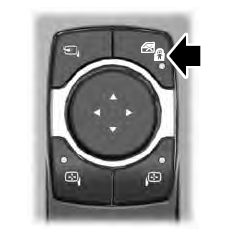
The child safety lock control is on the driver door.
Press the control to switch the child safety locks on. Press the control again to switch them off. A light on the child safety control illuminates when you switch them on.
