
Lincoln Aviator: Front Drive Halfshafts / Removal and Installation - Halfshaft
Special Tool(s) / General Equipment
.jpg) |
204-592 Separator, Lower Arm Ball Joint TKIT-2006C-FFMFLM TKIT-2006C-LM TKIT-2006C-ROW |
| Tie Rod End Remover | |
| Tire Lever | |
Removal
NOTICE: Suspension fasteners are critical parts that affect the performance of vital components and systems. Failure of these fasteners may result in major service expense. Use the same or equivalent parts if replacement is necessary. Do not use a replacement part of lesser quality or substitute design. Tighten fasteners as specified.
NOTE: RH shown, LH similar.
-
-
Remove the pin-type retainer.
-
Remove the bolts and the radiator air deflector.
Torque: 22 lb.in (2.5 Nm)
-
Remove the bolts.
Torque: 22 lb.in (2.5 Nm)
-
Remove the retainers and the engine undershield.
-
Remove the pin-type retainer.
.jpg) |
-
Remove the wheel and tire.
Refer to: Wheel and Tire (204-04A Wheels and Tires, Removal and Installation).
-
Remove and discard the wheel hub nut.
Torque: 98 lb.ft (133 Nm)
.jpg) |
-
NOTICE: The front suspension height sensor must be disconnected from the lower control arm prior to servicing suspension components or damage to the suspension height sensor and/or the vehicle dynamic suspension system may occur. The sensor will need to be recalibrated after reassembly.
NOTE: If equipped with dynamic suspension.
-
Disconnect the ride height sensor electrical connector.
-
Remove the ball stud from the lower control arm and position the front height sensor arm aside.
Torque: 80 lb.in (9 Nm)
-
Disconnect the ride height sensor electrical connector.
.jpg) |
-
NOTICE: Do not use a hammer to separate the outer tie-rod end from the wheel knuckle or damage to the wheel knuckle may result.
NOTICE: Use care when installing the tie rod separator or damage to the outer tie-rod end boot may occur.
-
Remove and discard the tie rod end nut.
Torque: 52 lb.ft (70 Nm)
-
Separate the tie rod end from the wheel knuckle.
Use the General Equipment: Tie Rod End Remover
-
Remove and discard the tie rod end nut.
.jpg) |
-
-
Remove the retainer bracket bolt.
Torque: 133 lb.in (15 Nm)
-
Remove the bolt and the front wheel speed sensor.
Torque: 106 lb.in (12 Nm)
-
Remove the retainer bracket bolt.
.jpg) |
-
NOTICE: Do not use power tools to remove or install the lower arm outboard nut. Damage to the ball joint or ball joint seal may occur.
NOTE: Use the TORX PLUS® holding feature to prevent the ball stud from turning while removing or installing the lower arm outboard nut. Torx® and TORX PLUS® is a reg. tm of Acument Intellectual Properties, LLC.
Remove and discard the front lower arm outboard nut.
Torque: 66 lb.ft (90 Nm)
.jpg) |
-
NOTICE: Do not use a hammer, prying device, or separator fork to separate the ball joint from the wheel knuckle. Damage to the ball joint or ball joint seal may occur.
NOTICE: Use care when releasing the lower arm and wheel knuckle into the resting position. Damage to the ball joint or ball joint seal may occur.
Separate the front lower arm from the wheel Knuckle.
Use Special Service Tool: 204-592 Separator, Lower Arm Ball Joint.
.jpg) |
-
-
NOTICE: Do not use power tools to remove or install the lower arm outboard nut. Damage to the ball joint or ball joint seal may occur.
NOTE: Use the TORX PLUS® holding feature to prevent the ball stud from turning while removing or installing the lower arm outboard nut. Torx® and TORX PLUS® is a reg. tm of Acument Intellectual Properties, LLC.
Remove and discard the rear lower arm outboard nut.
Torque: 210 lb.ft (285 Nm)
-
Remove and discard the lower arm bracket bolt and nut.
Torque: 136 lb.ft (185 Nm)
-
.jpg) |
-
NOTICE: Do not use a hammer, prying device, or separator fork to separate the lower arm from the ball joint. Damage to the ball joint or ball joint seal may occur.
NOTICE: Use care when releasing the lower arm and wheel knuckle into the resting position. Damage to the ball joint or ball joint seal may occur.
Separate the rear lower arm from the wheel Knuckle.
Use Special Service Tool: 204-592 Separator, Lower Arm Ball Joint.
.jpg) |
-
Separate the lower strut from rear lower arm.
.jpg) |
-
NOTE: Do not pull on the halfshaft. Pull or pry on the inner CV housing only or damage may occur.
Position aside the wheel knuckle.
Using the tire lever, remove the halfshaft from the differential and the disconnect actuator.
Use the General Equipment: Tire Lever
.jpg) |
-
NOTE: LH halfshaft.
-
Remove and discard the halfshaft retaining circlip.
-
Remove and discard the O-ring.
-
Remove and discard the halfshaft retaining circlip.
.jpg) |
-
NOTE: RH halfshaft.
Remove and discard the halfshaft retaining circlip.
.jpg) |
-
NOTE: RH halfshaft.
Remove and Install a new RH Halfshaft seal.
Refer to: Axle Shaft Seal (205-03 Front Drive Axle/Differential, Removal and Installation).
Installation
NOTICE: Verify the spline engagement by checking for spline lash before installing the halfshaft nut or component damage may occur.
-
Clean and inspect the outer CV housing at the shown locations.
.jpg) |
-
NOTE: RH side shown LH side similar.
Clean and inspect the inner CV housing at the shown locations.
.jpg) |
-
NOTE: LH halfshaft.
-
Install and lubricate the O-ring.
Refer to: Specifications (205-03 Front Drive Axle/Differential, Specifications).
-
Install the new halfshaft retaining circlip.
-
Install and lubricate the O-ring.
.jpg) |
-
NOTE: RH halfshaft.
Install the new halfshaft retaining circlip.
.jpg) |
-
NOTE: RH shown, LH similar.
NOTE: Make sure that the circlip opening is located at the bottom or 6 o'clock position to allow easy halfshaft installation.
NOTE: Insert shaft until circlip is fully seated. When checking if circlip is seated do not pull on CV joints or damage can result.
NOTE: Pull on the inner CV joint to ensure the halfshaft circlip is seated properly.
Position back the wheel knuckle.
Insert the halfshaft until the halfshaft retaining clip is fully seated.
.jpg) |
-
Position the lower arm into the lower strut.
.jpg) |
-
To install, reverse the removal procedure.
If equipped with dynamic suspension, calibrate suspension system. Connect the scan tool and cary out the ride height calibration routine. Follow the scan tool directions.
-
If the RH halfshaft is removed.
Check the front differential fluid level.
Refer to: Differential Fluid Level Check (205-03 Front Drive Axle/Differential, General Procedures).
 Diagnosis and Testing - Front Drive Halfshafts
Principles of Operation
Inspection and Verification
Verify the customer concern.
Visually inspect for obvious signs of mechanical or electrical damage...
 Removal and Installation - Intermediate Shaft
Removal
Remove the front halfshaft.
Refer to: Halfshaft (205-04 Front Drive Halfshafts, Removal and Installation).
Remove the engine mount LH...
Other information:
Lincoln Aviator 2020-2026 Owners Manual: Changing the Front Wiper Blades - Vehicles Without: Heated Wiper Blades
You can improve poor wiper quality by cleaning the wiper blades and the windshield. Replace the wiper blades at least annually for optimum performance. Removing the Front Wiper Blades Lift the wiper blade from the windshield by holding the middle of the retainer...
Lincoln Aviator 2020-2026 Service Manual: Description and Operation - Parking Aid - Overview
Overview - Active Park Assist The active park assist system is a full-assisted parking system. The system assists parking into and out (assist out of parking spots only available for parallel parking) of parking spaces. Sensors are used to detect parking spaces...
Categories
- Manuals Home
- Lincoln Aviator Owners Manual
- Lincoln Aviator Service Manual
- Description and Operation - Jacking and Lifting
- Body and Paint
- Opening and Closing the Hood
- New on site
- Most important about car
Child Safety Locks
When the child safety locks are set, you cannot open the rear doors from the inside.
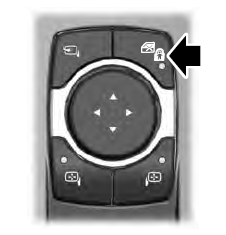
The child safety lock control is on the driver door.
Press the control to switch the child safety locks on. Press the control again to switch them off. A light on the child safety control illuminates when you switch them on.
