
Lincoln Aviator 2020-2026 Service Manual / Powertrain / Automatic Transmission / Automatic Transmission - 10-Speed Automatic Transmission – 10R60 / Description and Operation - Planetary Assembly
Lincoln Aviator: Automatic Transmission - 10-Speed Automatic Transmission – 10R60 / Description and Operation - Planetary Assembly
Planetary Gearset Exploded View
.jpg)
| Item | Description |
| 1 | Ring gear No. 1 |
| 2 | Sun gear No. 1 |
| 3 | Planetary carrier No. 1 |
| 4 | Sun gear No. 2 |
| 5 | Planetary carrier No. 2 |
| 6 | Ring gear No. 2 |
| 7 | Planetary carrier No. 3 |
| 8 | Sun gear No. 3 |
| 9 | Ring gear No. 3 |
| 10 | Shell and sun gear No. 4 |
| 11 | Ring gear No. 4 |
| 12 | Output shaft and planetary carrier No. 4 assembly |
| 13 | Cylinder (clutch and planetary container) |
The 10-speed transmission has 4 planetary gearsets. Each gearset consists of a ring gear, a sun gear and a carrier. The gear sets are numbered 1 through 4, from the front to the back of the transmission. There are several direct connections between the gearsets:
- Sun gears No. 1 and 2 are directly connected together with gear splines.
- Planetary carrier No. 1 and ring gear No. 4 are directly connected together with the cylinder (clutch and planetary container).
- Ring gear No. 2 and sun gear No. 3 are directly connected together with a shaft.
- Ring gear No. 3 and shell and sun gear No. 4 are directly connected together through the shell of the shell and sun gear No. 4.
 Description and Operation - Pump Assembly
Overview
Item
Description
1
Transmission fluid pump drive gear
2
Transmission fluid pump idler gear
3
Transmission fluid pump assembly
4
Transmission fluid filter
The
transmission fluid in the sump area at the bottom of the transmission
case flows through a transmission fluid filter to the pump assembly...
 Description and Operation - Transmission Fluid Auxiliary Pump
Item
Description
1
Transmission fluid auxiliary pump
2
Transmission fluid auxiliary pump tube
3
Transmission fluid auxiliary pump tube seal
4
Transmission fluid auxiliary pump tube O-ring
5
Transmission fluid auxiliary pump fluid inlet
10-speed
transmissions with the auto-start stop feature are equipped with a
transmission fluid auxiliary pump...
Other information:
Lincoln Aviator 2020-2026 Owners Manual: Extending the Engine Running Time. Turning Your Vehicle Off After Remote Starting. Memory Feature
Extending the Engine Running Time To extend the engine running time duration of your vehicle during remote start, repeat steps 1 and 2 while the engine is running. If the duration is set to 15 minutes, the duration extends by another 15 minutes. For example, if your vehicle had been running from the first remote start for 5 minutes, your vehicle continues to run now for a total of 30 minutes...
Lincoln Aviator 2020-2026 Service Manual: General Procedures - Air Conditioning (A/C) Compressor Leak Detection - Vehicles With: R1234YF Refrigerant
Special Tool(s) / General Equipment Air Conditioning Service Unit Electronic Leak Detector Air Conditioning Adaptor Kit Leak detection Recover the refrigerant. Refer to Air Conditioning (A/C) System Recovery, Evacuation and Charging procedure in Group 412...
Categories
- Manuals Home
- Lincoln Aviator Owners Manual
- Lincoln Aviator Service Manual
- Body and Paint
- Drive Modes
- Garage Door Opener
- New on site
- Most important about car
Fastening the Seatbelts
The front outboard and rear safety restraints in the vehicle are combination lap and shoulder belts.
Insert the belt tongue into the proper buckle (the buckle closest to the direction the tongue is coming from) until you hear a snap and feel it latch. Make sure that you securely fasten the tongue in the buckle.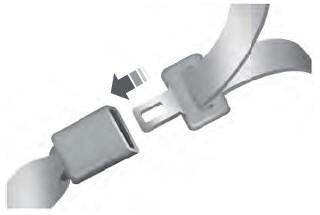

Copyright © 2026 www.liaviator2.com