
Lincoln Aviator: Using Voice Recognition / Phone
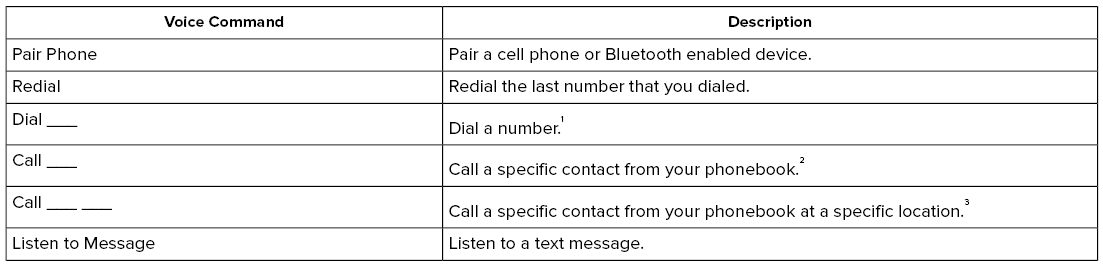

1 Add the number you want to dial to the command.
2 Add a contact name from your phonebook to the command. Say the first and last name of your contact exactly as it appears on your device.
3 Add a contact name and location from your phonebook to the command. Say the first and last name of your contact exactly as it appears on your device.
 Climate (If Equipped)
You can control the temperature of the
vehicle using voice commands.
___ is a dynamic listing, meaning that for
climate voice commands it can be the
desired degrees for the temperature setting...

Other information:
Lincoln Aviator 2020-2026 Service Manual: Diagnosis and Testing - Crankcase Ventilation
Diagnostic Trouble Code (DTC) Chart Diagnostics in this manual assume a certain skill level and knowledge of Ford-specific diagnostic practices.REFER to: Diagnostic Methods (100-00 General Information, Description and Operation). Diagnostic Trouble Code Chart Module DTC Description Action PCM P04DB:00 Crankcase Ventilation System Disconnected: No Sub Type Information GO to Pinpoint Test HG PCM P051A:00 Crankcase Pressure Sensor A Circuit: No Sub Type Information GO to Pinpoint Test HG PCM P051B:00 Crankcase Pressure Sensor Circuit Range/Performance: No Sub Type Information GO to Pinpoint Test HG PCM P051C:00 Crankcase Pressure Sensor Circuit Low: No Sub Type Information GO to Pinpoint Test HG PCM P051D:00 Crankcase Pressure Sensor Circuit High: No Sub Type Information GO to Pinpoint Test HG PCM P051E:00 Crankcase Pressure Sensor A Circuit Intermittent/Erratic: No Sub Type Information GO to Pinpoint Test HG PCM P2282:00 Air Leak Between Throttle Body And Intake Valve: No Sub Type Information GO to Pinpoint Test HG PCM U060E:00 Lost Communication With Crankcase Pressure Sensor: No Sub Type Information GO to Pinpoint Test HG Global Customer Symptom Code (GCSC) Chart Diagnostics in this manual assume a certain skill level and knowledge of Ford-specific diagnostic practices...
Lincoln Aviator 2020-2026 Service Manual: Removal and Installation - Air Distribution Door Actuator
Removal Fully lower the glove compartment. Disconnect the check strap. Push the stop tabs inward. Remove the screws and the air distribution door actuator. Disconnect the electrical connector...
Categories
- Manuals Home
- Lincoln Aviator Owners Manual
- Lincoln Aviator Service Manual
- Keyless Entry
- Resetting the System
- Disabling Auto-Start-Stop
- New on site
- Most important about car
Child Seats
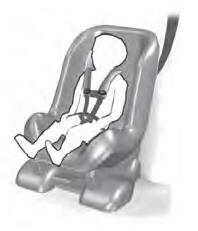
Use a child restraint (sometimes called an infant carrier, convertible seat, or toddler seat) for infants, toddlers and children weighing 40 lb (18 kg) or less (generally four-years-old or younger).
Using Lap and Shoulder Belts
WARNING: Do not place a rearward facing child restraint in front of an active airbag. Failure to follow this instruction could result in personal injury or death.

Copyright © 2026 www.liaviator2.com