Lincoln Aviator: Windows and Mirrors / Power Windows
WARNING: Do not leave children unattended in your vehicle and do not let them play with the power windows. Failure to follow this instruction could result in personal injury.
WARNING: When closing the power windows, verify they are free of obstruction and make sure that children and pets are not in the proximity of the window openings.
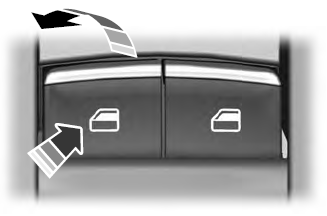
Note: You may hear a pulsing noise when just one of the windows is open. Lower the opposite window slightly to reduce this noise.
Press the switch to open the window.
Lift the switch to close the window.
One-Touch Down
Press the switch fully and release it. Press again or lift it to stop the window.
One-Touch Up
Lift the switch fully and release it. Press or lift it again to stop the window.
Resetting One-Touch Up
Start the engine.
- Lift and hold the window switch until you fully close the door window. Continue to hold the switch for a few seconds after you close the window.
- Release the window switch.
- Press and hold the window switch until you fully open the door window.
- Release the window switch.
- Lift and hold the window switch until you fully close the window.
Test for correct window operation by carrying out the one-touch down and one-touch up features.
Bounce-Back
The window will stop automatically while closing. It reverses some distance if there is an obstacle in the way.
Overriding the Bounce-Back Feature
WARNING: If you override bounce-back, the window does not reverse if it detects an obstacle. Take care when closing the windows to avoid personal injury or damage to your vehicle.
Pull up the window switch and hold within a few seconds of the window reaching the bounce-back position. The window travels up with no bounce-back protection. The window stops if you release the switch before the window fully closes.
Window Lock
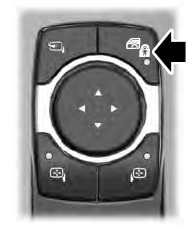
Press the control to lock or unlock the rear window controls. It illuminates when you lock the rear window controls.
Accessory Delay
You can use the window switches for several minutes after you switch the ignition off or until you open either front door.

 Global Opening and Closing
You can use the remote control to open the
windows with the ignition off.
Note: You can enable or disable this feature
in the information display or see an
authorized dealer...
Other information:
Lincoln Aviator 2020-2026 Service Manual: Description and Operation - Parking Aid - Overview
Overview Rear Only Parking Aid Camera The rear parking aid camera system visually aids the driver while reversing or reverse parking the vehicle. The camera system has features that provide fixed and active guideline overlays on the video image to assist the driver in aligning the vehicle and a visual alert function that provides a visual highlight in the zone where an object is detected by the audible parking aid system...
Lincoln Aviator 2020-2026 Service Manual: Diagnosis and Testing - Perimeter Anti-Theft Alarm
Diagnostic Trouble Code (DTC) Chart Diagnostics in this manual assume a certain skill level and knowledge of Ford-specific diagnostic practices. REFER to: Diagnostic Methods (100-00 General Information, Description and Operation). Diagnostic Trouble Code Chart Module DTC Description Action BCM B109F:01 Intrusion Sensor Module: General Electrical Failure GO to Pinpoint Test B BCM B109F:02 Intrusion Sensor Module: General Signal Failure GO to Pinpoint Test B BCM B109F:08 Intrusion Sensor Module: Bus Signal / Message Failure GO to Pinpoint Test B BCM B109F:49 Intrusion Sensor Module: Internal Electric Failure GO to Pinpoint Test E BCM B109F:55 Intrusion Sensor Module: Not Configured GO to Pinpoint Test F BCM B109F:97 Intrusion Sensor Module: Component or System Operation Obstructed or Blocked GO to Pinpoint Test B BCM B109F:9A Intrusion Sensor Module: Component or System Operating Conditions GO to Pinpoint Test B BCM B1305:01 Hood Switch: General Electrical Failure GO to Pinpoint Test D BCM B1305:11 Hood Switch: Circuit Short To Ground GO to Pinpoint Test D BCM B1305:15 Hood Switch: Circuit Short To Battery or Open GO to Pinpoint Test D Symptom Chart Symptom Chart: Anti-Theft - Perimeter Diagnostics in this manual assume a certain skill level and knowledge of Ford-specific diagnostic practices...
Categories
- Manuals Home
- Lincoln Aviator Owners Manual
- Lincoln Aviator Service Manual
- Configuring The Head Up Display
- Anti-Theft Alarm
- Child Safety Locks
- New on site
- Most important about car
Fastening the Seatbelts
The front outboard and rear safety restraints in the vehicle are combination lap and shoulder belts.
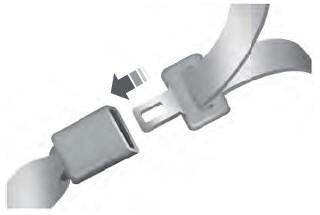
Insert the belt tongue into the proper buckle (the buckle closest to the direction the tongue is coming from) until you hear a snap and feel it latch. Make sure that you securely fasten the tongue in the buckle.