
Lincoln Aviator 2020-2026 Service Manual / Body and Paint / Body and Paint / Handles, Locks, Latches and Entry Systems / Removal and Installation - Approach Detection Antenna
Lincoln Aviator: Handles, Locks, Latches and Entry Systems / Removal and Installation - Approach Detection Antenna
Removal
-
Remove the pin-type retainers and the radiator sight shield.
.jpg) |
-
Remove the approach detection antenna.
-
Disconnect the approach detection antenna electrical connector.
-
Remove the pin-type retainers and the approach detection antenna.
-
Disconnect the approach detection antenna electrical connector.
.jpg) |
Installation
-
To install, reverse the removal procedure.
 General Procedures - Staged Unlock Programming
Activation
With the ignition in OFF, press the LOCK and UNLOCK buttons on the RKE transmitter simultaneously for 4 seconds.
The turn signals flash twice to indicate the mode change...
 Removal and Installation - Door Lock Cylinder
Special Tool(s) /
General Equipment
Interior Trim Remover
Removal
NOTE:
Removal steps in this procedure may contain installation details...
Other information:
Lincoln Aviator 2020-2026 Owners Manual: Front Passenger Sensing System
WARNING: Even with advanced restraints systems, properly restrain children 12 and under in a rear seating position. Failure to follow this could seriously increase the risk of injury or death. WARNING: Sitting improperly, out of position or with the seatback reclined too far can take weight off the seat cushion and affect the decision of the passenger sensing system, resulting in serious injury or death in the event of a crash...
Lincoln Aviator 2020-2026 Service Manual: Removal and Installation - Second Row Center Seat Cushion Cover
Special Tool(s) / General Equipment Interior Trim Remover Removal NOTE: Removal steps in this procedure may contain installation details. Remove the second row center seat. Refer to: Second Row Center Seat (501-10B Second Row Seats, Removal and Installation)...
Categories
- Manuals Home
- Lincoln Aviator Owners Manual
- Lincoln Aviator Service Manual
- Disabling Auto-Start-Stop
- Resetting the System
- Fuel Quality
- New on site
- Most important about car
Locking and Unlocking the Doors from Inside
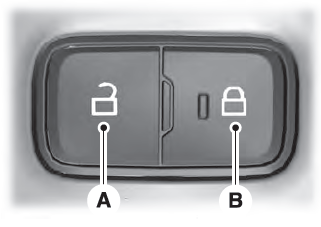
Locking the Doors
Press the lock switch on the door interior trim panel. The doors can no longer be released using the exterior door handle switches and the luggage compartment locks.

Copyright © 2026 www.liaviator2.com