
Lincoln Aviator: Handles, Locks, Latches and Entry Systems / Removal and Installation - Door Lock Cylinder
Special Tool(s) / General Equipment
| Interior Trim Remover |
Removal
NOTE: Removal steps in this procedure may contain installation details.
NOTE: Repair individual door lock cylinders by discarding the inoperative door lock cylinder and building a new door lock cylinder using the appropriate lock repair service kit. The lock repair service kit includes a detailed instruction sheet to build the new lock to match the key cut pattern for the vehicle, thus allowing for single point replacement without needing to replace or reprogram other locks or keys.
-
Remove the fore front door glass run and bracket.
Refer to: Front Door Glass Run and Bracket (501-11 Glass, Frames and Mechanisms, Removal and Installation).
-
Position the exterior mirror wiring harness and grommet aside.
.jpg) |
-
Disconnect the door lock cylinder cable assembly.
-
Pull back the door lock cylinder cable assembly from the door lock cylinder.
-
Turn the door lock cylinder cable assembly counter
clockwise, disconnect the door lock cylinder cable assembly from the
door lock cylinder.
-
Pull back the door lock cylinder cable assembly from the door lock cylinder.
.jpg) |
-
Remove the front door emblem.
-
Remove the front door emblem nut.
-
Remove the front door emblem.
Use the General Equipment: Interior Trim Remover
-
Remove the front door emblem nut.
.jpg) |
-
Remove the door lock cylinder.
-
Remove the door lock cylinder bolt.
-
Remove the door lock cylinder.
-
Remove the door lock cylinder bolt.
.jpg) |
Installation
-
To install, reverse the removal procedure.
-
Rotate the key to check for correct operation.
 Removal and Installation - Approach Detection Antenna
Removal
Remove the pin-type retainers and the radiator sight shield.
Remove the approach detection antenna.
Disconnect the approach detection antenna electrical connector...
 Removal and Installation - Exterior Front Door Handle
Removal
NOTE:
LH (left-hand) side shown, RH (right-hand) side similar.
NOTE:
Removal steps in this procedure may contain installation details.
Remove the front door window regulator and motor...
Other information:
Lincoln Aviator 2020-2026 Owners Manual: Child Restraint Positioning
WARNING: Do not place a rearward facing child restraint in front of an active airbag. Failure to follow this instruction could result in personal injury or death. WARNING: Properly secure children 12 years old and under in a rear seating position whenever possible...
Lincoln Aviator 2020-2026 Service Manual: General Procedures - Engine Oil Draining and Filling
Special Tool(s) / General Equipment Oil Drain Equipment Draining With the vehicle in NEUTRAL, position it on a hoist. Refer to: Jacking and Lifting (100-02 Jacking and Lifting, Description and Operation). NOTE: Use a shop towel when removing the oil filter housing to prevent oil from spilling on the engine or accessory components...
Categories
- Manuals Home
- Lincoln Aviator Owners Manual
- Lincoln Aviator Service Manual
- Interior Lamps
- Locking and Unlocking
- Child Safety Locks
- New on site
- Most important about car
Child Safety Locks
When the child safety locks are set, you cannot open the rear doors from the inside.
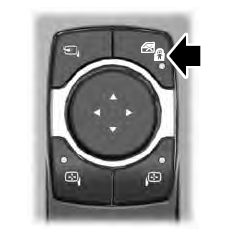
The child safety lock control is on the driver door.
Press the control to switch the child safety locks on. Press the control again to switch them off. A light on the child safety control illuminates when you switch them on.
