Lincoln Aviator: Doors and Locks / Locking and Unlocking
Your vehicle has an intelligent electronically controlled door system that is in constant communication with overall vehicle systems.
When you lock your vehicle using the lock switch on each door interior trim panel, or by using the keyless entry keypad or the lock sensor on each door exterior trim panel, the exterior door handle switches do not release the doors. This helps to secure your vehicle and prevent unauthorized entry. Also, when your vehicle reaches a speed greater than 12 mph (20 km/h) the exterior door handle switches do not release the doors.
If the airbags deploy or the fuel pump shutoff switch activates, all interior and exterior unlock switches do not unlock your door for six seconds. This helps to secure the doors in the event of a crash. After six seconds, all switches reset and you can open the doors using the interior and exterior unlatch switches.
- Door Lock Indicator. Door Lock Switch Inhibitor
- Activating Intelligent Access
- Remote Control
- Locking and Unlocking the Doors from Inside
- Locking the Doors from the Luggage Compartment
- Emergency Locking
- Unlatching the Driver Door with the Key Blade
- Smart Unlocks for Intelligent Access Keys
- Autolock (If Equipped)
- Illuminated Entry
- Battery Saver
- Opening the Luggage Compartment
- Closing the Luggage Compartment

 Door Lock Indicator. Door Lock Switch Inhibitor
Door Lock Indicator
An LED on each door lock switch illuminates
when you lock the doors. It remains on for
2 to 5 seconds after you switch the ignition
off...
Other information:
Lincoln Aviator 2020-2026 Service Manual: Removal and Installation - Shock Absorber and Spring Assembly
Removal NOTICE: Suspension fasteners are critical parts that affect the performance of vital components and systems. Failure of these fasteners may result in major service expense. Use the same or equivalent parts if replacement is necessary. Do not use a replacement part of lesser quality or substitute design...
Lincoln Aviator 2020-2026 Owners Manual: Remote Control
You can use the remote control at any time. When you press the lock button on the remote control, all exterior door handle switches do not release the doors. When you press the unlock button, all exterior door handle switches release the doors. Unlocking the Doors Press the button...
Categories
- Manuals Home
- Lincoln Aviator Owners Manual
- Lincoln Aviator Service Manual
- Locking and Unlocking
- Configuring The Head Up Display
- Resetting the System
- New on site
- Most important about car
Activating Intelligent Access
The intelligent access key must be within 3 ft (1 m) of the door or luggage compartment you intend to lock or unlock.
At a Door
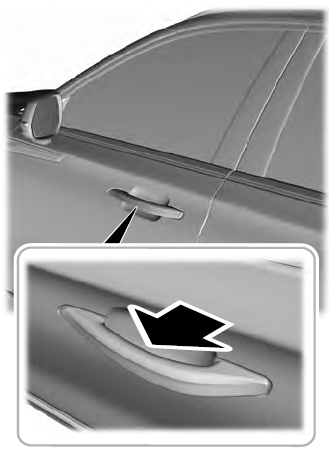
Electronic door handles are on each door. Gently depress the switch inside the exterior door handle to unlock and open the door. An unlock symbol illuminates on the door window trim indicating your vehicle is unlocked.