
Lincoln Aviator 2020-2026 Owners Manual / Lighting / Interior Lamps
Lincoln Aviator: Lighting / Interior Lamps
The lamps turn on under the following conditions:
- You open any door.
- You press a button on the remote control.
- You press the all lamps on button on the overhead console.
 Welcome Lighting
The Lincoln welcome mat projection lights
are on the bottom of the exterior mirror
housings. They project an image onto the
ground a short distance from your vehicle
when welcome lighting or lighted entry turns
on...
 Front Interior Lamp
The front interior lamp switches are on the
overhead console.
Note: The position of each button on the
overhead console depends on your vehicle.
All Lamps On or Off
Press to switch all interior
lamps
on or off...
Other information:
Lincoln Aviator 2020-2026 Owners Manual: Switching Hill Descent Control On and Off. Setting the Hill Descent Speed
Switching Hill Descent Control On and Off You can switch the hill descent control on and off through the touchscreen. Setting the Hill Descent Speed WARNING: The system does not replace the parking brake. When you leave your vehicle, always apply the parking brake and shift the transmission into park (P) for automatic transmission or first gear for manual transmission...
Lincoln Aviator 2020-2026 Service Manual: Diagnosis and Testing - Daytime Running Lamps (DRL)
Symptom Charts Symptom Chart: DRL Diagnostics in this manual assume a certain skill level and knowledge of Ford-specific diagnostic practices. REFER to: Diagnostic Methods (100-00 General Information, Description and Operation). NOTE: Before beginning diagnostics, refer to Description and Operation in this section for proper DRL operation...
Categories
- Manuals Home
- Lincoln Aviator Owners Manual
- Lincoln Aviator Service Manual
- Changing the Front Wiper Blades - Vehicles With: Heated Wiper Blades
- Disabling Auto-Start-Stop
- Fuel Quality
- New on site
- Most important about car
Adjusting the Steering Wheel - Vehicles With: Manual Adjustable Steering Column
WARNING: Do not adjust the steering wheel when your vehicle is moving.
Note: Make sure that you are sitting in the correct position.
Unlock the steering column. Adjust the steering wheel to the desired position.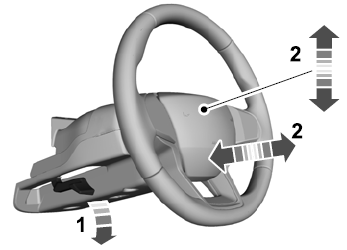

Copyright © 2026 www.liaviator2.com