
Lincoln Aviator 2020-2026 Service Manual / Body and Paint / Body and Paint / Bumpers / Removal and Installation - Rear Bumper
Lincoln Aviator: Bumpers / Removal and Installation - Rear Bumper
Removal
NOTE: Removal steps in this procedure may contain installation details.
All vehicles
-
Remove the rear bumper cover.
Refer to: Rear Bumper Cover (501-19 Bumpers, Removal and Installation).
Vehicles without trailer tow package
-
On both sides.
Remove the bolt, release the tab and position the exhaust isolator assembly aside.
Torque: 26 lb.ft (35 Nm)
.jpg) |
-
With the help of an assistant.
Remove the bolts and the rear bumper.
Torque: 129 lb.ft (175 Nm)
.jpg) |
Vehicles with trailer tow package
-
On both sides.
Remove the bolt, release the tab and position the exhaust isolator assembly aside.
Torque: 26 lb.ft (35 Nm)
.jpg) |
-
Disconnect the trailor tow electrical connector, the retainer and remove the wiring harness.
.jpg) |
-
With the help of an assistant.
Remove the bolts and the rear bumper.
Torque: 129 lb.ft (175 Nm)
.jpg) |
Installation
-
To install, reverse the removal procedure.
 Removal and Installation - Front Bumper Cover
Special Tool(s) /
General Equipment
Interior Trim Remover
Removal
NOTE:
Removal steps in this procedure may contain installation details...
 Removal and Installation - Rear Bumper Cover
Special Tool(s) /
General Equipment
Interior Trim Remover
Removal
NOTE:
Removal steps in this procedure may contain installation details...
Other information:
Lincoln Aviator 2020-2026 Owners Manual: Remote Function Actuator
China CMIIT ID: 2018DJ4563 United States and Canada WARNING: Changes or modifications not expressively approved by the party responsible for compliance could void the user's authority to operate the equipment. The term "IC:" before the radio certification number only signifies that Industry Canada technical specifications were met...
Lincoln Aviator 2020-2026 Owners Manual: Adjusting the Pre-Collision Assist Settings
You can adjust the following settings by using the information display controls. You can change Alert and Distance Alert sensitivity to one of three possible settings. You can switch Distance Indication and Alert on or off. If required, you can switch Active Braking on or off...
Categories
- Manuals Home
- Lincoln Aviator Owners Manual
- Lincoln Aviator Service Manual
- Body and Paint
- Description and Operation - Jacking and Lifting
- Tire Change Procedure
- New on site
- Most important about car
Child Safety Locks
When the child safety locks are set, you cannot open the rear doors from the inside.
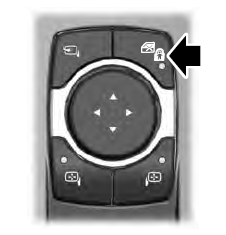
The child safety lock control is on the driver door.
Press the control to switch the child safety locks on. Press the control again to switch them off. A light on the child safety control illuminates when you switch them on.

Copyright © 2026 www.liaviator2.com