
Lincoln Aviator 2020-2026 Service Manual / Powertrain / Automatic Transmission / Transmission Cooling - 10-Speed Automatic Transmission – 10R80 MHT / Removal and Installation - Transmission Fluid Cooler Tubes
Lincoln Aviator: Transmission Cooling - 10-Speed Automatic Transmission – 10R80 MHT / Removal and Installation - Transmission Fluid Cooler Tubes
Special Tool(s) / General Equipment
.jpg) |
307-569 Disconnect Tool TOC Line (1/2) TKIT-2006U-F/FM TKIT-2006U-FLM/LM TKIT-2006U-ROW1 TKIT-2006U-ROW2 |
Removal
-
With the vehicle in N, position it on a hoist.
Refer to: Jacking and Lifting (100-02 Jacking and Lifting, Description and Operation).
-
Remove the transmission fluid cooler tube secondary latches.
.jpg) |
-
Using the special tool, disconnect the transmission fluid cooler tubes from the transmission fluid cooler.
Use Special Service Tool: 307-569 Disconnect Tool TOC Line (1/2).
.jpg) |
-
NOTE: Discard the top cooler tube bolt.
Remove the bolts and the transmission fluid cooler tubes.
.jpg) |
-
Inspect the transmission to be sure the transmission
fluid tube seals and backing rings were removed with the transmission
fluid tubes and are not stuck in the transmission. If the transmission
fluid tube seals and backing rings are stuck in the transmission, remove
the seals and backing rings.
.jpg) |
Installation
-
Inspect and lubricate the band seals and backing rings. Install new band seals and backing rings if necessary.
-
Seal (7D285).
-
Backing ring (7J324).
-
Seal (7D285).
.jpg) |
-
NOTE: Install a new top cooler tube bolt.
Install the transmission fluid cooler tubes and the bolts.
Torque: 177 lb.in (20 Nm)
.jpg) |
-
Connect the transmission fluid cooler tubes to the transmission fluid cooler.
.jpg) |
-
Install the transmission fluid cooler tube secondary latches.
|
-
Check the transmission fluid level and adjust as necessary.
Refer to: Transmission Fluid Level Check (307-01B Automatic Transmission - 10-Speed Automatic Transmission – 10R80 MHT, General Procedures).
 Removal and Installation - Transmission Fluid Cooler
Special Tool(s) /
General Equipment
307-569Disconnect Tool TOC Line (1/2)TKIT-2006U-F/FMTKIT-2006U-FLM/LMTKIT-2006U-ROW1TKIT-2006U-ROW2
Removal
NOTE:
Removal steps in this procedure may contain installation details...

Other information:
Lincoln Aviator 2020-2026 Service Manual: Diagnosis and Testing - Blind Spot Information System
Diagnostic Trouble Code (DTC) Chart Diagnostics in this manual assume a certain skill level and knowledge of Ford-specific diagnostic practices. REFER to: Diagnostic Methods (100-00 General Information, Description and Operation). Diagnostic Trouble Code Chart Module DTC Description Action DDM B118C:11 Left Blind Spot Warning Indicator: Circuit Short To Ground GO to Pinpoint Test D DDM B118C:15 Left Blind Spot Warning Indicator: Circuit Short To Battery Or Open GO to Pinpoint Test C DDM B118C:15 Left Blind Spot Warning Indicator: Circuit Short To Battery Or Open GO to Pinpoint Test D PDM B118D:11 Right Blind Spot Warning Indicator: Circuit Short To Ground GO to Pinpoint Test D PDM B118D:15 Right Blind Spot Warning Indicator: Circuit Short To Battery Or Open GO to Pinpoint Test C PDM B118D:15 Right Blind Spot Warning Indicator: Circuit Short To Battery Or Open GO to Pinpoint Test D SODL B11D6:11 Driver Display Alert LED: Circuit Short To Ground GO to Pinpoint Test V SODL B11D6:15 Driver Display Alert LED: Circuit Short To Battery Or Open GO to Pinpoint Test V SODL U0100:00 Lost Communication With ECM/PCM "A": No Sub Type Information GO to Pinpoint Test G SODL U0101:00 Lost Communication with TCM: No Sub Type Information GO to Pinpoint Test G SODL U0121:00 Lost Communication With Anti-Lock Brake System (ABS) Control Module "A": No Sub Type Information GO to Pinpoint Test O SODL U0140:00 Lost Communication With Body Control Module: No Sub Type Information GO to Pinpoint Test P SODL U0146:00 Lost Communication With Serial Data Gateway "A": No Sub Type Information GO to Pinpoint Test H SODL U0151:00 Lost Communication With Restraints Control Module: No Sub Type Information GO to Pinpoint Test Q SODL U0155:00 Lost Communication With Instrument Panel Cluster (IPC) Control Module: No Sub Type Information GO to Pinpoint Test R SODL U0199:00 Lost Communication With "Door Control Module A": No Sub Type Information GO to Pinpoint Test I SODL U0232:00 Lost Communication With Side Obstacle Detection Control Module "A": No Sub Type Information GO to Pinpoint Test S SODL U0232:87 Lost Communication With Side Obstacle Detection Control Module "A": Missing Message GO to Pinpoint Test S SODL U0401:86 Invalid Data Received from ECM/PCM A: Signal Invalid GO to Pinpoint Test M SODL U0402:86 Invalid Data Received from TCM: Signal Invalid GO to Pinpoint Test M SODL U0415:86 Invalid Data Received from Anti-Lock Brake System (ABS) Control Module "A": Signal Invalid GO to Pinpoint Test T SODL U049A:86 Invalid Data Received From "Door Control Module A": Signal Invalid GO to Pinpoint Test M SODL U0533:62 Invalid Data Received From Side Obstacle Detection Control Module "A": Signal Compare Failure GO to Pinpoint Test U SODL U2100:00 Initial Configuration Not Complete: No Sub Type Information GO to Pinpoint Test N SODL U2101:00 Control Module Configuration Incompatible: No Sub Type Information GO to Pinpoint Test N SODL U2300:55 Central Configuration: Not Configured GO to Pinpoint Test N SODL U3000:44 Control Module: Data Memory Failure GO to Pinpoint Test K SODL U3000:45 Control Module: Program Memory Failure GO to Pinpoint Test K SODL U3000:46 Control Module: Calibration/Parameter Memory Failure GO to Pinpoint Test K SODL U3000:49 Control Module: Internal Electronic Failure GO to Pinpoint Test K SODL U3002:62 Vehicle Identification Number: Signal Compare Failure GO to Pinpoint Test N SODR B11D6:11 Driver Display Alert LED: Circuit Short To Ground GO to Pinpoint Test V SODR B11D6:15 Driver Display Alert LED: Circuit Short To Battery Or Open GO to Pinpoint Test V SODR U0100:00 Lost Communication With ECM/PCM "A": No Sub Type Information GO to Pinpoint Test G SODR U0101:00 Lost Communication with TCM: No Sub Type Information GO to Pinpoint Test G SODR U0121:00 Lost Communication With Anti-Lock Brake System (ABS) Control Module "A": No Sub Type Information GO to Pinpoint Test O SODR U0140:00 Lost Communication With Body Control Module: No Sub Type Information GO to Pinpoint Test P SODR U0146:00 Lost Communication With Serial Data Gateway "A": No Sub Type Information GO to Pinpoint Test H SODR U0151:00 Lost Communication With Restraints Control Module: No Sub Type Information GO to Pinpoint Test Q SODR U0155:00 Lost Communication With Instrument Panel Cluster (IPC) Control Module: No Sub Type Information GO to Pinpoint Test R SODR U0200:00 Lost Communication With "Door Control Module B": No Sub Type Information GO to Pinpoint Test J SODR U0233:00 Lost Communication With Side Obstacle Detection Control Module "B": No Sub Type Information GO to Pinpoint Test S SODR U0233:87 Lost Communication With Side Obstacle Detection Control Module "B": Missing Message GO to Pinpoint Test S SODR U0401:86 Invalid Data Received from ECM/PCM A: Signal Invalid GO to Pinpoint Test M SODR U0402:86 Invalid Data Received from TCM: Signal Invalid GO to Pinpoint Test M SODR U0415:86 Invalid Data Received from Anti-Lock Brake System (ABS) Control Module "A": Signal Invalid GO to Pinpoint Test T SODR U0501:86 Invalid Data Received From "Door Control Module B": Signal Invalid GO to Pinpoint Test M SODR U0534:62 Invalid Data Received From Side Obstacle Detection Control Module "B": Signal Compare Failure GO to Pinpoint Test U SODR U2100:00 Initial Configuration Not Complete: No Sub Type Information GO to Pinpoint Test N SODR U2101:00 Control Module Configuration Incompatible: No Sub Type Information GO to Pinpoint Test N SODR U2300:55 Central Configuration: Not configured GO to Pinpoint Test N SODR U3000:44 Control Module: Data Memory Failure GO to Pinpoint Test K SODR U3000:45 Control Module: Program Memory Failure GO to Pinpoint Test K SODR U3000:46 Control Module: Calibration/Parameter Memory Failure GO to Pinpoint Test K SODR U3000:49 Control Module: Internal Electronic Failure GO to Pinpoint Test K SODR U3002:62 Vehicle Identification Number: Signal Compare Failure GO to Pinpoint Test N Global Customer Symptom Code (GCSC) Chart Diagnostics in this manual assume a certain skill level and knowledge of Ford-specific diagnostic practices...
Lincoln Aviator 2020-2026 Service Manual: Removal and Installation - Front Door Tweeter Speaker
Removal NOTE: Removal steps in this procedure may contain installation details. Remove the front door trim panel. Refer to: Front Door Trim Panel (501-05 Interior Trim and Ornamentation, Removal and Installation). Remove the screws and the front door tweeter speaker...
Categories
- Manuals Home
- Lincoln Aviator Owners Manual
- Lincoln Aviator Service Manual
- Tire Change Procedure
- USB Port and Power Point Locations
- Keyless Entry
- New on site
- Most important about car
Child Safety Locks
When the child safety locks are set, you cannot open the rear doors from the inside.
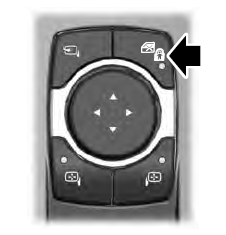
The child safety lock control is on the driver door.
Press the control to switch the child safety locks on. Press the control again to switch them off. A light on the child safety control illuminates when you switch them on.

Copyright © 2026 www.liaviator2.com