
Lincoln Aviator 2020-2026 Service Manual / Powertrain / Automatic Transmission / Automatic Transmission External Controls - 10-Speed Automatic Transmission – 10R60
Lincoln Aviator: Automatic Transmission / Automatic Transmission External Controls - 10-Speed Automatic Transmission – 10R60
- Description and Operation - External Controls - Overview
- Diagnosis and Testing - External Controls
- General Procedures - Stay in Neutral
- General Procedures - Transmission Park by Wire Manual Release
- Removal and Installation - Downshift Paddle Switch
- Removal and Installation - Gear Shift Module (GSM)
- Removal and Installation - Transmission Park Manual Release Cable
- Removal and Installation - Upshift Paddle Switch
 Removal and Installation - Transmission Fluid Cooler Tubes
Special Tool(s) /
General Equipment
307-569Disconnect Tool TOC Line (1/2)TKIT-2006U-F/FMTKIT-2006U-FLM/LMTKIT-2006U-ROW1TKIT-2006U-ROW2
Removal
With the vehicle in N, position it on a hoist...
 Description and Operation - External Controls - Overview
The shift by wire system uses a push button GSM to interface with the PCM to select gear positions.
The steering wheel includes paddle switches allowing the driver to manually shift the transmission when D is selected on the GSM...
Other information:
Lincoln Aviator 2020-2026 Service Manual: Removal and Installation - Rear Door Lock Control Switch
Special Tool(s) / General Equipment Interior Trim Remover Removal NOTE: LH (left-hand) side shown, RH (right-hand) side similar. Remove the rear door window control switch bezel assembly. Release the locking tabs from the rear door window control switch bezel assembly...
Lincoln Aviator 2020-2026 Service Manual: General Procedures - Headlamp Adjustment
Adjustment NOTE: If the flash video link does not load or is incompatible with your browser, a .wmv version of the video can be accessed at: http://www.fordservicecontent.com/Ford_Content/videos/FusionHeadlampAdj2.wmv Click on the link above to view video...
Categories
- Manuals Home
- Lincoln Aviator Owners Manual
- Lincoln Aviator Service Manual
- Resetting the System
- Interior Lamps
- Body and Paint
- New on site
- Most important about car
Remote Control
Passive Key
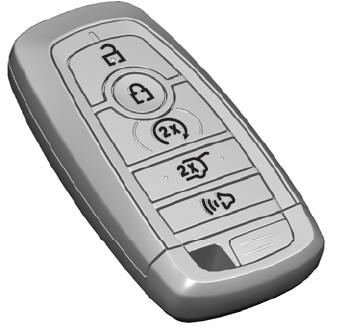
The passive key operates the power locks and the remote start system. The passive key must be in your vehicle to use the push button start.
Note: You may not be able to shift out of park (P) unless the passive key is inside your vehicle.

Copyright © 2026 www.liaviator2.com