
Lincoln Aviator 2020-2026 Service Manual / Powertrain / Automatic Transmission / Transmission Cooling - 10-Speed Automatic Transmission – 10R80 MHT / Removal and Installation - Transmission Fluid Cooler
Lincoln Aviator: Transmission Cooling - 10-Speed Automatic Transmission – 10R80 MHT / Removal and Installation - Transmission Fluid Cooler
Special Tool(s) / General Equipment
.jpg) |
307-569 Disconnect Tool TOC Line (1/2) TKIT-2006U-F/FM TKIT-2006U-FLM/LM TKIT-2006U-ROW1 TKIT-2006U-ROW2 |
Removal
NOTE: Removal steps in this procedure may contain installation details.
-
With the vehicle in N, position it on a hoist.
Refer to: Jacking and Lifting (100-02 Jacking and Lifting, Description and Operation).
-
NOTE: Be prepared to collect escaping fluid.
Clamp the coolant hoses, remove the coolant hose bracket nut, loosen the hose clamps and disconnect the coolant hoses from the transmission fluid cooler.
- Torque: 89 lb.in (10 Nm)
.jpg) |
-
Remove the transmission fluid cooler tube secondary latches.
.jpg) |
-
NOTE: Be prepared to collect escaping fluid.
Using the special tool, disconnect the transmission fluid cooler tubes from the transmission fluid cooler.
Use Special Service Tool: 307-569 Disconnect Tool TOC Line (1/2).
.jpg) |
-
Remove the bolts and the transmission fluid cooler.
Torque: 18 lb.ft (25 Nm)
.jpg) |
Installation
-
To install, reverse the removal procedure.
-
Check and adjust the engine coolant level as necessary.
Refer to: Engine Cooling System Draining, Vacuum Filling and Bleeding (303-03B Engine Cooling - 3.0L EcoBoost – Hybrid (BQ), General Procedures).
-
Check and adjust the transmission fluid level as necessary.
Refer to: Transmission Fluid Level Check (307-01B Automatic Transmission - 10-Speed Automatic Transmission – 10R80 MHT, General Procedures).
 General Procedures - Transmission Fluid Cooler - Backflushing and Cleaning
Special Tool(s) /
General Equipment
Transmission Cooling System Heated Flusher
Materials
Name
Specification
Motorcraft® MERCON® ULV Automatic Transmission FluidXT-12-QULV
WSS-M2C949-A, MERCON® ULV
Flushing
NOTE:
Use transmission fluid specified for this
transmission...
 Removal and Installation - Transmission Fluid Cooler Tubes
Special Tool(s) /
General Equipment
307-569Disconnect Tool TOC Line (1/2)TKIT-2006U-F/FMTKIT-2006U-FLM/LMTKIT-2006U-ROW1TKIT-2006U-ROW2
Removal
With the vehicle in N, position it on a hoist...
Other information:
Lincoln Aviator 2020-2026 Owners Manual: Auto-Start-Stop - Excluding: Plug-In Hybrid Electric Vehicle (PHEV)
The system helps reduce fuel consumption by automatically stopping and restarting the engine when your vehicle has stopped. The engine restarts automatically when you release the brake pedal. In some situations, your vehicle may restart automatically, for example: To maintain interior comfort...
Lincoln Aviator 2020-2026 Owners Manual: If Your Vehicle Gets Stuck in Mud or Snow
Note: Do not rock the vehicle if the engine is not at normal operating temperature or damage to the transmission could occur. Note: Do not rock the vehicle for more than a minute or damage to the transmission and tires could occur, or the engine could overheat...
Categories
- Manuals Home
- Lincoln Aviator Owners Manual
- Lincoln Aviator Service Manual
- Keyless Entry
- Child Safety Locks
- Drive Modes
- New on site
- Most important about car
Locking and Unlocking the Doors from Inside
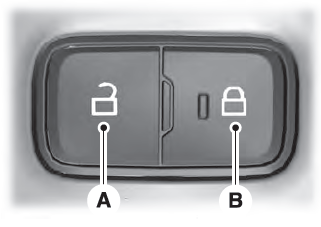
Locking the Doors
Press the lock switch on the door interior trim panel. The doors can no longer be released using the exterior door handle switches and the luggage compartment locks.

Copyright © 2026 www.liaviator2.com