
Lincoln Aviator 2020-2026 Owners Manual / Driving Aids / Cross Traffic Alert / Switching the System On and Off
Lincoln Aviator: Cross Traffic Alert / Switching the System On and Off
To switch the system on or off, adjust the setting. Depending on your vehicle options, the setting could be in the following:
- Information display.
- Touchscreen.
Note: The system turns on every time you switch the ignition on. To permanently switch the system off, contact an authorized dealer.
 Cross Traffic Alert Behavior When Trailer is Attached
Note: The system may not correctly operate
when towing a trailer. For vehicles with an
approved trailer tow module and tow bar,
the system turns off when you attach a
trailer...
 Cross Traffic Alert Indicator
When the system detects an
approaching vehicle, a tone
sounds, a warning lamp illuminates
in the relevant exterior mirror and arrows
appear in the information display to show
which side the approaching vehicle is coming
from...
Other information:
Lincoln Aviator 2020-2026 Owners Manual: General Information
Have your vehicle serviced regularly to help maintain its roadworthiness and resale value. There is a large network of authorized dealers that are there to help you with their professional servicing expertise. We believe that their specially trained technicians are best qualified to service your vehicle properly and expertly...
Lincoln Aviator 2020-2026 Service Manual: General Procedures - Fuel System Pressure Release
Pressure release With the vehicle in NEUTRAL, position it on a hoist. Refer to: Jacking and Lifting (100-02 Jacking and Lifting, Description and Operation). Remove the fasteners. Remove the nuts...
Categories
- Manuals Home
- Lincoln Aviator Owners Manual
- Lincoln Aviator Service Manual
- Description and Operation - Jacking and Lifting
- Interior Lamps
- USB Port and Power Point Locations
- New on site
- Most important about car
Child Safety Locks
When the child safety locks are set, you cannot open the rear doors from the inside.
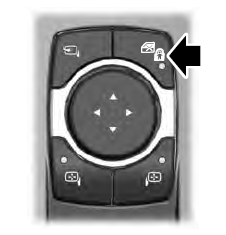
The child safety lock control is on the driver door.
Press the control to switch the child safety locks on. Press the control again to switch them off. A light on the child safety control illuminates when you switch them on.

Copyright © 2026 www.liaviator2.com