
Lincoln Aviator 2020-2026 Owners Manual / Driving Aids
Lincoln Aviator: Driving Aids
- Principle of Operation
- Using Driver Alert
- Lane Keeping System
- Blind Spot Information System
- Using the Blind Spot Information System
- Blind Spot Information System with Trailer Tow (If Equipped)
- System Errors. Switching the System On and Off
- Cross Traffic Alert
- Using Cross Traffic Alert
- Cross Traffic Alert System Sensors
- Cross Traffic Alert System Limitations
- Cross Traffic Alert Behavior When Trailer is Attached
- Switching the System On and Off
- Cross Traffic Alert Indicator
- Cross Traffic Alert Information Messages
- Speed Sign Recognition (If Equipped)
- Steering
- Pre-Collision Assist
 Adaptive Cruise Control – Troubleshooting
Adaptive Cruise Control – Information Messages - Vehicles With: Adaptive
Cruise Control With Lane Centering
Note: Depending on your vehicle options
and instrument cluster type, not all messages
display or are available...
 Principle of Operation
WARNING: You are responsible for
controlling your vehicle at all times. The
system is designed to be an aid and does
not relieve you of your responsibility to
drive with due care and attention...
Other information:
Lincoln Aviator 2020-2026 Service Manual: Overhaul - Main Control Valve Body
Special Tool(s) / General Equipment 307-299Alignment Pins, Valve BodyTKIT-1994-LMH/MH2TKIT-1994-FTKIT-1994-FLM/FM Materials Name Specification Motorcraft® MERCON® ULV Automatic Transmission FluidXT-12-QULV WSS-M2C949-A, MERCON® ULV For solenoid and valve identification...
Lincoln Aviator 2020-2026 Owners Manual: Braking
Your hybrid is equipped with standard hydraulic braking and regenerative braking. Regenerative braking is performed by your transmission and it captures brake energy and stores it in the high voltage battery. You may also notice during extending downhill driving that your engine continues to run instead of shutting off...
Categories
- Manuals Home
- Lincoln Aviator Owners Manual
- Lincoln Aviator Service Manual
- Interior Lamps
- Tire Change Procedure
- Resetting the System
- New on site
- Most important about car
Fastening the Seatbelts
The front outboard and rear safety restraints in the vehicle are combination lap and shoulder belts.
Insert the belt tongue into the proper buckle (the buckle closest to the direction the tongue is coming from) until you hear a snap and feel it latch. Make sure that you securely fasten the tongue in the buckle.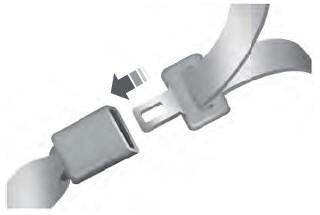

Copyright © 2026 www.liaviator2.com