
Lincoln Aviator 2020-2026 Owners Manual / Driving Aids / Lane Keeping System / Switching the System On and Off
Lincoln Aviator: Lane Keeping System / Switching the System On and Off
Note: The on or off setting is stored until it is manually changed, unless a MyKey is detected. If the system detects a MyKey, it defaults to on and the mode sets to Alert.
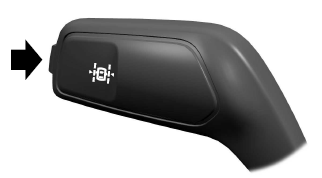
Press the button on the direction indicator stalk to switch the system on or off.
 Lane Keeping System
WARNING: You are responsible for
controlling your vehicle at all times. The
system is designed to be an aid and does
not relieve you of your responsibility to
drive with due care and attention...
 System Settings
The system has optional setting menus
available. The system stores the last known
selection for each of these settings. You do
not need to readjust your settings each time
you switch the system on...
Other information:
Lincoln Aviator 2020-2026 Service Manual: Diagnosis and Testing - Brake System
Symptom Chart(s) Symptom Chart: Brake System Diagnostics in this manual assume a certain skill level and knowledge of Ford-specific diagnostic practices. REFER to: Diagnostic Methods (100-00 General Information, Description and Operation). Condition Possible Sources Actions The red brake warning indicator and the yellow ABS warning indicator are illuminated Diagnostic Trouble Codes (DTCs) in the ABS CHECK for ABS diagnostic trouble codes (DTCs)...
Lincoln Aviator 2020-2026 Service Manual: Diagnosis and Testing - Driveshaft
Preliminary Inspection Visually inspect the CV joints for obvious signs of mechanical damage. If an obvious cause for an observed or reported concern is found, correct the cause (if possible) before proceeding to the next step If the cause is not visually evident, verify the symptom and REFER to Symptom Chart: NVH...
Categories
- Manuals Home
- Lincoln Aviator Owners Manual
- Lincoln Aviator Service Manual
- Drive Modes
- Child Safety Locks
- Resetting the System
- New on site
- Most important about car
Child Seats
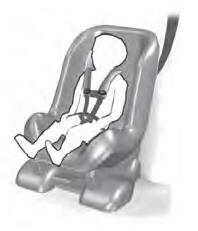
Use a child restraint (sometimes called an infant carrier, convertible seat, or toddler seat) for infants, toddlers and children weighing 40 lb (18 kg) or less (generally four-years-old or younger).
Using Lap and Shoulder Belts
WARNING: Do not place a rearward facing child restraint in front of an active airbag. Failure to follow this instruction could result in personal injury or death.

Copyright © 2026 www.liaviator2.com