Lincoln Aviator: Driving Aids / Using Driver Alert
Switching the System On and Off
Switch the system on or off using the information display.
When active, the system monitors your alertness level based upon your driving behavior in relation to the lane markings, and other factors.
System Warnings
Note: The system does not issue warnings below approximately 40 mph (64 km/h).
Note: If you receive a warning you should consider resting, even if the current assessment is within the typical range.
The warning system has two stages. At first, the system issues a temporary warning that you need to take a rest. This message only appears for a short time. If the system detects further reduction in driving alertness, it may issue another warning that remains in the information display for a longer time. You can press OK on the steering wheel control to clear the warning.
Resetting the System
You can reset the system by either:
- Switching the ignition off and on.
- Stopping the vehicle and then opening and closing the driver’s door.
 Principle of Operation
WARNING: You are responsible for
controlling your vehicle at all times. The
system is designed to be an aid and does
not relieve you of your responsibility to
drive with due care and attention...
 Lane Keeping System
WARNING: You are responsible for
controlling your vehicle at all times. The
system is designed to be an aid and does
not relieve you of your responsibility to
drive with due care and attention...
Other information:
Lincoln Aviator 2020-2026 Owners Manual: AM/FM Radio
Tuning a Station You can use the tune or seek controls on the radio bezel to select a station. To tune a station using the touchscreen, select: A pop up appears, allowing you to type in the frequency of a station. You can only enter a valid station for the source you are currently listening to...
Lincoln Aviator 2020-2026 Service Manual: Description and Operation - Adaptive Steering - System Operation and Component Description
System Operation System Diagram Item Description 1 SECM 2 ECU 3 Private CAN 4 IPMA 5 SIMA 6 PSCM 7 GWM 8 Locking solenoid 9 SASM 10 BCM 11 PCM 12 IPC 13 SUMA 14 RCM 15 Motor 16 HVAC module 17 APIM Network Input Message Chart SECM Network Input Messages Broadcast Message Originating Module Message Purpose Active front steering request PSCM Requests steering angle changes for stability control events...
Categories
- Manuals Home
- Lincoln Aviator Owners Manual
- Lincoln Aviator Service Manual
- USB Port and Power Point Locations
- Opening and Closing the Hood
- Changing the Front Wiper Blades - Vehicles With: Heated Wiper Blades
- New on site
- Most important about car
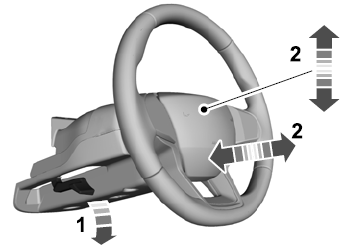
Adjusting the Steering Wheel - Vehicles With: Manual Adjustable Steering Column
WARNING: Do not adjust the steering wheel when your vehicle is moving.
Note: Make sure that you are sitting in the correct position.
Unlock the steering column. Adjust the steering wheel to the desired position.