
Lincoln Aviator: Doors and Locks / Keyless Entry
SECURICODE™ Keyless Entry Keypad
The keypad is near the driver window. It illuminates when touched.
Note: If you enter your entry code too fast on the keypad, the unlock function may not work. Enter your entry code again more slowly.

You can use the keypad to do the following:
- Lock or unlock the doors.
- Program and erase user codes.
- Arm and disarm the anti-theft alarm.
You can operate the keypad with the factory-set five-digit entry code. The code is on the owner's wallet card in the glove box and is available from an authorized dealer. You can also program up to five of your own five-digit personal entry codes.
Programming a Personal Entry Code
- Enter the factory-set five-digit code.
- Press 1·2 on the keypad within five seconds.
- Enter your personal five-digit code. You must enter each number within five seconds of each other.
- Press 1·2 on the keypad to save personal code 1.
The doors lock then unlock to confirm that programming was successful.
To program additional personal entry codes, repeat steps 1 through 3, then for step 4:
- Press 3·4 to save personal code 2.
- Press 5·6 to save personal code 3.
- Press 7·8 to save personal code 4.
- Press 9·0 to save personal code 5.
Hints:
- Do not set a code that uses five of the same number.
- Do not use five numbers in sequential order.
- The factory-set code works even if you have set your own personal code.
Erasing a Personal Code
- Enter the factory-set five-digit code.
- Press and release 1·2 on the keypad within five seconds.
- Press and hold 1·2 for two seconds. You must do this within five seconds of completing step 2.
All personal codes erase and only the factory-set five-digit code works.
Anti-Scan Feature
The keypad goes into an anti-scan mode if you enter the wrong code seven times. This mode turns off the keypad for one minute and the keypad lamp flashes.
The anti-scan feature turns off after any of the following occur:
- One minute of keypad inactivity.
- You press the unlock button on the remote control.
- You switch your vehicle on.
- You unlock the vehicle using intelligent access.
Locking and Unlocking the Doors
Locking All Doors
Press and hold 7·8 and 9·0 on the keypad simultaneously with the driver door closed. You do not need to enter a code first.
Unlocking All Doors
Enter the factory-set or your personal five-digit code, then press 3·4 on the keypad within five seconds.
Unlocking Only the Driver Door
Enter the factory-set or your personal five-digit code. You must press each number within five seconds of each other. The interior lamps illuminate.
Note: All doors unlock if you switch the two-stage unlocking feature off.
 Emergency Door Release. Soft Closing Door
Emergency Door Release
If you are inside your vehicle and unable to
use the electronic door system, you can
open the driver door using the emergency
door release switch in the map pocket...
 Liftgate
..
Other information:
Lincoln Aviator 2020-2026 Service Manual: Removal and Installation - Engine Mount RH
Special Tool(s) / General Equipment 303-050 (T70P-6000) Lifting Bracket, Engine 303-F070Support Bar, EngineTKIT-1999A-F/LTTKIT-1999A-FM/FLM Removal NOTE: AWD shown, RWD similar. With the vehicle in NEUTRAL, position it on a hoist...
Lincoln Aviator 2020-2026 Owners Manual: Changing a Fuse
Fuses WARNING: Always replace a fuse with one that has the specified amperage rating. Using a fuse with a higher amperage rating can cause severe wire damage and could start a fire. If electrical components in the vehicle are not working, a fuse may have blown...
Categories
- Manuals Home
- Lincoln Aviator Owners Manual
- Lincoln Aviator Service Manual
- Configuring The Head Up Display
- Drive Modes
- Garage Door Opener
- New on site
- Most important about car
Child Safety Locks
When the child safety locks are set, you cannot open the rear doors from the inside.
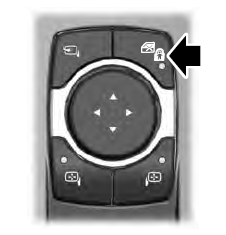
The child safety lock control is on the driver door.
Press the control to switch the child safety locks on. Press the control again to switch them off. A light on the child safety control illuminates when you switch them on.
