
Lincoln Aviator: Blind Spot Information System / Using the Blind Spot Information System
Vehicles with Automatic Transmission The system turns on when all of the following occur:
- You start your vehicle.
- You shift into drive (D).
- The vehicle speed is greater than 6 mph (10 km/h).
Note: The system does not operate in park (P) or reverse (R).
System Lights and Messages
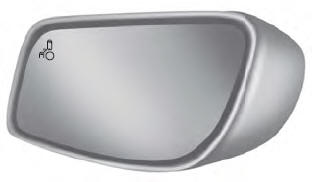
When the system detects a vehicle, an alert indicator illuminates in the exterior mirror on the side the approaching vehicle is coming from. If you turn the direction indicator on for that side of your vehicle, the alert indicator flashes.
Note: The system may not alert you if a vehicle quickly passes through the detection zone.
Blocked Sensors
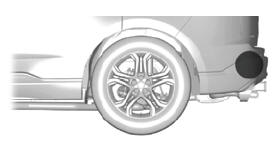
The sensors are behind the rear bumper on both sides of your vehicle.
Note: Keep the sensors free from snow, ice and large accumulations of dirt.
Note: Do not cover the sensors with bumper stickers, repair compound or other objects.
Note: Blocked sensors could affect system performance.
If the sensors become blocked, a message could appear in the information display. The alert indicators remain illuminated but the system does not alert you.
System Errors
If the system detects a fault, a warning lamp illuminates and a message displays.
Switching the System On and Off
To switch the system on or off, adjust the setting. Depending on your vehicle options, the setting could be in the following:
- Information display.
- Touchscreen.
When you switch the system off, a warning lamp illuminates and the alert indicators flash twice.
Note: The system remembers the last setting when you start your vehicle.
Note: The system may not correctly operate when towing a trailer. For vehicles with an approved trailer tow module and tow bar, the system turns off when you attach a trailer. For vehicles with an aftermarket trailer tow module or tow bar, we recommend that you switch the system off when you attach a trailer.
To permanently switch the system off, contact an authorized dealer.
 Blind Spot Information System
WARNING: Do not use the blind spot
information system as a replacement for
using the interior and exterior mirrors or
looking over your shoulder before
changing lanes...
 Blind Spot Information System with Trailer Tow (If Equipped)
The design of the system is to aid you in
detecting vehicles that could have entered
the detection area zone (A). The detection
area is on both sides of your vehicle and
trailer, extending rearward from the exterior
mirrors to the end of your trailer...
Other information:
Lincoln Aviator 2020-2026 Service Manual: Description and Operation - Cruise Control - Overview
Overview The cruise control system is controlled by the PCM. The cruise control mode is selected from the steering wheel mounted switches which are integrated into the steering wheel. Refer to Owners Literature for additional information. The cruise control system maintains a selected vehicle speed between 32 kmh (20 mph) or 30 kmh (18 mph) (metric cluster) and the maximum limited vehicle speed...
Lincoln Aviator 2020-2026 Service Manual: Removal and Installation - Wheel Studs
Special Tool(s) / General Equipment Hydraulic Press Removal Remove the wheel bearing and wheel hub. Refer to: Wheel Bearing and Wheel Hub (204-02 Rear Suspension, Removal and Installation). Refer to: Wheel Bearing and Wheel Hub (204-02 Rear Suspension, Removal and Installation)...
Categories
- Manuals Home
- Lincoln Aviator Owners Manual
- Lincoln Aviator Service Manual
- Interior Lamps
- Tire Change Procedure
- Keyless Entry
- New on site
- Most important about car
Emergency Locking
Each door has a backup power system which allows the door to function if your vehicle has no power. The system has a limited number of operations before the power is depleted and turns off. When the system turns off, the door remains open and unlatched and does not close.
If your vehicle has no power and the backup power system is turned off, you can close and secure your vehicle by manually resetting each door latch using a key in the position shown.
