
Lincoln Aviator: Lane Keeping System / Troubleshooting
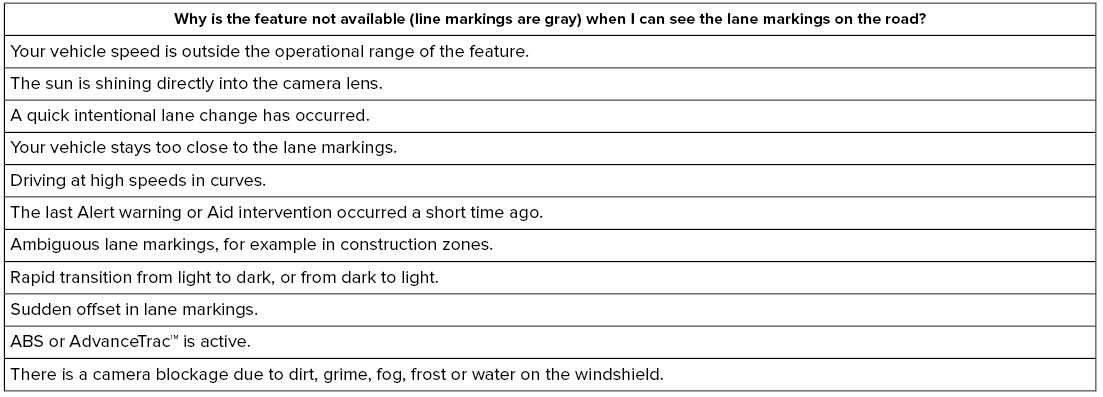
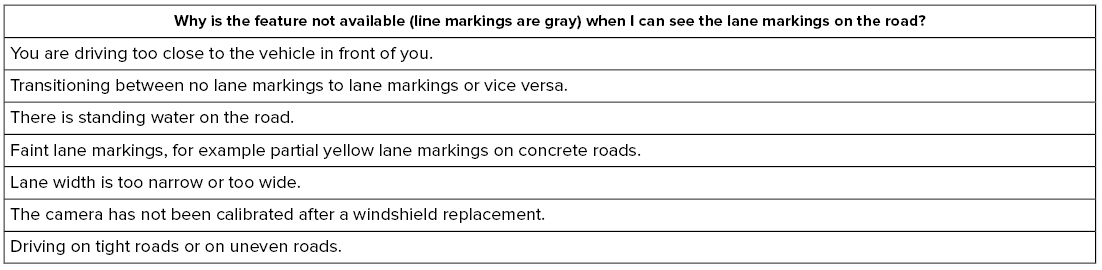

 System Display
When you switch the system on, a graphic
of lane markings appears in the information
display.
When you switch the system off, the lane
marking graphics do not display...
 Blind Spot Information System
WARNING: Do not use the blind spot
information system as a replacement for
using the interior and exterior mirrors or
looking over your shoulder before
changing lanes...
Other information:
Lincoln Aviator 2020-2026 Owners Manual: Understanding Your Tire Pressure Monitoring System
The tire pressure monitoring system measures pressure in your road tires and sends the tire pressure readings to your vehicle. You can view the tire pressure readings through the information displa. The low tire pressure warning light will turn on if the tire pressure is significantly low...
Lincoln Aviator 2020-2026 Service Manual: Description and Operation - Main Control Valve Body
Item Description 1 Internal wiring harness retaining bolt 2 Internal wiring harness 3 Park lock pawl solenoid 4 Solenoid retaining plate bolts 5 Solenoid retaining plate 6 TCC solenoid 7 LPC solenoid 8 Shift solenoid retaining plate bolts 9 Shift solenoid retaining plate 10 SSD 11 SSE 12 SSB 13 SSC 14 SSF 15 SSA 16 TFT 17 Valve channel plate bolts 18 Valve channel plate 19 Lower-to-upper valve body bolts 20 Lower valve body 21 Upper valve body 22 Valve body dowel pins Lower Valve Body 1 Valve body separator plate bolts 2 Valve body separator plate 3 TCC damper 4 LPC damper assembly 5 Check valve assemblies 6 Check balls (quantity 5) 7 LPC anti-backflow valve assembly 8 TCC priority valve assembly 9 Park lock pawl valve 10 A clutch control valve 11 SSA 12 F clutch control valve 13 SSF 14 C clutch control valve 15 SSC 16 B clutch control valve 17 SSB 18 E clutch control valve 19 SSE 20 D clutch control valve 21 SSD 22 Shift solenoid retainers Upper Valve Body 1 Lube control valve assembly 2 Plug and spring assembly 3 C clutch latch valve assembly 4 B clutch latch valve assembly 5 F clutch latch valve assembly 6 A clutch latch valve assembly 7 Plug and spring assembly 8 TCC regulator valve assembly 9 Main regulator valve assembly The main control consists of a upper and lower valve body with solenoids that are controlled by a remote mounted TCM or the PCM...
Categories
- Manuals Home
- Lincoln Aviator Owners Manual
- Lincoln Aviator Service Manual
- Description and Operation - Jacking and Lifting
- Garage Door Opener
- Tire Change Procedure
- New on site
- Most important about car
Child Safety Locks
When the child safety locks are set, you cannot open the rear doors from the inside.
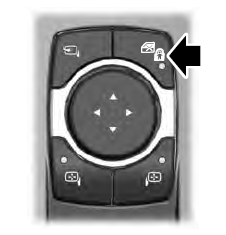
The child safety lock control is on the driver door.
Press the control to switch the child safety locks on. Press the control again to switch them off. A light on the child safety control illuminates when you switch them on.

Copyright © 2026 www.liaviator2.com