
Lincoln Aviator 2020-2026 Owners Manual / Driving Aids / Speed Sign Recognition (If Equipped)
Lincoln Aviator: Driving Aids / Speed Sign Recognition (If Equipped)

 Principle of Operation
WARNING: You are responsible for
controlling your vehicle at all times. The
system is designed to be an aid and does
not relieve you of your responsibility to
drive with due care and attention...
Other information:
Lincoln Aviator 2020-2026 Service Manual: General Procedures - Power Roof Opening Panel Initialization
Initialization WARNING: Keep objects and body parts clear of the glass panel when carrying out the initialization procedure. During the initialization procedure, the glass panel closes with high force and cannot detect objects in its path...
Lincoln Aviator 2020-2026 Service Manual: General Procedures - Fuel System Pressure Release
Pressure release With the vehicle in NEUTRAL, position it on a hoist. Refer to: Jacking and Lifting (100-02 Jacking and Lifting, Description and Operation). Remove the fasteners. Remove the nuts...
Categories
- Manuals Home
- Lincoln Aviator Owners Manual
- Lincoln Aviator Service Manual
- USB Port and Power Point Locations
- Tire Change Procedure
- Fuel Quality
- New on site
- Most important about car
Fastening the Seatbelts
The front outboard and rear safety restraints in the vehicle are combination lap and shoulder belts.
Insert the belt tongue into the proper buckle (the buckle closest to the direction the tongue is coming from) until you hear a snap and feel it latch. Make sure that you securely fasten the tongue in the buckle.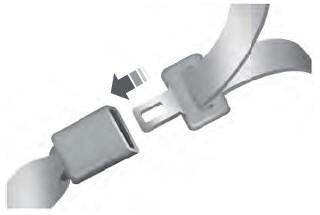

Copyright © 2026 www.liaviator2.com