
Lincoln Aviator: Vehicle Care / Waxing
Regular waxing is necessary to protect your car's paint from the elements. We recommend that you wash and wax the painted surface once or twice a year.
When washing and waxing, park your vehicle in a shaded area out of direct sunlight. Always wash your vehicle before applying wax.
- Use a quality wax that does not contain abrasives.
- Follow the manufacturer’s instructions to apply and remove the wax.
- Apply a small amount of wax in a back-and-forth motion, not in circles.
- Do not allow wax to come in contact with
any non-body (low-gloss black) colored
trim. The wax will discolor or stain the
parts over time.
- Roof racks.
- Bumpers.
- Grained door handles.
- Side moldings.
- Mirror housings.
- Windshield cowl area.
- Do not apply wax to glass areas.
- After waxing, your car's paint should feel smooth, and be free of streaks and smudges.
 Cleaning the Exterior
Wash your vehicle regularly with cool or
lukewarm water and a neutral pH shampoo,
we recommend Motorcraft Detail Wash.
Never use strong household detergents
or soap, for example dish washing or
laundry liquid...
 Cleaning the Engine
Engines are more efficient when they are
clean because grease and dirt buildup keep
the engine warmer than normal.
When washing:
Take care when using a power washer
to clean the engine...
Other information:
Lincoln Aviator 2020-2026 Service Manual: Description and Operation - Pedestrian Alert System - System Operation and Component Description
System Operation System Diagram Item Description 1 PACM 2 PCM 3 IPC 4 Rear sounder 5 BCM 6 SOBDMC 7 Front sounder Network Message Charts Module Network Input Messages - PACM Broadcast Message Originating Module Message Purpose Factory mode BCM Controls the pedestrian alert system based on the vehicle build status set in factory mode...
Lincoln Aviator 2020-2026 Service Manual: Removal and Installation - Axle Housing Bushing
Special Tool(s) / General Equipment 205-1066Installer, Bushing Flat Headed Screw Driver Removal NOTE: Only worn or damaged bushings need to be replaced. Remove the rear axle assembly. Refer to: Axle Assembly (205-02 Rear Drive Axle/Differential, Removal and Installation)...
Categories
- Manuals Home
- Lincoln Aviator Owners Manual
- Lincoln Aviator Service Manual
- Resetting the System
- Changing the Front Wiper Blades - Vehicles With: Heated Wiper Blades
- Drive Modes
- New on site
- Most important about car
Fastening the Seatbelts
The front outboard and rear safety restraints in the vehicle are combination lap and shoulder belts.
Insert the belt tongue into the proper buckle (the buckle closest to the direction the tongue is coming from) until you hear a snap and feel it latch. Make sure that you securely fasten the tongue in the buckle.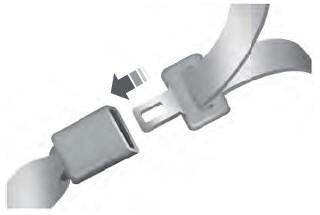

Copyright © 2026 www.liaviator2.com