
Lincoln Aviator 2020-2026 Owners Manual / Parking Aids / Active Park Assist (If Equipped) / Active Park Assist Information Messages. Active Park Assist Troubleshooting
Lincoln Aviator: Active Park Assist (If Equipped) / Active Park Assist Information Messages. Active Park Assist Troubleshooting
Active Park Assist Information Messages

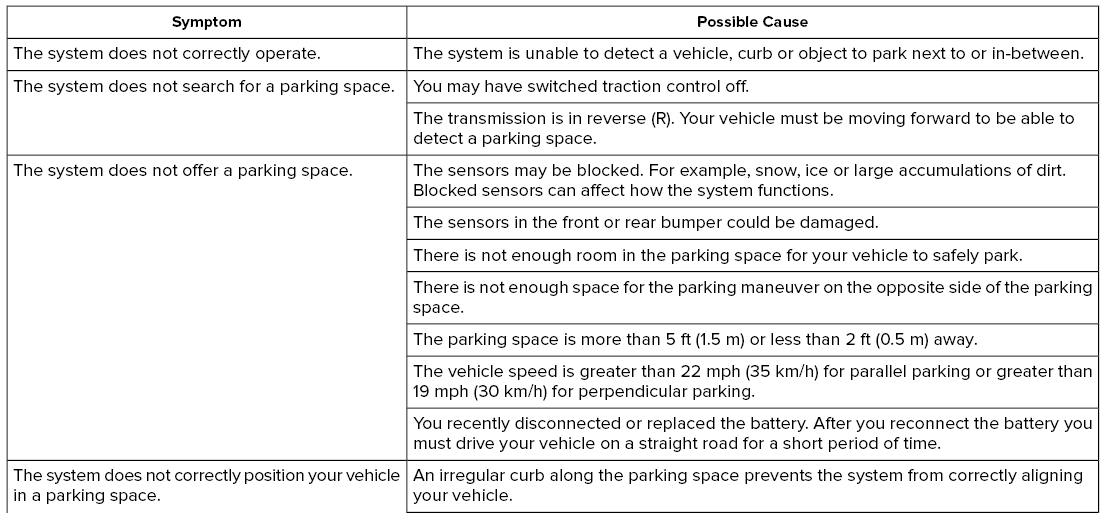
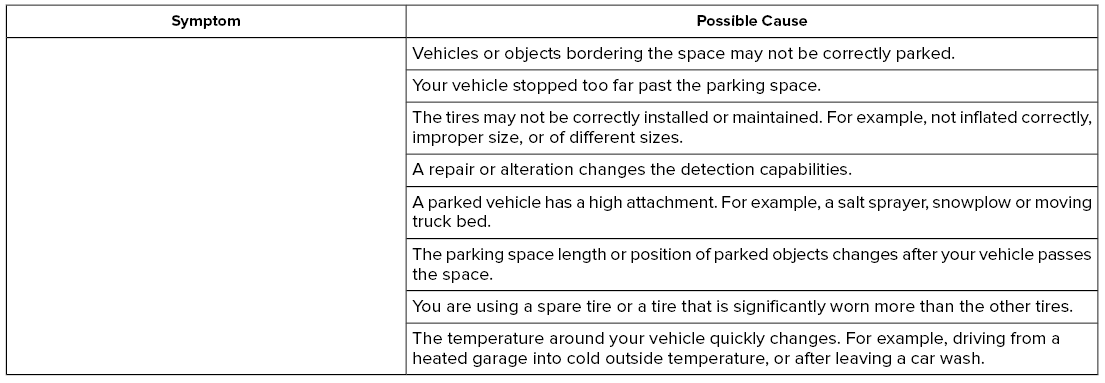
Active Park Assist Troubleshooting
 Using Active Park Assist
The parking button is above the transmission
selector, just below the display screen.
Press the parking button then touch the
Active Park Assist icon on the display screen
to bring up full screen notifications...
 Rear View Camera
WARNING: The rear view camera
system is a reverse aid supplement device
that still requires the driver to use it in
conjunction with the interior and exterior
mirrors for maximum coverage...
Other information:
Lincoln Aviator 2020-2026 Service Manual: Removal and Installation - Wheel and Tire
Materials Name Specification Motorcraft® High Temperature Nickel Anti-Seize LubricantXL-2 - Motorcraft® Wheel and Tire CleanerZC-37-A - Removal With the vehicle in NEUTRAL, position it on a hoist. Refer to: Jacking and Lifting (100-02 Jacking and Lifting, Description and Operation)...
Lincoln Aviator 2020-2026 Owners Manual: Keyless Entry
SECURICODE™ Keyless Entry Keypad The keypad is near the driver window. It illuminates when touched. Note: If you enter your entry code too fast on the keypad, the unlock function may not work. Enter your entry code again more slowly. You can use the keypad to do the following: Lock or unlock the doors...
Categories
- Manuals Home
- Lincoln Aviator Owners Manual
- Lincoln Aviator Service Manual
- Drive Modes
- Changing the Front Wiper Blades - Vehicles With: Heated Wiper Blades
- Wireless Accessory Charger (If Equipped)
- New on site
- Most important about car
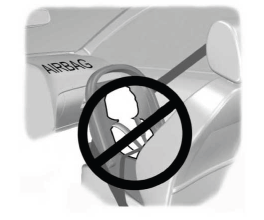
Children and Airbags
WARNING: Airbags can kill or injure a child in a child restraint. Never place a rear-facing child restraint in front of an active airbag. If you must use a forward-facing child restraint in the front seat, move the seat upon which the child restraint is installed all the way back.

Copyright © 2026 www.liaviator2.com