
Lincoln Aviator 2020-2026 Owners Manual / Maintenance / Adjusting the Headlamps
Lincoln Aviator: Maintenance / Adjusting the Headlamps
Vertical Aim Adjustment
If your vehicle has been involved in a crash, have the aim of the headlamp beam checked by an authorized dealer.
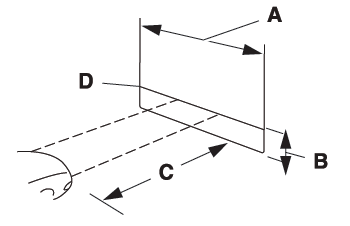
- 8 ft (2.4 m).
- Ground to the center of the headlamp high beam bulb.
- 25 ft (7.6 m).
- Horizontal reference line.
Vertical Aim Adjustment Procedure
- Park your vehicle on level ground approximately 25 ft (7.6 m) from a wall or screen.
- Measure the distance from the ground
to the center of the headlamp high beam
bulb and mark an 8 ft (2.4 m) long
horizontal reference line on the wall or
screen at this height.
Note: There may be an identifying mark on the lens to help you locate the center line of the headlamp high beam bulb.
Note: To see a clearer light pattern for adjusting, you may want to block the light from one headlamp while adjusting the other.
- Switch on the low beam headlamps and
open the hood.

- On the wall or screen you will observe a
flat zone of high intensity light located at
the top of the beam pattern. If the top
edge of the flat zone of high intensity
light is not on the horizontal reference
line, adjust the aim of the headlamp
beam.
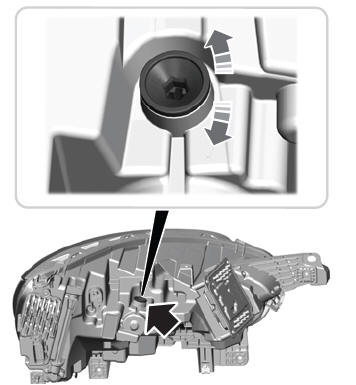
- Use a suitable tool, for example a screwdriver or socket wrench, to turn the adjuster clockwise or counterclockwise to adjust the vertical aim of the headlamp. The horizontal edge of the brighter light should touch the horizontal reference line.
- Close the hood and switch off the lamps.
 Remove and Reinstall the Battery
To disconnect or remove the battery, do the
following:
Apply the parking brake and switch the
ignition off.
Switch all electrical equipment off, for
example lights and radio...
 Washer Fluid Check. Fuel Filter. Checking the Wiper Blades
Washer Fluid Check
WARNING: If you operate your
vehicle in temperatures below 41.0°F (5°C),
use washer fluid with antifreeze protection.
Failure to use washer fluid with antifreeze
protection in cold weather could result in
impaired windshield vision and increase
the risk of injury or accident...
Other information:
Lincoln Aviator 2020-2026 Service Manual: Removal and Installation - Trailer Module (TRM)
Removal NOTE: Removal steps in this procedure may contain installation details. NOTE: This step is only necessary if the TRM is being replaced. Using a diagnostic scan tool, begin the PMI process for the TRM following the on-screen instructions...
Lincoln Aviator 2020-2026 Owners Manual: Maintaining Your Head Up Display
Do not place objects onto the transparent cover, as they may block you from seeing portions of the image. These objects could also damage the cover and affect the quality of the projected image. The system uses a special windshield designed to provide the optimum image quality...
Categories
- Manuals Home
- Lincoln Aviator Owners Manual
- Lincoln Aviator Service Manual
- Interior Lamps
- Body and Paint
- Wireless Accessory Charger (If Equipped)
- New on site
- Most important about car
Adjusting the Steering Wheel - Vehicles With: Manual Adjustable Steering Column
WARNING: Do not adjust the steering wheel when your vehicle is moving.
Note: Make sure that you are sitting in the correct position.
Unlock the steering column. Adjust the steering wheel to the desired position.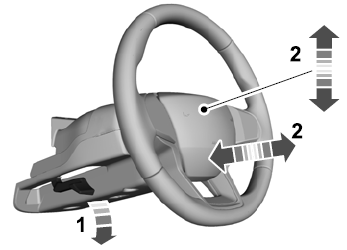

Copyright © 2026 www.liaviator2.com