
Lincoln Aviator: Network Connectivity / Connecting the Vehicle to a Mobile Network
What Is the Modem
The modem allows you to connect your vehicle to the Internet to use when you are on the road.
If you enable the modem using the Lincoln Way app, you can access the following services:
- Locating and remotely starting, locking and unlocking your vehicle. See the information in the Lincoln Way app.
- Automatic system updates.
Note: We may need to update operating system software on your vehicle to keep connected services updated without prior notice to you.
Enabling the Modem Using The Lincoln Way
- Open the Lincoln Way app on your device and log in.
- Select your vehicle.
- Select the option for vehicle details.
- Select the option to activate your vehicle.
- Switch the ignition on.
- Make sure that the name on the screen matches the name shown in your Lincoln Way account.
- Confirm the association of your vehicle with your Lincoln Way account.
Enabling the Modem Using the Touchscreen
 Select the settings option on the
feature bar.
Select the settings option on the
feature bar.
- Select Lincoln Connect.
- Select Connectivity Settings.
- Switch connectivity features on.


Other information:
Lincoln Aviator 2020-2026 Service Manual: General Procedures - Air Conditioning (A/C) Odor Treatment - Vehicles With: R1234YF Refrigerant
Special Tool(s) / General Equipment A/C Odor Remover Flexible Applicator Materials Name Specification Motorcraft® A/C Cooling Coil CoatingYN-29 - Inspection NOTE: There are typically 4 types of objectionable odors found in a vehicle: chemical odors environmental odors human and other interior-generated odors microbiological odors Before determining that A/C odor treatment is required, determine the source and the circumstances under which the odor occurs...
Lincoln Aviator 2020-2026 Service Manual: Removal and Installation - Fuel Level Sensor
Removal NOTE: Removal steps in this procedure may contain installation details. Remove the fuel pump sender unit. Refer to: Fuel Pump and Sender Unit (310-01A Fuel Tank and Lines - 3.0L EcoBoost, Removal and Installation). Disconnect the electrical connector...
Categories
- Manuals Home
- Lincoln Aviator Owners Manual
- Lincoln Aviator Service Manual
- General Procedures - Transmission Fluid Drain and Refill
- Tire Change Procedure
- Remove and Reinstall the Battery
- New on site
- Most important about car
Child Seats
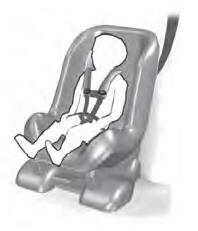
Use a child restraint (sometimes called an infant carrier, convertible seat, or toddler seat) for infants, toddlers and children weighing 40 lb (18 kg) or less (generally four-years-old or younger).
Using Lap and Shoulder Belts
WARNING: Do not place a rearward facing child restraint in front of an active airbag. Failure to follow this instruction could result in personal injury or death.
