Lincoln Aviator: Body Repairs - General Information / General Procedures - Joining Techniques
Special Tool(s) / General Equipment
| Resistance Spotwelding Equipment | |
| Spherical Cutter | |
| Grinder | |
| Plasma Cutter | |
| Air Body Saw | |
| 8 mm Drill Bit | |
| MIG/MAG Welding Equipment | |
| Spot Weld Drill Bit |
Materials
| Name | Specification |
|---|---|
| Metal Bonding Adhesive TA-1, TA-1-B, 3M™ 08115, LORD Fusor® 108B |
- |
| Seam Sealer TA-2-B, 3M™ 08308, LORD Fusor® 803DTM |
- |
| Motorcraft® Metal Surface Prep Wipes ZC-31-B |
- |
Repair
NOTE: Weld Bonding-Squeeze Type Resistance Spot Welding (STRW) Method.
-
Verify the vehicle is dimensionally correct. Repair as required .
Refer to: Body and Frame (501-26 Body Repairs - Vehicle Specific Information and Tolerance Checks, Description and Operation).
-
Remove damaged panel. Remove only damaged portions of
the panel. Avoid cutting into mating flanges or adjacent parts.
Use the General Equipment: Air Body Saw
Use the General Equipment: Plasma Cutter
Use the General Equipment: Spherical Cutter
-
Mill spot welds and remove damaged portions of the panel to be replaced.
Use the General Equipment: Spot Weld Drill Bit
-
Prepare any damaged flanges on the vehicle using hammer and dolly.
-
Grind the mating surface of the original flanges no
greater the 25 mm where the metal bonding adhesive will be applied.
Use the General Equipment: Grinder
-
Be sure to remove galvanizing on metal. Metal should
have a shiny appearance. Be careful not to damage the corners or thin
the metal. The E-coat should also be remove on the opposite side of the
flange only where spot welds are to be placed. Clean surfaces with
surface prep.
Material: Motorcraft® Metal Surface Prep Wipes / ZC-31-B
-
Dry-fit and clamp the replacement service parts to verify a correct fit.
-
Remove the service part after verifying correct fit and alignment.
-
Prepare the adhesive. Dispense a small amount of
adhesive from the cartridge to make sure of an even flow of both
components. Attach the mixing tip and dispense a mixing tip length of
adhesive to make sure of a correct mix ratio.
Material: Metal Bonding Adhesive / TA-1, TA-1-B, 3M™ 08115, LORD Fusor® 108B
-
NOTE: Welding can be carried out anytime during the adhesive curing process, or after the adhesive is fully cured. Welder settings will vary when welding through wet adhesive versus welding through fully cured adhesive. Refer to welder manufacturer's recommended settings for welding through fully cured adhesive. It is recommended to place a shunt weld in an area with no adhesive to make sure of conductivity, particularly when welding through fully cured adhesive.
Create a test sample.
-
Prepare the metal and adhesive as described. Apply a 6 mm - 9 mm bead of adhesive and weld the sample.
Use the General Equipment: Resistance Spotwelding Equipment
-
Place the welded sample in a vice and carry out
destructive weld tests by peeling the scrap metal apart using large
lock-type pliers. Measure the weld nugget to determine that the nugget
meets Ford weld nugget requirements. If the weld nugget does not meet
required size, adjust welder settings until the correct weld nugget size
is achieved.
-
Apply a 6 mm - 9 mm bead of adhesive to the vehicle prepared flange surface.
-
Place the service part(s) in the correct position on the vehicle.
-
When positioned, do not pull the component away from the
vehicle. If repositioning is necessary, slide the service part(s). This
will make sure of correct contact between the components and adhesive.
-
Clamp evenly and tightly. The adhesive contains glass beads which will prevent over-clamping the component.
-
NOTE: Refer to the product label for cure times and handling instructions. Clamps may be removed immediately after the component is welded.
Wipe excess adhesive from the panel before it cures.
-
NOTE: The ends of welding clamps should be insulated on the ends using tape or similar material when welding is carried out.
Complete the spot welding process following Ford recommendations and welder manufacturer procedures and settings.
Use the General Equipment: Resistance Spotwelding Equipment
-
Finish any cosmetic section seams with fiber-filled body
filler. Rough sand the filler, apply conventional body filler after the
adhesive cures and block-sand the area.
-
Mix and apply primer surfacer per Ford-approved paint recommendations.
-
Seal wherever a cosmetic seam sealer is required.
Material: Seam Sealer / TA-2-B, 3M™ 08308, LORD Fusor® 803DTM
-
Refinish per Ford-approved paint recommendations.
-
Restore corrosion protection.
Refer to: Corrosion Prevention (501-25 Body Repairs - General Information, General Procedures).
Repair
NOTE: MIG (Metal Inert Gas) Welding Method
-
Verify the vehicle is dimensionally correct. Repair as required.
Refer to: Body and Frame (501-26 Body Repairs - Vehicle Specific Information and Tolerance Checks, Description and Operation).
-
Mill spot welds and remove damaged portions of the component to be replaced.
Use the General Equipment: Spot Weld Drill Bit
-
Remove damaged panel. Remove only damaged portions of
the panel. Avoid cutting into mating flanges or adjacent parts.
Use the General Equipment: Air Body Saw
Use the General Equipment: Plasma Cutter
Use the General Equipment: Spherical Cutter
-
NOTE: Illustration is generic and not vehicle specific.
Determine sectioning point of component and make appropriate cut.
Use the General Equipment: Air Body Saw
Use the General Equipment: Spherical Cutter
Use the General Equipment: Plasma Cutter
 |
-
Prepare any damaged flanges on the vehicle using hammer and dolly.
-
Be sure to remove galvanizing on metal. Metal should
have a shiny appearance. Be careful not to damage the corners or thin
the metal. The E-coat should also be remove on the opposite side of the
flange only where spot welds are to be placed. Clean surfaces with
surface prep.
Material: Motorcraft® Metal Surface Prep Wipes / ZC-31-B
-
Dry-fit and clamp the replacement service parts to verify a correct fit.
-
Remove the service part after verifying correct fit and alignment.
-
After removing the damaged sheet metal panel(s), repair
any damaged flanges on the vehicle using a hammer and dolly.
-
NOTE: Illustration is generic and not vehicle specific.
Make a 50 mm wide backing plate from an unused portion of the old or new service part.
Use the General Equipment: Air Body Saw
Use the General Equipment: Spherical Cutter
Use the General Equipment: Plasma Cutter
 |
-
Measure and cut to fit the replacement service component.
-
NOTE: Illustration is generic and not vehicle specific.
NOTE: 80 to 125 grit sand papers are the recommended for best adhesion.
Remove old adhesive as required and e-coat from mating surfaces of the original component and the replacement part measuring 25 mm on each.
 |
-
Drill plug weld holes in backer plate as indicated.
Use the General Equipment: 8 mm Drill Bit
 |
-
NOTE: Illustration is generic and not vehicle specific.
Install and clamp backing plate to existing component.
 |
-
NOTICE: MIG welder must be set up for metal thickness and grade. Refer to welding manufacturer recommendations.
Plug weld as indicated.
Use the General Equipment: MIG/MAG Welding Equipment
 |
-
NOTICE: MIG welder must be set up for metal thickness and grade. Refer to welding manufacturer recommendations.
NOTE: Illustration is generic and not vehicle specific.
Install service component and plug weld as indicated.
Use the General Equipment: MIG/MAG Welding Equipment
 |
-
NOTICE: MIG welder must be set up for metal thickness and grade. Refer to welding manufacturer recommendations.
NOTE: Illustration is generic and not vehicle specific.
Seam weld repair area as indicated.
Use the General Equipment: MIG/MAG Welding Equipment
 |
-
Finish any cosmetic section seams with fiber-filled body
filler. Rough sand the filler, apply conventional body filler after the
adhesive cures and block-sand the area.
-
Mix and apply primer surfacer per Ford-approved paint recommendations.
-
Seal wherever a cosmetic seam sealer is required.
Material: Seam Sealer / TA-2-B, 3M™ 08308, LORD Fusor® 803DTM
-
Refinish per Ford-approved paint recommendations.
-
Restore corrosion protection.
Refer to: Corrosion Prevention (501-25 Body Repairs - General Information, General Procedures).
 General Procedures - Corrosion Prevention
Special Tool(s) /
General Equipment
Rust Protection Coating Gun
Undercoating Gun
Materials
Name
Specification
ValuGard™ Premium UndercoatingVG101, VG101A
-
ValuGard™ Rust InhibitorVG104, VG104A
-
Motorcraft® Metal Surface Prep WipesZC-31-B
-
Repair
NOTE:
Undercoating
NOTE:
The following illustrations are not vehicle specific and are intended for reference only...
 General Procedures - Plastic Repairs
Materials
Name
Specification
Plastic Bonding AdhesiveTA-9
-
Inspection
NOTE:
Plastics Identification
WARNING:
Before beginning any service procedure in this
manual, refer to health and safety warnings in section 100-00 General
Information...
Other information:
Lincoln Aviator 2020-2026 Service Manual: Diagnosis and Testing - Intake Air Pressure and Temperature
Diagnostic Trouble Code (DTC) Chart Diagnostics in this manual assume a certain skill level and knowledge of Ford-specific diagnostic practices.REFER to: Diagnostic Methods (100-00 General Information, Description and Operation). Diagnostic Trouble Code Chart Module DTC Description Action PCM P007A:00 Charge Air Cooler Temperature Sensor Circuit (Bank 1): No Sub Type Information GO to Pinpoint Test DN PCM P007B:00 Charge Air Cooler Temperature Sensor Circuit Range/Performance (Bank 1): No Sub Type Information GO to Pinpoint Test DN PCM P007C:00 Charge Air Cooler Temperature Sensor Circuit Low (Bank 1) : No Sub Type Information GO to Pinpoint Test DN PCM P007D:00 Charge Air Cooler Temperature Sensor Circuit High (Bank 1) : No Sub Type Information GO to Pinpoint Test DN PCM P0096:00 Intake Air Temperature Sensor 2 Circuit Range/Performance (Bank 1): No Sub Type Information GO to Pinpoint Test DN PCM P0097:00 Intake Air Temperature Sensor 2 Circuit Low (Bank 1): No Sub Type Information GO to Pinpoint Test DN PCM P0098:00 Intake Air Temperature Sensor 2 Circuit High (Bank 1): No Sub Type Information GO to Pinpoint Test DN PCM P00CE:00 Intake Air Temperature Measurement System - Multiple Sensor Correlation (Bank 1): No Sub Type Information GO to Pinpoint Test DN PCM P0106:00 Manifold Absolute Pressure/Barometric Pressure Sensor Circuit Range/Performance: No Sub Type Information GO to Pinpoint Test DM PCM P0107:00 Manifold Absolute Pressure/Barometric Pressure Sensor Circuit Low : No Sub Type Information GO to Pinpoint Test DM PCM P0108:00 Manifold Absolute Pressure/Barometric Pressure Sensor Circuit High: No Sub Type Information GO to Pinpoint Test DM PCM P0109:00 Manifold Absolute Pressure/Barometric Pressure Sensor Circuit Intermittent: No Sub Type Information GO to Pinpoint Test DM PCM P012B:00 Turbocharger/Supercharger Inlet Pressure Sensor A Circuit Range/Performance: No Sub Type Information GO to Pinpoint Test DM PCM P012C:00 Turbocharger/Supercharger Inlet Pressure A Sensor Circuit Low: No Sub Type Information GO to Pinpoint Test DM PCM P012D:00 Turbocharger/Supercharger Inlet Pressure Sensor A Circuit High: No Sub Type Information GO to Pinpoint Test DM PCM P012E:00 Turbocharger/Supercharger Inlet Pressure Sensor A Circuit Intermittent/Erratic: No Sub Type Information GO to Pinpoint Test DM PCM P0235:00 Turbocharger/Supercharger Boost Sensor A Circuit: No Sub Type Information GO to Pinpoint Test DM PCM P0236:00 Turbocharger/Supercharger Boost Sensor A Circuit Range/Performance: No Sub Type Information GO to Pinpoint Test DM PCM P0237:00 Turbocharger/Supercharger Boost Sensor A Circuit Low: No Sub Type Information GO to Pinpoint Test DM PCM P0238:00 Turbocharger/Supercharger Boost Sensor A Circuit High: No Sub Type Information GO to Pinpoint Test DM PCM P025E:00 Turbocharger/Supercharger Boost Sensor A Intermittent/Erratic: No Sub Type Information GO to Pinpoint Test DM PCM P1104:00 Internal Control Module MAP Sensor Performance : No Sub Type Information GO to Pinpoint Test DM PCM P2227:00 Barometric Pressure Sensor A Circuit Range/Performance: No Sub Type Information GO to Pinpoint Test DO PCM P2228:00 Barometric Pressure Sensor A Circuit Low: No Sub Type Information GO to Pinpoint Test DO PCM P2229:00 Barometric Pressure Sensor A Circuit High: No Sub Type Information GO to Pinpoint Test DO PCM P2230:00 Barometric Pressure Sensor A Circuit Intermittent/Erratic: No Sub Type Information GO to Pinpoint Test DO PCM U060B:00 Lost Communication With Turbocharger/Supercharger Boost Sensor A: No Sub Type Information GO to Pinpoint Test DM PCM U066D:00 Lost Communication With Charge Air Cooler Temperature Sensor Bank 1: No Sub Type Information GO to Pinpoint Test DN Global Customer Symptom Code (GCSC) Chart Diagnostics in this manual assume a certain skill level and knowledge of Ford-specific diagnostic practices...
Lincoln Aviator 2020-2026 Owners Manual: Inspecting Your Tires and Wheel Valve Stems
Periodically inspect the tire treads for uneven or excessive wear and remove objects such as stones, nails or glass that may be wedged in the tread grooves. Check the tire and valve stems for holes, cracks, or cuts that may permit air leakage and repair or replace the tire and replace the valve stem...
Categories
- Manuals Home
- Lincoln Aviator Owners Manual
- Lincoln Aviator Service Manual
- Remove and Reinstall the Battery
- General Procedures - Transmission Fluid Drain and Refill
- Drive Modes
- New on site
- Most important about car
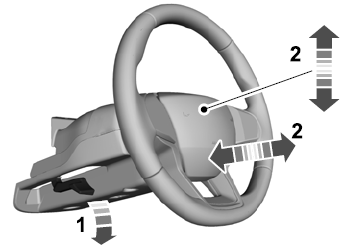
Adjusting the Steering Wheel - Vehicles With: Manual Adjustable Steering Column
WARNING: Do not adjust the steering wheel when your vehicle is moving.
Note: Make sure that you are sitting in the correct position.
Unlock the steering column. Adjust the steering wheel to the desired position.