Lincoln Aviator: Catalytic Converter / On-Board Diagnostics (OBD-II)
Your vehicle has a computer known as the on-board diagnostics system (OBD-II) that monitors the engine’s emission control system. The system protects the environment by making sure that your vehicle continues to meet government emission standards. The OBD-II system also assists a service technician in properly servicing your vehicle.
 When the service engine soon
indicator illuminates, the OBD-II
system has detected a malfunction.
Temporary malfunctions may cause the
service engine soon indicator to illuminate.
Examples are:
When the service engine soon
indicator illuminates, the OBD-II
system has detected a malfunction.
Temporary malfunctions may cause the
service engine soon indicator to illuminate.
Examples are:
- Your vehicle has run out of fuel—the engine may misfire or run poorly.
- Poor fuel quality or water in the fuel—the engine may misfire or run poorly.
- The fuel fill inlet may not have closed properly.
- Driving through deep water—the electrical system may be wet.
You can correct these temporary malfunctions by filling the fuel tank with good quality fuel, properly closing the fuel fill inlet or letting the electrical system dry out. After three driving cycles without these or any other temporary malfunctions present, the service engine soon indicator should stay off the next time you start the engine. A driving cycle consists of a cold engine startup followed by mixed city and highway driving. No additional vehicle service is required.
If the service engine soon indicator remains on, have your vehicle serviced at the first available opportunity. Although some malfunctions detected by the OBD-II may not have symptoms that are apparent, continued driving with the service engine soon indicator on can result in increased emissions, lower fuel economy, reduced engine and transmission smoothness and lead to more costly repairs.
 Catalytic Converter
WARNING: Do not park, idle or drive
your vehicle on dry grass or other dry
ground cover. The emission system heats
up the engine compartment and exhaust
system, creating the risk of fire...
 Readiness for Inspection and Maintenance (I/M) Testing
Some state and provincial and local
governments may have
Inspection/Maintenance (I/M) programs to
inspect the emission control equipment on
your vehicle...
Other information:
Lincoln Aviator 2020-2026 Service Manual: Removal and Installation - Rear Door Upper Moulding
Removal NOTE: Removal steps in this procedure may contain installation details. NOTE: LH side shown, RH side similar. Remove the upper belt moulding screw at front of the door. Torque: 12 lb.in (1.3 Nm) Lift the moulding at the front edge using a non-marring trim tool and slide forward to disengage from the tab at the rear and remove the moulding...
Lincoln Aviator 2020-2026 Owners Manual: Special Notices
New Vehicle Limited Warranty For a detailed description of what is covered by your New Vehicle Limited Warranty, see your warranty guide that is available online. For more information, refer to our website and download your copy of the warranty guide...
Categories
- Manuals Home
- Lincoln Aviator Owners Manual
- Lincoln Aviator Service Manual
- Wireless Accessory Charger (If Equipped)
- Description and Operation - Body and Frame
- Disabling Auto-Start-Stop
- New on site
- Most important about car
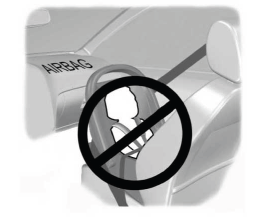
Children and Airbags
WARNING: Airbags can kill or injure a child in a child restraint. Never place a rear-facing child restraint in front of an active airbag. If you must use a forward-facing child restraint in the front seat, move the seat upon which the child restraint is installed all the way back.