
Lincoln Aviator 2020-2026 Service Manual / Electrical / Battery and Charging System / Battery, Mounting and Cables / Removal and Installation - Auxiliary Battery Cable
Lincoln Aviator: Battery, Mounting and Cables / Removal and Installation - Auxiliary Battery Cable
Removal
NOTE: This procedure provides information about routing, retaining points and connectors of the cable. It does not include the steps for removing components to gain access to the cable.
-
Disconnect the batteries.
Refer to: Battery Disconnect and Connect (414-01 Battery, Mounting and Cables, General Procedures).
- Torque: 62 lb.in (7 Nm)
.jpg) |
.jpg) |
.jpg) |
.jpg) |
Installation
-
To install, reverse the removal procedure.
 Removal and Installation - Auxiliary Battery
Removal
NOTE:
Removal steps in this procedure may contain installation details.
Disconnect the batteries.
Refer to: Battery Disconnect and Connect (414-01 Battery, Mounting and Cables, General Procedures)...
 Removal and Installation - Battery
Removal
NOTE:
Removal steps in this procedure may contain installation details.
Disconnect the battery/batteries.
Refer to: Battery Disconnect and Connect (414-01 Battery, Mounting and Cables, General Procedures)...
Other information:
Lincoln Aviator 2020-2026 Service Manual: Removal and Installation - Second Row Single Seat Armrest - Vehicles With: Second Row Captain Chairs
Removal NOTE: Removal steps in this procedure may contain installation details. Unzip the second row single seat armrest cover. Remove the second row single seat armrest. Invert the single seat armrest cover to access the armrest pivot bolt...
Lincoln Aviator 2020-2026 Service Manual: Removal and Installation - B-Pillar and Reinforcement
Special Tool(s) / General Equipment Resistance Spotwelding Equipment Spherical Cutter Hot Air Gun Air Body Saw 8 mm Drill Bit MIG/MAG Welding Equipment Spot Weld Drill Bit Locking Pliers Materials Name Specification Metal Bonding AdhesiveTA-1, TA-1-B, 3M™ 08115, LORD Fusor® 108B - Seam SealerTA-2-B, 3M™ 08308, LORD Fusor® 803DTM - Flexible Foam Repair3M™ 08463, LORD Fusor® 121 - Removal WARNING: Electric vehicles damaged by a crash may have compromised high voltage safety systems and present a potential high voltage electrical shock hazard...
Categories
- Manuals Home
- Lincoln Aviator Owners Manual
- Lincoln Aviator Service Manual
- Changing the Front Wiper Blades - Vehicles With: Heated Wiper Blades
- Keyless Entry
- Garage Door Opener
- New on site
- Most important about car
Locking and Unlocking the Doors from Inside
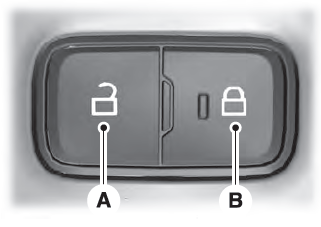
Locking the Doors
Press the lock switch on the door interior trim panel. The doors can no longer be released using the exterior door handle switches and the luggage compartment locks.

Copyright © 2026 www.liaviator2.com