
Lincoln Aviator 2020-2026 Service Manual / Electrical / Electronic Feature Group / Passive Anti-Theft System (PATS) - Vehicles With: Phone as a Key / Removal and Installation - Bluetooth Liftgate Antenna
Lincoln Aviator: Passive Anti-Theft System (PATS) - Vehicles With: Phone as a Key / Removal and Installation - Bluetooth Liftgate Antenna
Special Tool(s) / General Equipment
| Interior Trim Remover |
Removal
-
Remove the liftgate trim panel.
Refer to: Liftgate Trim Panel (501-05 Interior Trim and Ornamentation, Removal and Installation).
-
Remove the bluetooth liftgate antenna.
-
Disconnect the bluetooth liftgate antenna electrical connector.
-
Release the bluetooth liftgate antenna clip.
Use the General Equipment: Interior Trim Remover
-
Disconnect the bluetooth liftgate antenna electrical connector.
.jpg) |
Installation
-
To install, reverse the removal procedure.
-
Using the diagnostic scan tool, carry out the remote function actuator (RFA) module self test.
 Removal and Installation - Bluetooth Front Exterior Antenna
Special Tool(s) /
General Equipment
Interior Trim Remover
Removal
Remove the front bumper cover.
Refer to: Front Bumper Cover (501-19 Bumpers, Removal and Installation)...
 Removal and Installation - Bluetooth Rear Exterior Antenna
Special Tool(s) /
General Equipment
Interior Trim Remover
Removal
NOTE:
Left hand side shown, right hand side similar.
Remove the rear bumper cover...
Other information:
Lincoln Aviator 2020-2026 Owners Manual: Adaptive Headlamps
About Adaptive Headlamps The headlamps are designed to adapt when you are steering around a curve, or if the camera detects lane markings indicating a curve or traffic signs indicating an intersection. The system is designed to operate if all of the following occur: You switch the system on through your vehicle settings...
Lincoln Aviator 2020-2026 Service Manual: Diagnosis and Testing - Leakage Inspection
Leak Check Test With the vehicle in NEUTRAL, position it on a hoist. REFER to: Preliminary Inspection (307-01A Automatic Transmission - 10-Speed Automatic Transmission – 10R60, Diagnosis and Testing). Inspect the gasket and sealing areas for evidence of leakage...
Categories
- Manuals Home
- Lincoln Aviator Owners Manual
- Lincoln Aviator Service Manual
- Anti-Theft Alarm
- Garage Door Opener
- Changing the Front Wiper Blades - Vehicles With: Heated Wiper Blades
- New on site
- Most important about car
Adjusting the Steering Wheel - Vehicles With: Manual Adjustable Steering Column
WARNING: Do not adjust the steering wheel when your vehicle is moving.
Note: Make sure that you are sitting in the correct position.
Unlock the steering column. Adjust the steering wheel to the desired position.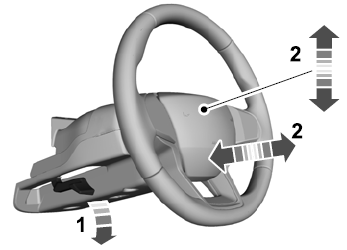

Copyright © 2026 www.liaviator2.com