
Lincoln Aviator 2020-2026 Service Manual / Electrical / Electronic Feature Group / Multifunction Electronic Modules / Removal and Installation - Body Control Module C (BCMC)
Lincoln Aviator: Multifunction Electronic Modules / Removal and Installation - Body Control Module C (BCMC)
Removal
NOTE: Removal steps in this procedure may contain installation details.
-
NOTE: If the BCMC did not respond to the diagnostic scan tool, As-Built Data may need to be entered as part of the repair. This step is only necessary if the BCMC is being replaced.
Using a diagnostic scan tool, begin the PMI process for the BCMC following the on-screen instructions.
-
Disconnect the battery.
Refer to: Battery Disconnect and Connect (414-01 Battery, Mounting and Cables, General Procedures).
-
Release the tabs and remove the BCMC compartment cover.
.jpg) |
-
Release the tabs and remove the BCMC access cover.
.jpg) |
-
-
Remove the wire terminal nut and position aside the wire.
Torque: 106 lb.in (12 Nm)
-
Fully loosen the BCMC bolts.
Torque: 48 lb.in (5.4 Nm)
-
Remove the wire terminal nut and position aside the wire.
.jpg) |
-
Release the tabs and remove the BCMC.
.jpg) |
Installation
-
To install, reverse the removal procedure.
-
NOTE: Carry out this step only if the BCMC is being replaced.
Using a diagnostic scan tool, complete the PMI process for the BCMC following the on-screen instructions.
 Removal and Installation - Body Control Module (BCM)
Removal
NOTE:
Removal steps in this procedure may contain installation details.
If installing a new BCM, connect a battery charger to the battery to make sure it is charged to maintain proper battery voltage...
 Removal and Installation - Driver Door Module (DDM)
Removal
NOTE:
Removal steps in this procedure may contain installation details.
NOTE:
If installing a new module, it is necessary to
upload the module configuration information to the diagnostic scan tool
prior to removing the module...
Other information:
Lincoln Aviator 2020-2026 Service Manual: Removal and Installation - Front Door Glass Run and Bracket
Removal NOTE: LH (left-hand) side shown, RH (right-hand) side similar. NOTE: Removal steps in this procedure may contain installation details. Aft front door glass run and bracket Remove the front door window regulator and motor...
Lincoln Aviator 2020-2026 Service Manual: Description and Operation - Power Brake System - System Operation and Component Description
System Operation System Diagram - Electric Brake Boost E347819 *.sttxt { visibility: hidden; } *.stcallout { visibility: visible; } HS-CAN3 HS-CAN1 HS-CAN2 1 IPC 2 RCM 3 BCM 4 PCM 5 GWM 6 ABS/EBB 7 Wheel speed sensors 8 Brake pedal Item Description 1 IPC 2 RCM 3 BCM 4 PCM 5 GWM 6 ABS/ EBB 7 Wheel speed sensors 8 Brake pedal Network Message Chart Module Network Input Messages - ABS Module Broadcast Message Originating Module Message Purpose Accelerator pedal position PCM This message is first sent to the GWM and then to the ABS module...
Categories
- Manuals Home
- Lincoln Aviator Owners Manual
- Lincoln Aviator Service Manual
- Keyless Entry
- Interior Lamps
- Child Safety Locks
- New on site
- Most important about car
Child Safety Locks
When the child safety locks are set, you cannot open the rear doors from the inside.
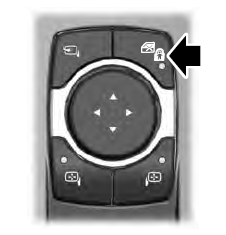
The child safety lock control is on the driver door.
Press the control to switch the child safety locks on. Press the control again to switch them off. A light on the child safety control illuminates when you switch them on.

Copyright © 2026 www.liaviator2.com