
Lincoln Aviator 2020-2026 Service Manual / Electrical / Electronic Feature Group / Multifunction Electronic Modules / Removal and Installation - Driver Door Module (DDM)
Lincoln Aviator: Multifunction Electronic Modules / Removal and Installation - Driver Door Module (DDM)
Removal
NOTE: Removal steps in this procedure may contain installation details.
-
NOTE: If installing a new module, it is necessary to upload the module configuration information to the diagnostic scan tool prior to removing the module. This information must be downloaded into the new module after installation.
Carry out the PMI procedure for the DDM.
Refer to: Module Configuration - System Operation and Component Description (418-01 Module Configuration, Description and Operation).
-
Remove the front door trim panel.
Refer to: Front Door Trim Panel (501-05 Interior Trim and Ornamentation, Removal and Installation).
-
Remove the bolts and the DDM.
-
Disconnect the elecrical connectors.
-
Disconnect the elecrical connectors.
.jpg) |
Installation
-
To install, reverse the removal procedure.
-
Using the previous diagnostic scan tool session, carry out the PMI procedure for the DDM.
Refer to: Module Configuration - System Operation and Component Description (418-01 Module Configuration, Description and Operation).
-
If installing a new module, carry out the power door
window initialization on the drivers side front door and rear door
windows.
Refer to: Power Door Window Initialization (501-11 Glass, Frames and Mechanisms, General Procedures).
 Removal and Installation - Body Control Module C (BCMC)
Removal
NOTE:
Removal steps in this procedure may contain installation details.
NOTE:
If the BCMC
did not respond to the diagnostic scan tool, As-Built Data may need to
be entered as part of the repair...
 Removal and Installation - Passenger Door Module (PDM)
Removal
NOTE:
Removal steps in this procedure may contain installation details.
NOTE:
If installing a new module, it is necessary to
upload the module configuration information to the diagnostic scan tool
prior to removing the module...
Other information:
Lincoln Aviator 2020-2026 Owners Manual: Creating a Vehicle Wi-Fi Hotspot
You can create a Wi-Fi hotspot in your vehicle and allow devices to connect to it for access to the Internet. Select the settings option on the feature bar. Press Lincoln Connect. Press Vehicle Hotspot.Note: The vehicle hotspot default setting is on...
Lincoln Aviator 2020-2026 Service Manual: Removal and Installation - Air Distribution Door Actuator
Removal Fully lower the glove compartment. Disconnect the check strap. Push the stop tabs inward. Remove the screws and the air distribution door actuator. Disconnect the electrical connector...
Categories
- Manuals Home
- Lincoln Aviator Owners Manual
- Lincoln Aviator Service Manual
- Tire Change Procedure
- Keyless Entry
- Disabling Auto-Start-Stop
- New on site
- Most important about car
Remote Control
Passive Key
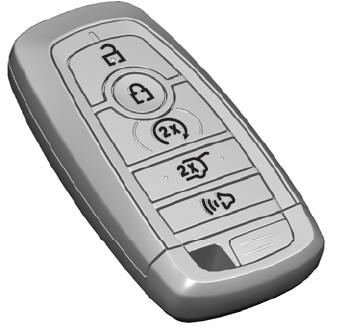
The passive key operates the power locks and the remote start system. The passive key must be in your vehicle to use the push button start.
Note: You may not be able to shift out of park (P) unless the passive key is inside your vehicle.

Copyright © 2026 www.liaviator2.com