
Lincoln Aviator 2020-2026 Service Manual / Body and Paint / Body and Paint / Exterior Trim and Ornamentation / Removal and Installation - Rear Door Moulding
Lincoln Aviator: Exterior Trim and Ornamentation / Removal and Installation - Rear Door Moulding
Removal
NOTE: Removal steps in this procedure may contain installation details.
NOTE: LH side door shown, RH side door similar.
-
NOTE: Do not use excessive force when removing retainers, to avoid damage to moulding.
Using a non-marring trim tool, disengage the moulding retainers attaching the moulding to the door.
.jpg) |
-
Remove the moulding.
.jpg) |
Installation
-
To install, reverse the removal procedure.

 Removal and Installation - Rear Door Upper Moulding
Removal
NOTE:
Removal steps in this procedure may contain installation details.
NOTE:
LH side shown, RH side similar.
Remove the upper belt moulding screw at front of the door...
Other information:
Lincoln Aviator 2020-2026 Owners Manual: Child Restraint and Seatbelt Maintenance
Inspect the vehicle seatbelts and child safety seat systems periodically to make sure they work properly and are not damaged. Inspect the vehicle and child restraint seatbelts to make sure there are no nicks, tears or cuts. Replace if necessary. All vehicle seatbelt assemblies, including retractors, buckles, front seatbelt buckle assemblies, buckle support assemblies (slide bar-if equipped), shoulder belt height adjusters (if equipped), shoulder belt guide on seat backrest (if equipped), child safety seat LATCH and tether anchors, and attaching hardware, should be inspected after a crash...
Lincoln Aviator 2020-2026 Owners Manual: Switching Automatic High Beam Control On and Off
WARNING: Do not use the system in poor visibility, for example fog, heavy rain, spray or snow. Press Settings on the touchscreen. Press Vehicle. Press Lighting. Activating the Automatic High Beam Control Switch the lighting control to the autolamps position...
Categories
- Manuals Home
- Lincoln Aviator Owners Manual
- Lincoln Aviator Service Manual
- Disabling Auto-Start-Stop
- Interior Lamps
- USB Port and Power Point Locations
- New on site
- Most important about car
Child Safety Locks
When the child safety locks are set, you cannot open the rear doors from the inside.
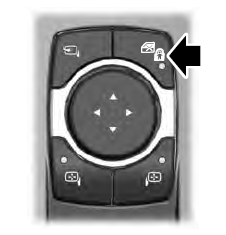
The child safety lock control is on the driver door.
Press the control to switch the child safety locks on. Press the control again to switch them off. A light on the child safety control illuminates when you switch them on.

Copyright © 2026 www.liaviator2.com