
Lincoln Aviator: Steering Column / Removal and Installation - Steering Wheel - Vehicles With: Adaptive Steering
Removal
NOTE: Removal steps in this procedure may contain installation details.
NOTE: Make sure the road wheels are in the straight ahead position, regardless of steering wheel position.
-
NOTE: This step is only necessary when installing a new component.
NOTE: The PMI process must begin with the current SECM installed. If the current SECM does not respond to the diagnostic scan tool, the tool may prompt for As-Built Data as part of the repair.
Using a diagnostic scan tool, begin the PMI process for the SECM following the on-screen instructions.
-
NOTE: This step is only necessary when installing a new component.
NOTE: The PMI process must begin with the current SIMA installed. If the current SIMA does not respond to the diagnostic scan tool, the tool may prompt for As-Built Data as part of the repair.
Using a diagnostic scan tool, begin the PMI process for the SIMA following the on-screen instructions.
-
Remove the driver airbag.
Refer to: Driver Airbag (501-20B Supplemental Restraint System, Removal and Installation).
-
Remove the steering column shrouds.
Refer to: Steering Column Shrouds (501-05 Interior Trim and Ornamentation, Removal and Installation).
-
Disconnect the clockspring electrical connectors.
.jpg) |
-
Remove and discard the bolt and remove the steering wheel.
Torque: 35 lb.ft (48 Nm)
.jpg) |
Installation
-
To install, reverse the removal procedure.
-
NOTE: This step is only necessary when installing a new component.
Using a diagnostic scan tool, complete the PMI process for the SIMA following the on-screen instructions.
-
NOTE: This step is only necessary when installing a new component.
Using a diagnostic scan tool, complete the PMI process for the SECM following the on-screen instructions and INSTALL as-built data from PTS for the SASM, following the diagnostic scan tool instructions under Module Programming>As-Built.
-
NOTE: This step is only necessary when installing a new component.
Using a diagnostic scan tool, complete the following service routines in the order shown, following the on-screen instructions.
-
Steering Wheel Angle Trim.
-
Steering Motor Angle Trim.
-
Steering Wheel Angle Trim.
-
Check and if necessary adjust front toe.
Refer to: Front Toe Adjustment - Vehicles With: Adaptive Steering (204-00 Suspension System - General Information, General Procedures).
 Removal and Installation - Steering Wheel
Removal
NOTE:
Removal steps in this procedure may contain installation details.
NOTE:
Make sure the steering wheel and the road wheels are in the straight ahead position...

Other information:
Lincoln Aviator 2020-2026 Service Manual: Diagnosis and Testing - Body Closures
Diagnostic Trouble Code (DTC) Chart Diagnostics in this manual assume a certain skill level and knowledge of Ford-specific diagnostic practices. REFER to: Diagnostic Methods (100-00 General Information, Description and Operation). Diagnostic Trouble Code Chart Module DTC Description Action BCM B11C4:23 Boot/Trunk Close Button: Signal Stuck Low GO to Pinpoint Test C BCM B1219:11 Interior Boot/Trunk Release Switch: Circuit Short To Ground GO to Pinpoint Test C BCM B12E8:23 Liftgate/Tailgate Control/Release Switch: Signal Stuck Low GO to Pinpoint Test C BCM B144C:23 Tailgate/Liftgate/Boot/Trunk Outer Handle Switch: Signal Stuck Low GO to Pinpoint Test C BCM B1495:11 Hands Free Liftgate/Decklid Input Sensor: Circuit Short To Ground GO to Pinpoint Test J BCM B1495:49 Hands Free Liftgate/Decklid Input Sensor:Internal Electronic Failure GO to Pinpoint Test J BCM B1495:55 Hands Free Liftgate/Decklid Input Sensor:Not Configured GO to Pinpoint Test P RGTM B12E8:11 Liftgate/Tailgate Control/Release Switch:Circuit Short To Ground GO to Pinpoint Test C RGTM B144D:29 Tailgate/Liftgate/Boot/Trunk Position Sensor 1: Signal Invalid GO to Pinpoint Test B RGTM B144E:29 Tailgate/Liftgate/Boot/Trunk Position Sensor 2: Signal Invalid GO to Pinpoint Test B RGTM B144F:11 Tailgate/Liftgate/Boot/Trunk Driver Motor: Circuit Short To Ground GO to Pinpoint Test B RGTM B144F:12 Tailgate/Liftgate/Boot/Trunk Driver Motor: Circuit Short To Battery GO to Pinpoint Test B RGTM B144F:13 Tailgate/Liftgate/Boot/Trunk Driver Motor: Circuit Open GO to Pinpoint Test B RGTM B144F:79 Tailgate/Liftgate/Boot/Trunk Driver Motor: Mechanical Linkage Failure GO to Pinpoint Test B RGTM B1451:29 Tailgate/Liftgate/Boot/Trunk Latch Centering Position Switch: Signal Invalid GO to Pinpoint Test D RGTM B1452:11 Tailgate/Liftgate/Boot/Trunk Latch Release Actuator: Circuit Short To Ground GO to Pinpoint Test A RGTM B1452:13 Tailgate/Liftgate/Boot/Trunk Latch Release Actuator: Circuit Open GO to Pinpoint Test A RGTM B1453:29 Tailgate/Liftgate/Boot/Trunk Latch Position Switch: Signal Invalid GO to Pinpoint Test D RGTM B1454:11 Tailgate/Liftgate/Boot/Trunk Left Pinch Strip: Circuit Short To Ground GO to Pinpoint Test G RGTM B1454:13 Tailgate/Liftgate/Boot/Trunk Left Pinch Strip: Circuit Open GO to Pinpoint Test G RGTM B1455:11 Tailgate/Liftgate/Boot/Trunk Right Pinch Strip: Circuit Short To Ground GO to Pinpoint Test G RGTM B1455:13 Tailgate/Liftgate/Boot/Trunk Right Pinch Strip: Circuit Open GO to Pinpoint Test G RGTM B145D:11 Tailgate/Liftgate/Boot/Trunk Power Cinch Striker Motor: Circuit Short To Ground GO to Pinpoint Test D RGTM B145D:12 Tailgate/Liftgate/Boot/Trunk Power Cinch Striker Motor: Circuit Short To Battery GO to Pinpoint Test D RGTM B145D:13 Tailgate/Liftgate/Boot/Trunk Power Cinch Striker Motor: Circuit Open GO to Pinpoint Test D RGTM B1495:02 Hands Free Liftgate/Decklid Input Sensor:General Signal Failure GO to Pinpoint Test J RGTM B1495:08 Hands Free Liftgate/Decklid Input Sensor:Bus Signal/Message Failures GO to Pinpoint Test J RGTM B1515:77 Tailgate/Liftgate/Boot/Trunk:Commanded Position Not Reachable GO to Pinpoint Test B RGTM B1515:97 Tailgate/Liftgate/Boot/Trunk:Component Or System Operation Obstructed Or Blocked GO to Pinpoint Test B RGTM B1555:29 Tailgate/Liftgate/Boot/Trunk Position Sensor 4: Signal Invalid GO to Pinpoint Test B RGTM B1556:29 Tailgate/Liftgate/Boot/Trunk Position Sensor 3: Signal Invalid GO to Pinpoint Test B RGTM B1557:11 Power Liftgate/Decklid Driver Motor 2: Circuit Short To Ground GO to Pinpoint Test B RGTM B1557:12 Power Liftgate/Decklid Driver Motor 2: Circuit Short To Battery GO to Pinpoint Test B RGTM B1557:13 Power Liftgate/Decklid Driver Motor 2: Circuit Open GO to Pinpoint Test B RGTM C1B14:11 Sensor Supply Voltage A: Circuit Short To Ground GO to Pinpoint Test B RGTM C1B15:11 Sensor Supply Voltage B:Circuit Short To Ground GO to Pinpoint Test B RGTM P0A2F:4B Drive Motor "A" Over Temperature:Over Temperature GO to Pinpoint Test B RGTM P0A35:4B Drive Motor "B" Over Temperature:Over Temperature GO to Pinpoint Test B RGTM U0101:87 Lost Communication with TCM: Missing Message GO to Pinpoint Test K RGTM U0140:87 Lost Communication With Body Control Module: Missing Message GO to Pinpoint Test L RGTM U0294:87 Lost Communication With Powertrain Control Monitor Module: Missing Message GO to Pinpoint Test M RGTM U201A:55 Control Module Main Calibration Data:Not Configured GO to Pinpoint Test Q RGTM U2300:56 Central Configuration:Invalid/Incompatible Configuration GO to Pinpoint Test Q RGTM U3000:49 Control Module:Internal Electronic Failure GO to Pinpoint Test Q RGTM U3003:16 Battery Voltage: Circuit Voltage Below Threshold GO to Pinpoint Test N RGTM U3003:17 Battery Voltage: Circuit Voltage Above Threshold GO to Pinpoint Test O Symptom Chart Symptom Chart: Power Liftgate Diagnostics in this manual assume a certain skill level and knowledge of Ford-specific diagnostic practices...
Lincoln Aviator 2020-2026 Service Manual: General Procedures - Washer Hose Repair
Repair NOTE: This procedure may be carried out on rubber hoses only. If a plastic washer hose is damaged, a new washer hose must be installed. Locate and verify the damaged washer hose. Cut the hose cleanly and remove the damaged portion of the washer hose...
Categories
- Manuals Home
- Lincoln Aviator Owners Manual
- Lincoln Aviator Service Manual
- USB Port and Power Point Locations
- Drive Modes
- Keyless Entry
- New on site
- Most important about car
Child Safety Locks
When the child safety locks are set, you cannot open the rear doors from the inside.
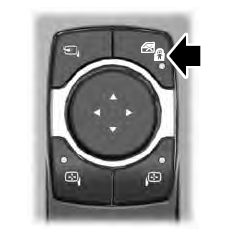
The child safety lock control is on the driver door.
Press the control to switch the child safety locks on. Press the control again to switch them off. A light on the child safety control illuminates when you switch them on.
