
Lincoln Aviator: Steering Column / Removal and Installation - Steering Wheel
Removal
NOTE: Removal steps in this procedure may contain installation details.
NOTE: Make sure the steering wheel and the road wheels are in the straight ahead position.
NOTE: Vehicle with heated steering wheel shown others similar.
-
NOTE: This step is only necessary when installing a new component.
NOTE: The PMI process must begin with the current SIMA installed. If the current SIMA does not respond to the diagnostic scan tool, the tool may prompt for As-Built Data as part of the repair.
Using a diagnostic scan tool, begin the PMI process for the SIMA following the on-screen instructions.
-
Remove the driver airbag.
Refer to: Driver Airbag (501-20B Supplemental Restraint System, Removal and Installation).
-
-
Disconnect the steering wheel electrical connector.
-
Remove and discard the steering wheel bolt and remove the steering wheel.
Torque: 35 lb.ft (48 Nm)
-
Disconnect the steering wheel electrical connector.
.jpg) |
-
NOTE: Make sure the clockspring rotor does not rotate.
NOTE: Make sure the clockspring pins are not bent or damaged.
Tape the clockspring rotor to the outer housing to keep it from rotating.
.jpg) |
Installation
-
To install, reverse the removal procedure.
-
NOTE: This step is only necessary when installing a new component.
Using a diagnostic scan tool, complete the PMI process for the SIMA following the on-screen instructions.
 Removal and Installation - Steering Column Upper Shaft
Removal
NOTE:
Removal steps in this procedure may contain installation details.
Remove the steering column.
Refer to: Steering Column (211-04 Steering Column, Removal and Installation)...
 Removal and Installation - Steering Wheel - Vehicles With: Adaptive Steering
Removal
NOTE:
Removal steps in this procedure may contain installation details.
NOTE:
Make sure the road wheels are in the straight ahead position, regardless of steering wheel position...
Other information:
Lincoln Aviator 2020-2026 Owners Manual: Obstacle Detection and Switching the Power Liftgate On or Off
Obstacle Detection Note: Entering your vehicle while the liftgate is closing can cause your vehicle to bounce and activate obstacle detection. To prevent this, let the power liftgate close completely before you enter your vehicle. Before driving off, check the instrument cluster for a liftgate or door ajar message or warning indicator...
Lincoln Aviator 2020-2026 Service Manual: Diagnosis and Testing - Engine Cooling
Special Tool(s) Coolant/Battery RefractometerROB75240 or equivalent D-Gas Adapter300-OTC014-R1068 or equivalent Radiator Tester014-R1072 or equivalent UView® Combustion Leak TesterUVU560000-R Diagnostic Trouble Code (DTC) Chart WARNING: Before beginning any service procedure in this section, refer to Safety Warnings in section 100-00 General Information...
Categories
- Manuals Home
- Lincoln Aviator Owners Manual
- Lincoln Aviator Service Manual
- Description and Operation - Body and Frame
- Anti-Theft Alarm
- Disabling Auto-Start-Stop
- New on site
- Most important about car
Locking and Unlocking the Doors from Inside
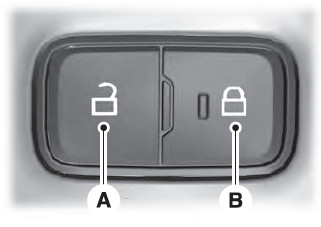
Locking the Doors
Press the lock switch on the door interior trim panel. The doors can no longer be released using the exterior door handle switches and the luggage compartment locks.
