
Lincoln Aviator 2020-2026 Service Manual / Powertrain / Automatic Transmission / Automatic Transmission - 10-Speed Automatic Transmission – 10R60 / Removal and Installation - Transmission Fluid Temperature (TFT) Sensor
Lincoln Aviator: Automatic Transmission - 10-Speed Automatic Transmission – 10R60 / Removal and Installation - Transmission Fluid Temperature (TFT) Sensor
Removal
-
Remove the main control valve body.
Refer to: Main Control Valve Body (307-01A Automatic Transmission - 10-Speed Automatic Transmission – 10R60, Removal and Installation).
-
Disconnect the TFT sensor.
-
Slide the plastic lock to the unlocked position.
While pressing the plastic tab, disconnect the electrical connector.
-
Slide the plastic lock to the unlocked position.
While pressing the plastic tab, disconnect the electrical connector.
.jpg) |
-
Remove the TFT sensor.
-
Lift plastic tab.
-
Rotate the TFT sensor clockwise.
-
Remove the TFT sensor.
-
Lift plastic tab.
.jpg) |
Installation
-
Install the TFT sensor.
-
Position the TFT sensor in the main control valve body.
-
Rotate the TFT sensor counter clockwise until the plastic tab locks into place.
-
Position the TFT sensor in the main control valve body.
.jpg) |
-
Connect the TFT sensor.
-
Slide the plastic lock to the locked position.
-
Slide the plastic lock to the locked position.
.jpg) |
-
Install the main control valve body.
Refer to: Main Control Valve Body (307-01A Automatic Transmission - 10-Speed Automatic Transmission – 10R60, Removal and Installation).
 Removal and Installation - Transmission Fluid Pump Idler Gear
Special Tool(s) /
General Equipment
205-1018Installation Tube
307-003
(T57L-500-B)
Holding Fixture, Transmission
307-091Handle, Torque ConverterTKIT-2009TC-F
307-346
(T97T-7902-A)
Retainer, Torque ConverterTKIT-1998-LM (NavigatoR)TKIT-1997-F/FLM/LT
307-736Installer, Pump Drive Gear Bearing
307-737Press Tool, Oil Pump Drive Idler Gear
307-743Remover, Pump Drive Gear
307-780Converter Seal installer
307-803F1 Seal Guide, Installer & Sizer
Hydraulic Press
Removal
To remove the transmission assembly...
 Removal and Installation - Transmission Internal Wiring Harness
Special Tool(s) /
General Equipment
307-625Fixture, Bench MountingTKIT-2008ET-FLMTKIT-2008ET-ROW
307-746Remover, Transmission Wiring Harness Connector
Transmission Jack
Vehicle/Axle Stands
Wooden Block
Materials
Name
Specification
Motorcraft® MERCON® ULV Automatic Transmission FluidXT-12-QULV
WSS-M2C949-A, MERCON® ULV
Removal
NOTE:
If removing the main control valve body harness only it is
not necessary to remove the transmission case harness, refer to the Main
Control Valve Body Harness steps...
Other information:
Lincoln Aviator 2020-2026 Service Manual: Diagnosis and Testing - Instrument Panel and Interior Switches Illumination
Diagnostic Trouble Code (DTC) Chart Diagnostics in this manual assume a certain skill level and knowledge of Ford-specific diagnostic practices. REFER to: Diagnostic Methods (100-00 General Information, Description and Operation). Diagnostic Trouble Code Chart Module DTC Description Action BCM B1314:11 White Lighting (Reflective Controls) Illumination Output: Circuit Short To Ground GO to Pinpoint Test I BCM B1314:15 White Lighting (Reflective Controls) Illumination Output: Circuit Short To Battery or Open GO to Pinpoint Test I BCM B1315:11 Backlighting (Non Reflective Controls) Illumination Output: Circuit Short To Ground GO to Pinpoint Test C BCM B1315:15 Backlighting (Non Reflective Controls) Illumination Output: Circuit Short To Battery or Open GO to Pinpoint Test C DCME B1170:11 Back Light: Circuit Short To Ground GO to Pinpoint Test J DCMF B1170:11 Back Light: Circuit Short To Ground GO to Pinpoint Test J DCMG B1170:11 Back Light: Circuit Short To Ground GO to Pinpoint Test J DCMH B1170:11 Back Light: Circuit Short To Ground GO to Pinpoint Test J DDM B12FF:11 Rear Door Switch Illumination: Circuit Short To Ground GO to Pinpoint Test G DDM B12FF:15 Rear Door Switch Illumination: Circuit Short To Battery or Open GO to Pinpoint Test G DDM U2010:11 Switch Illumination: Circuit Short to Ground GO to Pinpoint Test E DDM U2010:15 Switch Illumination: Circuit Short To Battery or Open GO to Pinpoint Test E PDM B12FF:11 Rear Door Switch Illumination: Circuit Short To Ground GO to Pinpoint Test H PDM B12FF:15 Rear Door Switch Illumination: Circuit Short To Battery or Open GO to Pinpoint Test H PDM U2010:11 Switch Illumination: Circuit Short to Ground GO to Pinpoint Test F PDM U2010:15 Switch Illumination: Circuit Short To Battery or Open GO to Pinpoint Test F Symptom Chart Diagnostics in this manual assume a certain skill level and knowledge of Ford-specific diagnostic practices...
Lincoln Aviator 2020-2026 Owners Manual: Automatic Engine Shutdown
This feature shuts down the engine if it has been idling for an extended period. The ignition also turns off in order to save battery power. Before your vehicle shuts down, a message appears in the information display showing a timer counting down from 30 seconds...
Categories
- Manuals Home
- Lincoln Aviator Owners Manual
- Lincoln Aviator Service Manual
- Locking and Unlocking
- Configuring The Head Up Display
- Garage Door Opener
- New on site
- Most important about car
Child Safety Locks
When the child safety locks are set, you cannot open the rear doors from the inside.
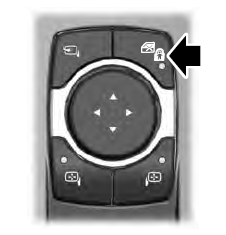
The child safety lock control is on the driver door.
Press the control to switch the child safety locks on. Press the control again to switch them off. A light on the child safety control illuminates when you switch them on.

Copyright © 2026 www.liaviator2.com