
Lincoln Aviator 2020-2026 Service Manual / Body and Paint / Body and Paint / Wipers and Washers / Removal and Installation - Windshield Wiper Motor
Lincoln Aviator: Wipers and Washers / Removal and Installation - Windshield Wiper Motor
Removal
NOTE: Removal steps in this procedure may contain installation details.
-
Remove the wiper linkage assembly.
Refer to: Wiper Linkage Assembly (501-16 Wipers and Washers, Removal and Installation).
-
NOTICE: Be careful not to damage the link seals during removal. Failure to follow this instruction may result in poor windshield wiper performance.
Position the windshield wiper links.-
Detach the RH windshield wiper link from the windshield wiper motor crank.
-
Position the link aside.
-
Detach the LH windshield wiper link from the windshield wiper motor crank.
-
Position the link aside.
-
Detach the RH windshield wiper link from the windshield wiper motor crank.
.jpg) |
-
NOTE: Note the position of the component before moving.
Rotate the windshield wiper motor crank to gain access to all of the windshield wiper motor mounting screws.
.jpg) |
-
Remove the wiper motor screws and the wiper motor.
.jpg) |
Installation
-
Position the windshield wiper motor and install the windshield wiper motor mounting screws.
Torque: 102 lb.in (11.5 Nm)
|
-
Rotate the windshield wiper motor crank to the park position.
.jpg) |
-
Clean and inspect the components before assembly.
-
Remove all old grease and inspect for damage.
-
Remove all old grease and inspect for damage.
.jpg) |
-
Apply supplied grease to the ball cap and the grease cover.
.jpg) |
-
Attach the windshield wiper links.
-
Position the LH link.
-
Attach the LH windshield wiper link to the windshield wiper motor crank.
-
Position the RH link.
-
Attach the RH windshield wiper link to the windshield wiper motor crank.
-
Position the LH link.
.jpg) |
-
Install the wiper linkage assembly.
Refer to: Wiper Linkage Assembly (501-16 Wipers and Washers, Removal and Installation).
 Removal and Installation - Windshield Wiper Blade Insert
Special Tool(s) /
General Equipment
Flat Headed Screw Driver
Removal
NOTE:
Left hand side (LH) shown, right hand side (RH) similar.
Lift the windshield wiper blade and arm assembly off of the windshield...
 Removal and Installation - Windshield Wiper Pivot Arm
Special Tool(s) /
General Equipment
Two Leg Puller
Removal
NOTE:
RH shown, LH similar.
NOTE:
The hood is removed in this step for clarity...
Other information:
Lincoln Aviator 2020-2026 Service Manual: Description and Operation - Airbag and Seatbelt Pretensioner Supplemental Restraint System (SRS) - Component Location
..
Lincoln Aviator 2020-2026 Owners Manual: Driving on Snow and Ice
WARNING: If you are driving in slippery conditions that require tire chains or cables, then it is critical that you drive cautiously. Keep speeds down, allow for longer stopping distances and avoid aggressive steering to reduce the chances of a loss of vehicle control which can lead to serious injury or death...
Categories
- Manuals Home
- Lincoln Aviator Owners Manual
- Lincoln Aviator Service Manual
- Body and Paint
- Locking and Unlocking
- Configuring The Head Up Display
- New on site
- Most important about car
Locking and Unlocking the Doors from Inside
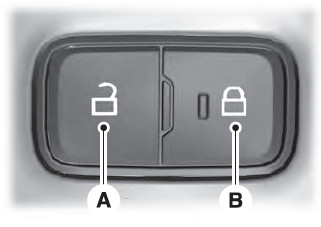
Locking the Doors
Press the lock switch on the door interior trim panel. The doors can no longer be released using the exterior door handle switches and the luggage compartment locks.

Copyright © 2026 www.liaviator2.com