
Lincoln Aviator 2020-2026 Service Manual / Powertrain / Automatic Transmission / Transfer Case / Removal - Transfer Case
Lincoln Aviator: Transfer Case / Removal - Transfer Case
-
With the vehicle in NEUTRAL, position it on a hoist.
Refer to: Jacking and Lifting (100-02 Jacking and Lifting, Description and Operation).
-
If equipped, remove the transfer case heat shield.
.jpg) |
-
NOTE: Take extra care not to damage the component.
Position aside and support the rear driveshaft.
-
Mark the driveshaft flex coupling to the transfer case flange.
-
Remove and discard the driveshaft flex coupling to transfer case flange bolts.
-
Mark the driveshaft flex coupling to the transfer case flange.
.jpg) |
-
Remove the transmission support insulator.
Refer to: Transmission Support Insulator (307-01A Automatic Transmission - 10-Speed Automatic Transmission – 10R60, Removal and Installation).
Refer to: Transmission Support Insulator (307-01B Automatic Transmission - 10-Speed Automatic Transmission – 10R80 MHT, Removal and Installation).
-
NOTICE: Make sure that the vent hose/valve is not blocked.
Detach the transfer case vent hose and position aside.
.jpg) |
-
Disconnect the transfer case wiring connector.
.jpg) |
-
Remove and discard the transfer case mounting bolts.
.jpg) |
-
Remove and discard the transfer case mounting bolts.
.jpg) |
-
Disconnect the transfer case from the transmission output
shaft and the driveshaft. Remove the transfer case from the vehicle.
.jpg) |
-
Remove and Install a new front driveshaft slip yoke boot.
Refer to: Front Driveshaft Slip Yoke Boot (205-01 Driveshaft, Removal and Installation).
 Removal and Installation - Transfer Case Rear Seal
Special Tool(s) /
General Equipment
205-072Universal Flange Holding Wrench
205-1018Installation Tube
205-1067Installer, Output Shaft AWD
205-D027
(D80L-1013-A)
2 or 3 Jaw Puller
Removal
With the vehicle in NEUTRAL, position it on a hoist...
 Installation - Transfer Case
Materials
Name
Specification
Motorcraft® High Temperature 4x4 Front Axle and Wheel Bearing GreaseXG-11
WSS-M1C267-A1
NOTICE:
Do not over-lubricate the driveshaft components...
Other information:
Lincoln Aviator 2020-2026 Service Manual: General Procedures - Cylinder Bore Taper
Check NOTE: Refer to the appropriate Section 303-01 for the specification. Measure the cylinder bore at the top, middle and bottom of piston ring travel in 2 directions as indicated. Verify the cylinder bore is within the wear limit. The difference indicates the cylinder bore taper...
Lincoln Aviator 2020-2026 Service Manual: Removal and Installation - Generator Current Sensor
Removal NOTE: Removal steps in this procedure may contain installation details. Disconnect the battery/batteries. Refer to: Battery Disconnect and Connect (414-01 Battery, Mounting and Cables, General Procedures). Release the tabs and remove the BJB cover...
Categories
- Manuals Home
- Lincoln Aviator Owners Manual
- Lincoln Aviator Service Manual
- Changing the Front Wiper Blades - Vehicles With: Heated Wiper Blades
- Locking and Unlocking
- Disabling Auto-Start-Stop
- New on site
- Most important about car
Adjusting the Steering Wheel - Vehicles With: Manual Adjustable Steering Column
WARNING: Do not adjust the steering wheel when your vehicle is moving.
Note: Make sure that you are sitting in the correct position.
Unlock the steering column. Adjust the steering wheel to the desired position.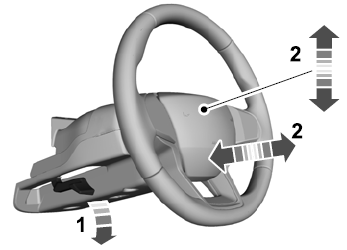

Copyright © 2026 www.liaviator2.com