Lincoln Aviator: Charging the High Voltage Battery - Plug-In Hybrid Electric Vehicle (PHEV) / RISK OF FIRE or ELECTRIC SHOCK
WARNING: The AC wall plug must fit firmly into the AC outlet. If the connection feels loose, worn or the AC outlet is damaged, please have a qualified electrician replace the AC outlet. Using a convenience cord with a worn outlet may cause burns, property damage and increase the risk of electric shock or fire.
WARNING: Do not use the 120 V convenience cord with an extension cord, two-prong adapter, surge protector, timer or other adapter. Failure to follow this instruction could result in electric shock or fire.
WARNING: Do not allow charging equipment to be immersed in water or liquids. Failure to follow this warning could result in fire, electric shock, or serious personal injury or death.
WARNING: Do not attempt to open the charging equipment. Failure to follow this instruction could result in personal injury, fire, electric shock, death or property damage.
WARNING: Do not use the charging equipment if it is faulty or has been damaged. Failure to follow this instruction could result in personal injury, fire, electric shock, death or property damage.
WARNING: You risk death, fire, or serious injury to yourself and others if you do not follow the instruction highlighted by the warning symbol.
WARNING: Install charging equipment in compliance with local regulations. Failure to follow this warning could result in fire, electric shock, serious personal injury or death.
WARNING: Do not use an ungrounded wall outlet. If you suspect that the wall outlet is not properly grounded, have a qualified electrician inspect the wall outlet. Failure to follow this instruction could result in personal injury, fire, electric shock, or death.
WARNING: Do not modify the convenience cord plug. If the convenience cord plug does not properly fit into the wall outlet, have a qualified electrician install the correct wall outlet. Failure to follow this instruction could result in personal injury, fire, electric shock, or death.
 Charging the High Voltage Battery - Plug-In Hybrid Electric Vehicle (PHEV)
IMPORTANT SAFETY INSTRUCTIONS
WARNING: In Canada, do not use
the 120 volt convenience cord in
commercial garages.
WARNING: This equipment has
arcing or sparking parts...
 OPERATION INSTRUCTIONS
Read all the instructions before using this
product.
Supervise this device when in use around
children.
Do not put fingers into the electric vehicle
connector...
Other information:
Lincoln Aviator 2020-2026 Owners Manual: Power Liftgate
WARNING: It is extremely dangerous to ride in a cargo area, inside or outside of a vehicle. In a crash, people riding in these areas are more likely to be seriously injured or killed. Do not allow people to ride in any area of your vehicle that is not equipped with seats and seatbelts...
Lincoln Aviator 2020-2026 Service Manual: General Procedures - Refrigerant Oil Adding - Vehicles With: R134A Refrigerant
Special Tool(s) / General Equipment Air Conditioning Service Unit Refrigerant Oil Injector Set Filling Adjust the oil injector piston and fill the oil injector with the correct amount of clean, new Motorcraft® PAG Refrigerant Compressor Oil (YN-12-D)...
Categories
- Manuals Home
- Lincoln Aviator Owners Manual
- Lincoln Aviator Service Manual
- Remove and Reinstall the Battery
- Description and Operation - Jacking and Lifting
- Garage Door Opener
- New on site
- Most important about car
Fastening the Seatbelts
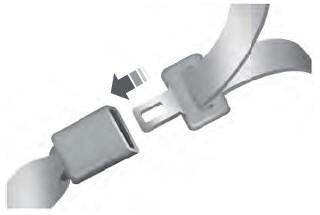
The front outboard and rear safety restraints in the vehicle are combination lap and shoulder belts.
Insert the belt tongue into the proper buckle (the buckle closest to the direction the tongue is coming from) until you hear a snap and feel it latch. Make sure that you securely fasten the tongue in the buckle.