Lincoln Aviator: Accessories
For a complete listing of the accessories that are available for your vehicle, please contact your authorized dealer or visit the online store website:
Web Address (United States)
Web Address (Canada)
We will repair or replace any properly authorized dealer-installed Lincoln Original Accessory found to be defective in factory-supplied materials or workmanship during the warranty period, as well as any component damaged by the defective accessories.
We will warrant your Lincoln Original Accessory through the warranty that provides the greatest benefit:
- 24 months, unlimited mileage.
- The remainder of your new vehicle limited warranty.
*Lincoln Licensed Accessory. The accessory manufacturer designs, develops and therefore warrants Lincoln Licensed Accessories, and does not design or test these accessories to Lincoln Motor Company engineering requirements. Contact an authorized Lincoln dealer for the accessory manufacturer's limited warranty details and request a copy of the Lincoln Licensed Accessories product limited warranty from the accessory manufacturer.
For maximum vehicle performance, keep the following information in mind when adding accessories or equipment to your vehicle:
- When adding accessories, equipment, passengers and luggage to your vehicle, do not exceed the total weight capacity of the vehicle or of the front or rear axle (GVWR or GAWR as indicated on the Safety Compliance Certification label). Ask an authorized dealer for specific weight information.
- The Federal Communications Commission (FCC) and Canadian Radio Telecommunications Commission (CRTC) regulate the use of mobile communications systems that have radio transmitters, for example two-way radios, telephones and theft alarms. Any such equipment installed in your vehicle should comply with Federal Communications Commission (FCC) and Canadian Radio Telecommunications Commission (CRTC) regulations and should only be installed by an authorized dealer.
- Mobile communications systems may harm the operation of your vehicle, particularly if their manufacturer did not design them specifically for automotive use.
- If you or an authorized Lincoln dealer add any non-Lincoln electrical or electronic accessories or components to your vehicle, you may adversely affect battery performance and durability. In addition, you may also adversely affect the performance of other electrical systems in the vehicle.
 Resetting the System
Simultaneously press and hold the seek
up and the audio unit power buttons until
the screen goes black.
Wait three minutes to allow the system
to complete the reset...
 Lincoln Protect
PROTECT YOURSELF FROM THE RISING COST OF VEHICLE REPAIRS WITH LINCOLN
PROTECT EXTENDED SERVICE PLAN.
Lincoln Protect Extended Service Plans (U.S. Only)
Lincoln Protect means peace of mind...
Other information:
Lincoln Aviator 2020-2026 Service Manual: Removal and Installation - Fuel Filler Door Spring
Removal NOTE: Removal steps in this procedure may contain installation details. Remove the fuel filler door assembly. Refer to: Fuel Filler Door Assembly (501-03 Body Closures, Removal and Installation). Remove the fuel filler door spring...
Lincoln Aviator 2020-2026 Service Manual: Diagnosis and Testing - Fog Lamps
Diagnostic Trouble Code (DTC) Chart Diagnostics in this manual assume a certain skill level and knowledge of Ford-specific diagnostic practices. REFER to: Diagnostic Methods (100-00 General Information, Description and Operation). Diagnostic Trouble Code Chart Module DTC Description Action BCM B1147:11 Left Front Fog Lamps:Circuit Short To Ground GO to Pinpoint Test B BCM B1147:15 Left Front Fog Lamps:Circuit Short To Battery or Open GO to Pinpoint Test B BCM B1148:11 Right Front Fog Lamps:Circuit Short To Ground GO to Pinpoint Test B BCM B1148:15 Right Front Fog Lamps:Circuit Short To Battery or Open GO to Pinpoint Test B BCM B1499:11 Exterior Lamps Power Supply "A":Circuit Short To Ground GO to Pinpoint Test B BCM B1499:15 Exterior Lamps Power Supply "A":Circuit Short To Battery or Open GO to Pinpoint Test B BCM B149D:11 Exterior Lamps Power Supply "B":Circuit Short To Ground GO to Pinpoint Test B BCM B149D:15 Exterior Lamps Power Supply "B":Circuit Short To Battery or Open GO to Pinpoint Test B BCM B1A79:11 Rear Fog Lamp:Circuit Short To Ground GO to Pinpoint Test C BCM B1A79:15 Rear Fog Lamp:Circuit Short To Battery or Open GO to Pinpoint Test C Symptom Chart Symptom Chart: Fog Lamps Diagnostics in this manual assume a certain skill level and knowledge of Ford-specific diagnostic practices...
Categories
- Manuals Home
- Lincoln Aviator Owners Manual
- Lincoln Aviator Service Manual
- Keyless Entry
- Wireless Accessory Charger (If Equipped)
- Remove and Reinstall the Battery
- New on site
- Most important about car
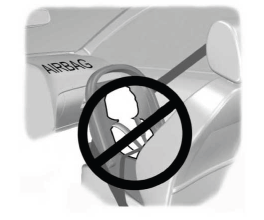
Children and Airbags
WARNING: Airbags can kill or injure a child in a child restraint. Never place a rear-facing child restraint in front of an active airbag. If you must use a forward-facing child restraint in the front seat, move the seat upon which the child restraint is installed all the way back.