
Lincoln Aviator: General Information / Settings
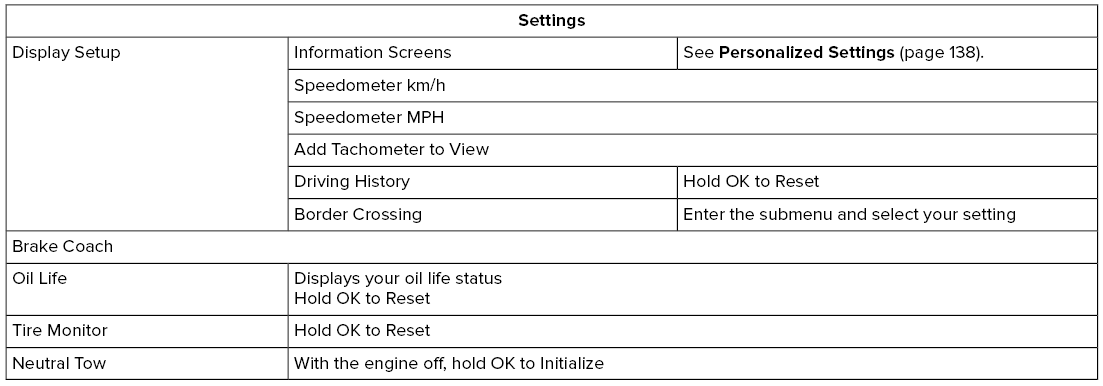
Note: Additional vehicle settings are available through your touchscreen.
 Menu
Menu
This icon shows the features on
or
off status. A check in the box
indicates the feature is on, and
unchecked indicates the feature is off.
Note: Some menu items are regional specific
or optional and may appear slightly different
or not at all...

Other information:
Lincoln Aviator 2020-2026 Service Manual: Removal and Installation - Rear Lamp Assembly
Removal NOTE: Removal steps in this procedure may contain installation details. NOTE: LH lamp assembly shown, RH lamp assembly is similar. Remove the rear bumper cover. Refer to: Rear Bumper Cover (501-19 Bumpers, Removal and Installation)...
Lincoln Aviator 2020-2026 Owners Manual: Wireless Accessory Charging Module
South Korea R-R-1Ap-WACM2 United States and Canada WARNING: Changes or modifications not expressively approved by the party responsible for compliance could void the user's authority to operate the equipment. The term "IC:" before the radio certification number only signifies that Industry Canada technical specifications were met...
Categories
- Manuals Home
- Lincoln Aviator Owners Manual
- Lincoln Aviator Service Manual
- Tire Change Procedure
- Fuel Quality
- General Procedures - Transmission Fluid Drain and Refill
- New on site
- Most important about car
Child Seats
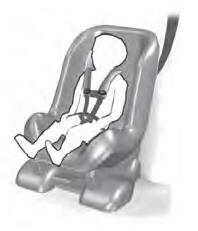
Use a child restraint (sometimes called an infant carrier, convertible seat, or toddler seat) for infants, toddlers and children weighing 40 lb (18 kg) or less (generally four-years-old or younger).
Using Lap and Shoulder Belts
WARNING: Do not place a rearward facing child restraint in front of an active airbag. Failure to follow this instruction could result in personal injury or death.

Copyright © 2026 www.liaviator2.com