
Lincoln Aviator: Automatic High Beam Control / Switching Automatic High Beam Control On and Off
WARNING: Do not use the system in poor visibility, for example fog, heavy rain, spray or snow.
- Press Settings on the touchscreen.
- Press Vehicle.
- Press Lighting.
Activating the Automatic High Beam Control
 Switch the lighting control to
the
autolamps position.
Switch the lighting control to
the
autolamps position.
Note: The lighting control defaults to autolamps each time you switch your vehicle on.
When active, the high beams turn on if:
- The ambient light level is low enough.
- There is no traffic in front of your vehicle.
- The vehicle speed is greater than approximately 32 mph (51 km/h).
When active, the high beams turn off if:
- The ambient light level is high enough that high beams are not required.
- The system detects an approaching vehicle's headlamps or tail lamps.
- The system detects severe rain, snow or fog.
- The camera is blocked.
- The vehicle speed falls below approximately 27 mph (44 km/h).
Note: The deactivation speed is lower on curves.
Note: High beam reactivation may be delayed in certain curvy road situations.
Note: The system may not operate properly if the sensor is blocked. Keep the windshield free from obstruction or damage.
Note: The system may not operate properly in cold or inclement conditions. You can switch on the high beams by overriding the system.
Note: If the system detects a blockage, for example bird droppings, bug splatter, snow or ice, the system goes into low beam mode until you clear the blockage. A message may appear in the information display if the camera is blocked.
Note: Using much larger tires or equipping vehicle accessories such as snowplows can modify your vehicle's ride height and degrade automatic high beam control performance.
 Automatic High Beam Control
What Is Automatic High Beam Control
The system turns on high beams if it is dark
enough and no other traffic is present. If it
detects an approaching vehicle’s headlamps
or tail lamps, or street lighting ahead, the
system turns the high beams off...
 Automatic High Beam Control Indicators. Overriding Automatic High Beam
Control
Automatic High Beam Control Indicators. Overriding Automatic High Beam
Control
Automatic High Beam Control Indicators
The indicator illuminates to
confirm
when the system is ready to assist.
Overriding Automatic High Beam Control
WARNING: The system does not
relieve you of your responsibility to drive
with due care and attention...
Other information:
Lincoln Aviator 2020-2026 Service Manual: Diagnosis and Testing - Instrumentation, Message Center and Warning Chimes
Diagnostic Trouble Code (DTC) Chart Diagnostics in this manual assume a certain skill level and knowledge of Ford-specific diagnostic practices. REFER to: Diagnostic Methods (100-00 General Information, Description and Operation). Diagnostic Trouble Code Chart Module DTC Description Action ABS C0049:01 Brake Fluid Level:General Electrical Failure GO to Pinpoint Test L ABS C0049:7B Brake Fluid Level:Low Fluid Level GO to Pinpoint Test L IPC P0460:11 Fuel Level Sensor "A" Circuit:Circuit Short To Ground GO to Pinpoint Test D IPC P0460:13 Fuel Level Sensor "A" Circuit:Circuit Open GO to Pinpoint Test D IPC U0100:00 Lost Communication With ECM/PCM "A":No Sub Type Information GO to Pinpoint Test CC IPC U0103:00 Lost Communication With Gear Shift Control Module A:No Sub Type Information GO to Pinpoint Test CE IPC U0111:00 Lost Communication With Battery Energy Control Module "A":No Sub Type Information GO to Pinpoint Test CF IPC U0121:00 Lost Communication With Anti-Lock Brake System (ABS) Control Module: No Sub Type Information GO to Pinpoint Test CG IPC U013F:00 Lost Communication With Pedestrian Alert Control Module:No Sub Type Information GO to Pinpoint Test CI IPC U0140:00 Lost Communication With Body Control Module: No Sub Type Information GO to Pinpoint Test CJ IPC U0151:00 Lost Communication With Restraints Control Module: No Sub Type Information GO to Pinpoint Test CM IPC U0158:00 Lost Communication With Head Up Display:No Sub Type Information GO to Pinpoint Test CN IPC U0159:00 Lost Communication With Parking Assist Control Module "A": No Sub Type Information GO to Pinpoint Test CP IPC U0193:00 Lost Communication With "Digital Audio Control Module A": No Sub Type Information GO to Pinpoint Test CQ IPC U0199:00 Lost Communication With "Door Control Module A":No Sub Type Information GO to Pinpoint Test CR IPC U0212:00 Lost Communication With Steering Column Control Module: No Sub Type Information GO to Pinpoint Test CS IPC U0212:82 Lost Communication With Steering Column Control Module:Alive/Sequence Counter Incorrect/Not Updated GO to Pinpoint Test CS IPC U0232:00 Lost Communication With Side Obstacle Detection Control Module - Left: No Sub Type Information GO to Pinpoint Test CU IPC U0233:00 Lost Communication With Side Obstacle Detection Control Module - Right: No Sub Type Information GO to Pinpoint Test CU IPC U023A:00 Lost Communication With Image Processing Module A: No Sub Type Information GO to Pinpoint Test CW IPC U023B:82 Lost Communication With Image Processing Module B:Alive/Sequence Counter Incorrect/Not Updated GO to Pinpoint Test CX IPC U0241:00 Lost Communication With Headlamp Control Module "A":No Sub Type Information GO to Pinpoint Test CY IPC U0253:00 Lost Communication With Accessory Protocol Interface Module:No Sub Type Information GO to Pinpoint Test CZ IPC U0260:00 Lost Communication With Seat Control Switch Module "A":No Sub Type Information GO to Pinpoint Test DA IPC U0293:00 Lost Communication with Hybrid/EV Powertrain Control Module:No Sub Type Information GO to Pinpoint Test CD IPC U0293:82 Lost Communication with Hybrid/EV Powertrain Control Module:Alive/Sequence Counter Incorrect/Not Updated GO to Pinpoint Test CD IPC U0401:00 Invalid Data Received from ECM/PCM A:No Sub Type Information GO to Pinpoint Test CC IPC U0401:81 Invalid Data Received from ECM/PCM A:Invalid Serial Data Received GO to Pinpoint Test CC IPC U0401:82 Invalid Data Received from ECM/PCM A:Alive/Sequence Counter Incorrect/Not Updated GO to Pinpoint Test CC IPC U0401:86 Invalid Data Received from ECM/PCM A:Signal Invalid GO to Pinpoint Test CC IPC U0405:56 Invalid Data Received From Cruise Control Module:Invalid/Incompatible Configuration GO to Pinpoint Test CK IPC U0412:86 Invalid Data Received From Battery Energy Control Module "A":Signal Invalid GO to Pinpoint Test CF IPC U0415:00 Invalid Data Received From Anti-Lock Brake System (ABS) Module: No Sub Type Information GO to Pinpoint Test CG IPC U0415:82 Invalid Data Received from Anti-Lock Brake System (ABS) Control Module "A":Alive/Sequence Counter Incorrect/Not Updated GO to Pinpoint Test CG IPC U0420:82 Invalid Data Received from Power Steering Control Module "A":Alive/Sequence Counter Incorrect/Not Updated GO to Pinpoint Test CH IPC U0422:00 Invalid Data Received From Body Control Module:No Sub Type Information GO to Pinpoint Test CJ IPC U0424:80 Invalid Data Received From HVAC Control Module:ISO/SAE Reserved GO to Pinpoint Test CL IPC U0424:81 Invalid Data Received From HVAC Control Module:Invalid Serial Data Received GO to Pinpoint Test CL IPC U0424:82 Invalid Data Received From HVAC Control Module:Alive/Sequence Counter Incorrect/Not Updated GO to Pinpoint Test CL IPC U0431:82 Invalid Data Received From Body Control Module "A":Alive/Sequence Counter Incorrect/Not Updated GO to Pinpoint Test CJ IPC U0452:81 Invalid Data Received From Restraints Control Module:Invalid Serial Data Received GO to Pinpoint Test CM IPC U045A:82 Invalid Data Received From Parking Assist Control Module "A":Alive/Sequence Counter Incorrect/Not Updated GO to Pinpoint Test CP IPC U049C:82 Invalid Data Received From Battery Charger Control Module "A":Alive/Sequence Counter Incorrect/Not Updated GO to Pinpoint Test CO IPC U0531:82 Invalid Data Received From Rear Gate Module:Alive/Sequence Counter Incorrect/Not Updated GO to Pinpoint Test CT IPC U0533:00 Invalid Data Received From Side Obstacle Detection Control Module-Left: No Sub Type information GO to Pinpoint Test CU IPC U0533:56 Invalid Data Received From Side Obstacle Detection Control Module "A":Invalid/Incompatible Configuration GO to Pinpoint Test CV IPC U0534:00 Invalid Data Received From Side Obstacle Detection Control Module-Right: No Sub Type Information GO to Pinpoint Test CU IPC U0534:56 Invalid Data Received From Side Obstacle Detection Control Module "B":Invalid/Incompatible Configuration GO to Pinpoint Test CV IPC U0542:82 Invalid Data Received From Headlamp Control Module "A":Alive/Sequence Counter Incorrect/Not Updated GO to Pinpoint Test CY IPC U0594:86 Invalid Data Received From Hybrid/EV Powertrain Control Module:Signal Invalid GO to Pinpoint Test CD IPC U2100:00 Initial Configuration Not Complete:No Sub Type Information GO to Pinpoint Test DB IPC U3000:04 Control Module:System Internal Failures GO to Pinpoint Test DC IPC U3000:46 Control Module:Calibration/Parameter Memory Failure GO to Pinpoint Test DC IPC U3003:16 Battery Voltage: Circuit Voltage Below Threshold GO to Pinpoint Test DE IPC U3003:17 Battery Voltage: Circuit Voltage Above Threshold GO to Pinpoint Test DF IPC U300A:64 Ignition Switch:Signal Plausibility Failure GO to Pinpoint Test DD PCM P0461:00 Fuel Level Sensor "A" Circuit Range/Performance:No Sub Type Information GO to Pinpoint Test D PCM P0462:00 Fuel Level Sensor "A" Circuit Low:No Sub Type Information GO to Pinpoint Test D PCM P0463:00 Fuel Level Sensor "A" Circuit High:No Sub Type Information GO to Pinpoint Test D PCM P0522:00 Engine Oil Pressure Sensor/Switch "A" Circuit Low:No Sub Type Information GO to Pinpoint Test W PCM P0523:00 Engine Oil Pressure Sensor/Switch "A" Circuit High:No Sub Type Information GO to Pinpoint Test W PCM P25B0:00 Fuel Level Sensor "A" Stuck:No Sub Type Information GO to Pinpoint Test D SIMA B1380:4A Steering Wheel Right Switch Pack:Incorrect Component Installed GO to Pinpoint Test AG SIMA B1380:71 Steering Wheel Right Switch Pack:Actuator Stuck GO to Pinpoint Test AG Symptom Chart(s) Symptom Chart: Instrument Panel Cluster (IPC) Diagnostics in this manual assume a certain skill level and knowledge of Ford-specific diagnostic practices...
Lincoln Aviator 2020-2026 Service Manual: Removal and Installation - Transmission Fluid Pump
Removal Remove the main control valve body. Refer to: Main Control Valve Body (307-01A Automatic Transmission - 10-Speed Automatic Transmission – 10R60, Removal and Installation). Remove the bolts and the transmission fluid pump...
Categories
- Manuals Home
- Lincoln Aviator Owners Manual
- Lincoln Aviator Service Manual
- Drive Modes
- Disabling Auto-Start-Stop
- Remove and Reinstall the Battery
- New on site
- Most important about car
Child Safety Locks
When the child safety locks are set, you cannot open the rear doors from the inside.
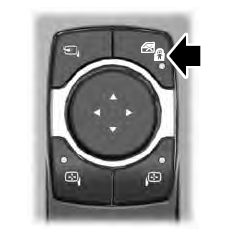
The child safety lock control is on the driver door.
Press the control to switch the child safety locks on. Press the control again to switch them off. A light on the child safety control illuminates when you switch them on.
