
Lincoln Aviator 2020-2026 Owners Manual / Automatic High Beam Control
Lincoln Aviator: Automatic High Beam Control
What Is Automatic High Beam Control
The system turns on high beams if it is dark enough and no other traffic is present. If it detects an approaching vehicle’s headlamps or tail lamps, or street lighting ahead, the system turns the high beams off. Low beams remain on.
A camera sensor, centrally mounted behind the windshield of your vehicle, continuously monitors conditions to turn the high beams on and off.
- Switching Automatic High Beam Control On and Off
- Automatic High Beam Control Indicators. Overriding Automatic High Beam Control
 Ambient Lighting (If equipped)
Use the touchscreen to select the following:
Select the settings option on
the
feature bar.
Select ambient lighting.
Switching Ambient Lighting On
Touch a color once...
 Switching Automatic High Beam Control On and Off
WARNING: Do not use the system in
poor visibility, for example fog, heavy rain,
spray or snow.
Press Settings on the touchscreen.
Press Vehicle.
Press Lighting...
Other information:
Lincoln Aviator 2020-2026 Owners Manual: Blind Spot Information System Sensors
Argentina Brazil China CMIIT ID: 2015DJ1610 Djibouti European Union EU Ghana Jamaica Malaysia RALM/24A/0715/S(15-2272) Mauritania Moldova Pakistan Paraguay Serbia Singapore South Africa South Korea MSIP-CRM-8DC-SRR3B Taiwan, China Ukraine United Arab Emirates (U...
Lincoln Aviator 2020-2026 Service Manual: Removal and Installation - Axle Housing Bushing
Special Tool(s) / General Equipment 205-1066Installer, Bushing Flat Headed Screw Driver Removal NOTE: Only worn or damaged bushings need to be replaced. Remove the rear axle assembly. Refer to: Axle Assembly (205-02 Rear Drive Axle/Differential, Removal and Installation)...
Categories
- Manuals Home
- Lincoln Aviator Owners Manual
- Lincoln Aviator Service Manual
- Wireless Accessory Charger (If Equipped)
- Tire Change Procedure
- Changing the Front Wiper Blades - Vehicles With: Heated Wiper Blades
- New on site
- Most important about car
Locking and Unlocking the Doors from Inside
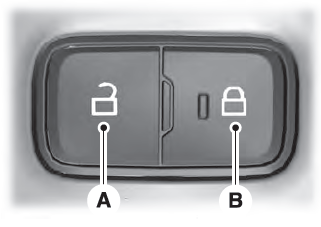
Locking the Doors
Press the lock switch on the door interior trim panel. The doors can no longer be released using the exterior door handle switches and the luggage compartment locks.

Copyright © 2026 www.liaviator2.com