
Lincoln Aviator 2020-2026 Owners Manual / Wipers and Washers
Lincoln Aviator: Wipers and Washers
- Windshield Wipers - Vehicles Without: Heated Wiper Blades
- Windshield Wipers - Vehicles With: Heated Wiper Blades. Autowipers
- Windshield Washers
- Rear Window Wiper and Washers
 Heated Steering Wheel (If equipped)
The heated steering wheel button is on the
climate controls.
Press the button to switch the
heated steering wheel on and off.
Note: You can use the heated steering
wheel only when the engine is running...
 Windshield Wipers - Vehicles Without: Heated Wiper Blades
Push the lever up or down to
operate the windshield wiper.
Single wipe.
Intermittent wipe.
Normal wipe.
High-speed wipe.
Note: Fully defrost the windshield before you
switch the windshield wipers on...
Other information:
Lincoln Aviator 2020-2026 Service Manual: Removal and Installation - Wiper Linkage Assembly
Removal NOTE: Removal steps in this procedure may contain installation details. NOTE: The hood is removed in this procedure for clarity. Remove the cowl panel grille. Refer to: Cowl Panel Grille (501-02 Front End Body Panels, Removal and Installation)...
Lincoln Aviator 2020-2026 Owners Manual: Fast Restart. Vehicles Using Phone as a Key
Fast Restart The fast restart feature allows you to restart your vehicle within 20 seconds of switching it off, even if it does not detect a valid passive key. Within 20 seconds of switching your vehicle off, press the brake pedal and press the push button ignition switch...
Categories
- Manuals Home
- Lincoln Aviator Owners Manual
- Lincoln Aviator Service Manual
- Disabling Auto-Start-Stop
- Garage Door Opener
- Drive Modes
- New on site
- Most important about car
Child Safety Locks
When the child safety locks are set, you cannot open the rear doors from the inside.
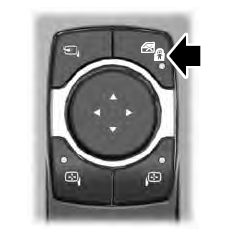
The child safety lock control is on the driver door.
Press the control to switch the child safety locks on. Press the control again to switch them off. A light on the child safety control illuminates when you switch them on.

Copyright © 2026 www.liaviator2.com