
Lincoln Aviator: Engine Coolant Check / Adding Coolant

WARNING: Do not add engine coolant when the engine is on or the cooling system is hot. Failure to follow this instruction could result in personal injury.

WARNING: Do not remove the coolant reservoir cap when the engine is on or the cooling system is hot. Wait 10 minutes for the cooling system to cool down. Cover the coolant reservoir cap with a thick cloth to prevent the possibility of scalding and slowly remove the cap. Failure to follow this instruction could result in personal injury.

WARNING: Do not put coolant in the windshield washer reservoir. If sprayed on the windshield, coolant could make it difficult to see through the windshield.

Note: Do not use stop leak pellets, cooling system sealants, or non-specified additives as they can cause damage to the engine cooling or heating systems. Resulting component damage may not be covered by the vehicle Warranty.

Note: Automotive fluids are not interchangeable.

It is very important to use prediluted coolant approved to the correct specification in order to avoid plugging the small passageways in the engine cooling system. Do not mix different colors or types of coolant in your vehicle. Mixing of engine coolants or using an incorrect coolant may harm the engine or cooling system components and may not be covered by the vehicle Warranty.

Note: If prediluted coolant is not available, use the approved concentrated coolant diluting it to 50/50 with distilled water. Using water that has not been deionised may contribute to deposit formation, corrosion and plugging of the small cooling system passageways.

Note: Coolants marketed for all makes and models may not be approved to our specifications and may cause damage to the cooling system. Resulting component damage may not be covered by the vehicle Warranty.

If the coolant level is at or below the minimum mark, add prediluted coolant immediately.

To top up the coolant level do the following:

  1. Unscrew the cap slowly. Any pressure escapes as you unscrew the cap.
  2. Add prediluted coolant approved to the correct specification.
  3. Add enough prediluted coolant to reach the correct level.
  4. Replace the coolant reservoir cap. Turn the cap clockwise until it contacts the hard stop.
  5. Check the coolant level in the coolant reservoir the next few times you drive your vehicle. If necessary, add enough prediluted engine coolant to bring the coolant level to the correct level. If you have to add more than 1.1 qt (1 L) of engine coolant per month, have your vehicle checked as soon as possible. Operating an engine with a low level of coolant can result in engine overheating and possible engine damage.

In case of emergency, you can add a large amount of water without engine coolant in order to reach a vehicle service location. In this instance, qualified personnel:

  1. Must drain the cooling system.
  2. Chemically clean the coolant system.
  3. Refill with engine coolant as soon as possible.

Water alone, without engine coolant, can cause engine damage from corrosion, overheating or freezing.

Do not use the following as a coolant substitute:

  • Alcohol.
  • Methanol.
  • Brine.
  • Any coolant mixed with alcohol or methanol antifreeze.

Alcohol and other liquids can cause engine damage from overheating or freezing.

Do not add extra inhibitors or additives to the coolant. These can be harmful and compromise the corrosion protection of the coolant.

    Engine Coolant Check

    WARNING: Do not remove the coolant reservoir cap when the engine is on or the cooling system is hot. Wait 10 minutes for the cooling system to cool down...

    Recycled Coolant. Severe Climates. Coolant Change

    Recycled Coolant We do not recommend the use of recycled coolant as an approved recycling process is not yet available. Note: Dispose of used coolant in the appropriate manner...

    Other information:

    Lincoln Aviator 2020-2026 Service Manual: General Procedures - Power Roof Opening Panel Initialization


    Initialization   WARNING: Keep objects and body parts clear of the glass panel when carrying out the initialization procedure. During the initialization procedure, the glass panel closes with high force and cannot detect objects in its path...

    Lincoln Aviator 2020-2026 Service Manual: Diagnosis and Testing - Passive Anti-Theft System (PATS)


    Diagnostic Trouble Code (DTC) Chart Diagnostics in this manual assume a certain skill level and knowledge of Ford-specific diagnostic practices. REFER to: Diagnostic Methods (100-00 General Information, Description and Operation).   Diagnostic Trouble Code Chart Module   DTC Description Action   BCM B1551:51 Phone As A Key: Not Programmed   GO to Pinpoint Test G   BCM B155E:00 Incorrect Response from Immobilizer SubControl Module: No Sub Type Information   GO to Pinpoint Test M   RFA B1589:29 Antenna #3: Signal Invalid   GO to Pinpoint Test A   RFA B1589:31 Antenna #3: No Signal   GO to Pinpoint Test A   RFA B1589:45 Antenna #3: Program Memory Failure   GO to Pinpoint Test A   RFA B1589:49 Antenna #3: Internal Electronic Failure   GO to Pinpoint Test A   RFA B1589:57 Antenna #3: Invalid/ Incompatible Software Component   GO to Pinpoint Test A   RFA B1590:29 Antenna #4: Signal Invalid   GO to Pinpoint Test A   RFA B1590:31 Antenna #4: No Signal   GO to Pinpoint Test A   RFA B1590:45 Antenna #4: Program Memory Failure   GO to Pinpoint Test A   RFA B1590:49 Antenna #4: Internal Electronic Failure   GO to Pinpoint Test A   RFA B1590:57 Antenna #4: Invalid/ Incompatible Software Component   GO to Pinpoint Test A   RFA B1591:29 Antenna #5: Signal Invalid   GO to Pinpoint Test B   RFA B1591:31 Antenna #5: No Signal   GO to Pinpoint Test B   RFA B1591:45 Antenna #5: Program Memory Failure   GO to Pinpoint Test B   RFA B1591:49 Antenna #5: Internal Electronic Failure   GO to Pinpoint Test B   RFA B1591:57 Antenna #5: Invalid/ Incompatible Software Component   GO to Pinpoint Test B   RFA B1592:29 Antenna #6: Signal Invalid   GO to Pinpoint Test B   RFA B1592:31 Antenna #6: No Signal   GO to Pinpoint Test B   RFA B1592:45 Antenna #6: Program Memory Failure   GO to Pinpoint Test B   RFA B1592:49 Antenna #6: Internal Electronic Failure   GO to Pinpoint Test B   RFA B1592:57 Antenna #6: Invalid/ Incompatible Software Component   GO to Pinpoint Test B   RFA B1593:29 Antenna #7: Signal Invalid   GO to Pinpoint Test C   RFA B1593:31 Antenna #7: No Signal   GO to Pinpoint Test C   RFA B1593:45 Antenna #7: Program Memory Failure   GO to Pinpoint Test C   RFA B1593:49 Antenna #7: Internal Electronic Failure   GO to Pinpoint Test C   RFA B1593:57 Antenna #7: Invalid/ Incompatible Software Component   GO to Pinpoint Test C   RFA B1594:29 Antenna #8: Signal Invalid   GO to Pinpoint Test B   RFA B1594:31 Antenna #8: No Signal   GO to Pinpoint Test B   RFA B1594:45 Antenna #8: Program Memory Failure   GO to Pinpoint Test B   RFA B1594:49 Antenna #8: Internal Electronic Failure   GO to Pinpoint Test B   RFA B1594:57 Antenna #8: Invalid/ Incompatible Software Component   GO to Pinpoint Test B   RFA B1595:29 Antenna #9: Signal Invalid   GO to Pinpoint Test C   RFA B1595:31 Antenna #9: No Signal   GO to Pinpoint Test C   RFA B1595:45 Antenna #9: Program Memory Failure   GO to Pinpoint Test C   RFA B1595:49 Antenna #9: Internal Electronic Failure   GO to Pinpoint Test C   RFA B1595:57 Antenna #9: Invalid/ Incompatible Software Component   GO to Pinpoint Test C   RFA B1596:29 Antenna #10: Signal Invalid   GO to Pinpoint Test C   RFA B1596:31 Antenna #10: No Signal   GO to Pinpoint Test C   RFA B1596:45 Antenna #10: Program Memory Failure   GO to Pinpoint Test C   RFA B1596:49 Antenna #10: Internal Electronic Failure   GO to Pinpoint Test C   RFA B1596:57 Antenna #10: Invalid/ Incompatible Software Component   GO to Pinpoint Test C   RFA B1597:29 Antenna #11: Signal Invalid   GO to Pinpoint Test D   RFA B1597:31 Antenna #11: No Signal   GO to Pinpoint Test D   RFA B1597:45 Antenna #11: Program Memory Failure   GO to Pinpoint Test D   RFA B1597:49 Antenna #11: Internal Electronic Failure   GO to Pinpoint Test D   RFA B1597:57 Antenna #11: Invalid/ Incompatible Software Component   GO to Pinpoint Test D   RFA B15A5:56 Bluetooth Low Energy Module: Invalid/ Incompatible Configuration   GO to Pinpoint Test E   RFA B1A56:29 Antenna: Signal Invalid   GO to Pinpoint Test A   RFA B1A56:31 Antenna: No Signal   GO to Pinpoint Test A   RFA B1A56:45 Antenna: Program Memory Failure   GO to Pinpoint Test A   RFA B1A56:49 Antenna: Internal Electronic Failure   GO to Pinpoint Test A   RFA B1A56:57 Antenna: Invalid/ Incompatible Software Component   GO to Pinpoint Test A   RFA B1D55:29 Antenna #2: Signal Invalid   GO to Pinpoint Test D   RFA B1D55:31 Antenna #2: No Signal   GO to Pinpoint Test D   RFA B1D55:45 Antenna #2: Program Memory Failure   GO to Pinpoint Test D   RFA B1D55:49 Antenna #2: Internal Electronic Failure   GO to Pinpoint Test D   RFA B1D55:57 Antenna #2: Invalid/ Incompatible Software Component   GO to Pinpoint Test D   RFA P0601:41 Internal Control Module Memory Checksum Error: General Checksum Failure   GO to Pinpoint Test K   RFA P1269:00 Immobilizer Code Not Programmed: No Sub Type Information   GO to Pinpoint Test G   RFA P1602:00 Immobilizer/ ECM Communication Error: No Sub Type Information   GO to Pinpoint Test G   RFA P1622:00 Immobilizer ID Does Not Match: No Sub Type Information   GO to Pinpoint Test G   RFA P1623:00 Immobilizer Code Word/ID Number Write Failure: No Sub Type Information   GO to Pinpoint Test G   RFA U0146:08 Lost Communication With Gateway "A": Bus Signal/Message Failure   GO to Pinpoint Test L   RFA U0198:00 Lost Communication With Telematic Control Module: No Sub Type Information   GO to Pinpoint Test L   RFA U0422:00 Invalid Data Received From Body Control Module: No Sub Type Information   GO to Pinpoint Test G   RFA U200D:11 Control Module Output Power A: Circuit Short to Ground   GO to Pinpoint Test A   RFA U200D:15 Control Module Output Power A: Circuit Short to Battery or Open   GO to Pinpoint Test A   RFA U200E:11 Control Module Output Power B: Circuit Short to Ground   GO to Pinpoint Test B   RFA U200E:15 Control Module Output Power B: Circuit Short to Battery or Open   GO to Pinpoint Test B   RFA U200F:11 Control Module Output Power C: Circuit Short to Ground   GO to Pinpoint Test C   RFA U200F:15 Control Module Output Power C: Circuit Short to Battery or Open   GO to Pinpoint Test C   RFA U201A:06 Control Module Main Calibration Data: Algorithm Based Failure   GO to Pinpoint Test F   RFA U201A:46 Control Module Main Calibration Data: Calibration/ Parameter Memory failure   GO to Pinpoint Test F   RFA U201A:55 Control Module Main Calibration Data: Not Configured   GO to Pinpoint Test F   RFA U2100:55 Initial Configuration Not Complete: Not Configured   GO to Pinpoint Test F   RFA U3000:42 Control Module: General Memory Failure   GO to Pinpoint Test K   RFA U3000:44 Control Module: Data Memory Failure   GO to Pinpoint Test K   RFA U3000:49 Control Module: Internal Electronic Failure   GO to Pinpoint Test K   RFA U3003:16 Battery Voltage: Circuit Voltage Below Threshold   GO to Pinpoint Test I   RFA U3003:17 Battery Voltage: Circuit Voltage Above Threshold   GO to Pinpoint Test J Symptom Chart Symptom Chart: PATS Diagnostics in this manual assume a certain skill level and knowledge of Ford-specific diagnostic practices...

    Categories

    Adjusting the Steering Wheel - Vehicles With: Manual Adjustable Steering Column

    WARNING: Do not adjust the steering wheel when your vehicle is moving.

    Note: Make sure that you are sitting in the correct position.

    Unlock the steering column. Adjust the steering wheel to the desired position.
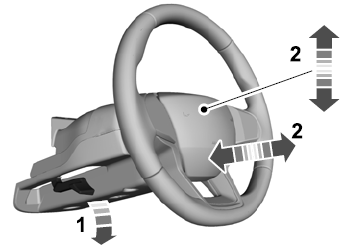
    Lincoln Aviator. Column

    Lock the steering column.

    read more

     
    Copyright © 2026 www.liaviator2.com