Lincoln Aviator: Steering Wheel / Adjusting the Steering Wheel - Vehicles With: Power Adjustable Steering Column
WARNING: Do not adjust the steering wheel when your vehicle is moving.
Note: Make sure that you are sitting in the correct position.
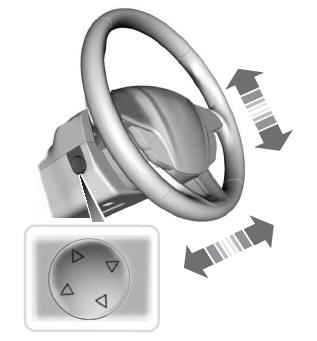
Use the control on the side of the steering column to adjust the position.
To adjust:
- Tilt: Press the top or bottom of the control.
- Telescope: Press the front or rear of the control.
End of Travel Position
The steering column stops just short of the end of the column travel to prevent damage to the steering column. A new stopping position sets if it encounters an object when tilting or telescoping.
To reset the steering column to its normal stopping position:
- Confirm there is nothing obstructing the motion of the steering column.
- Press and hold the steering column control until the steering column stops moving.
- Press the steering column control again.
Note: The steering column may begin to move again.
- When the steering column stops, continue holding the control for a few seconds.
- Repeat for each direction as necessary.
A new stopping position sets. The next time you tilt or telescope the steering column, it stops just short of the end of the column travel.
Memory Feature
You can save and recall the steering column position with the memory function.
Pressing the adjustment control during a memory recall cancels the operation.
Easy Entry and Exit Feature
The column moves up when you switch the ignition off. Switch the ignition on to return the system to its previous settings. You can switch this feature on or off through the touchscreen.
Note: If you press any adjustment or memory button when in easy exit mode, the system cancels the operation.
Note: Depending on your vehicle, the column may move up and in.
 Adjusting the Steering Wheel - Vehicles With: Manual Adjustable Steering
Column
Adjusting the Steering Wheel - Vehicles With: Manual Adjustable Steering
Column
WARNING: Do not adjust the steering
wheel when your vehicle is moving.
Note: Make sure that you are sitting in the
correct position.
Unlock the steering column...
 Audio and Voice Control
Audio Control
You can operate the following
functions with the control:
Move the selector switch up to
increase volume level.
Move the selector switch down to
decrease volume level...
Other information:
Lincoln Aviator 2020-2026 Service Manual: Diagnosis and Testing - Fuel System - 3.0L EcoBoost
Symptom Chart(s) Symptom Chart: Fuel System Diagnostics in this manual assume a certain skill level and knowledge of Ford-specific diagnostic practices. REFER to: Diagnostic Methods (100-00 General Information, Description and Operation). for information regarding Ford-specific diagnostic practices...
Lincoln Aviator 2020-2026 Service Manual: Removal and Installation - Rear Door Speaker
Removal NOTE: Removal steps in this procedure may contain installation details. All vehicles Remove the rear door trim panel. Refer to: Rear Door Trim Panel (501-05 Interior Trim and Ornamentation, Removal and Installation). Rear door mid range speaker Separate the wiring harness guide, remove the screws and the front door mid range speaker Torque: 22 lb...
Categories
- Manuals Home
- Lincoln Aviator Owners Manual
- Lincoln Aviator Service Manual
- Configuring The Head Up Display
- USB Port and Power Point Locations
- Opening and Closing the Hood
- New on site
- Most important about car
Activating Intelligent Access
The intelligent access key must be within 3 ft (1 m) of the door or luggage compartment you intend to lock or unlock.
At a Door
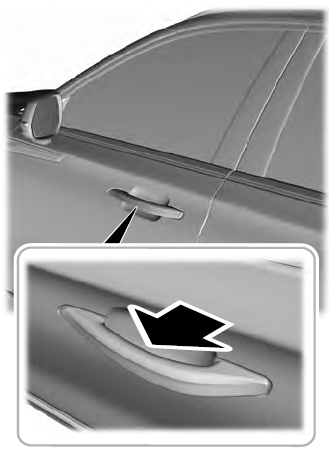
Electronic door handles are on each door. Gently depress the switch inside the exterior door handle to unlock and open the door. An unlock symbol illuminates on the door window trim indicating your vehicle is unlocked.